Success story : Bosch CS6800i heatpump integration via EMS-ESP(BBQKees) and MQTT Hub

I was looking to integrate my new Bosch heatpump with Homey, but unfortunately this was not possible at all as Bosch has currently no API set which can be easily used. They annouced a REST API set for later this year.

I decide to purchase the BBQKees device which is based on the EMS-ESP project.
I was really impressed by the quality and functionality of this device. It finds all components connected to the Bosch EMS bus like the heatpump, thermostat, mixer, UI800 and publishes nearly 300 values via REST, MQTT and Modbus TCP. It also can set certain parameters via those protocols.

There is a Homey integration as a base with another heapump model to integrate via REST. As I am not a developer I decided not to go this way and fork this driver. If you are interested : GitHub - angas/se.assermark.ems-esp: Homey Pro app for EMS-ESP

I integrated BBQKees via EMS Broker/Client/Hub. Unfortunately MQTT Discovery via homeassistant discover protocol is not supported, only homie discovery. So I had to configure the certain parmeters manually which took some hours do to the lack of documentation and stability of the the current community version which hopefully improves over time.

At the end I am quite happy what I have achieved now and I am looking to improve the integration further once MQTT is a bit more stable.

6 Likes

Dear Alexander_Adam1,

I’m very curious how you managed to pull this off. I’m struggling with the same. What EMS broker/client/hub did you use? I have the EMS-ESP working, but am looking for a way to have it in homey through MQTT. When I use the homie discover protocol, I get strange output. Don’t think I have the right settings. Do you have a set-up how to?

Best
Michiel

I am publishing to MQTT running on Homey. The EMS-ESP config is quite standard:

On Homey, I am using MQTT Broker, MQTT Client and MQTT Hub. MQTT Broker and Client config is somehow default.

With MQTT Hub I tried automatic discovery via Homie, Homematic without success. Thererefore I look with MQTT Explorer what is published and configured MQTT Hub Devices for that.

This are 2 examples how to work with MQTT Client to gather MQTT events and another example how to set via REST a writable value in EMS-ESP (in my case starting the cirlculation pump once the light in the bathroom is switched on).

This is the MQTT Hub device export which you can use as a basis to configure your devices manually.

{ 
    "dim": { 
        "capability": "dim", 
        "stateTopic": "ems-esp/boiler_data", 
        "setTopic": "", 
        "valueTemplate": "curburnpow", 
        "outputTemplate": "", 
        "displayName": "Wärmepumpen-Modulation" 
    }, 
    "measure_power": { 
        "capability": "measure_power", 
        "stateTopic": "ems-esp/boiler_data", 
        "setTopic": "", 
        "valueTemplate": "hppower * 1000", 
        "outputTemplate": "", 
        "displayName": "Kompressor-Leisung (w)" 
    }, 
    "meter_power": { 
        "capability": "meter_power", 
        "stateTopic": "ems-esp/boiler_data", 
        "setTopic": "", 
        "valueTemplate": "$.dhw.nrgsupp", 
        "outputTemplate": "", 
        "displayName": "WW erzeugte Energie (kWh)" 
    }, 
    "meter_power.1": { 
        "capability": "meter_power", 
        "stateTopic": "ems-esp/boiler_data", 
        "setTopic": "", 
        "valueTemplate": "$.dhw.nrgconscomp", 
        "outputTemplate": "", 
        "displayName": "WW elektrische Energie (kWh)" 
    }, 
    "meter_power.2": { 
        "capability": "meter_power", 
        "stateTopic": "ems-esp/boiler_data", 
        "setTopic": "", 
        "valueTemplate": "nrgconscompheating", 
        "outputTemplate": "", 
        "displayName": "Energieverbrauch Kompressor heizen (kWh)" 
    }, 
    "meter_power.3": { 
        "capability": "meter_power", 
        "stateTopic": "ems-esp/boiler_data", 
        "setTopic": "", 
        "valueTemplate": "nrgconscompcooling", 
        "outputTemplate": "", 
        "displayName": "Energieverbrauch Kompressor kühlen (kWh)" 
    }, 
    "meter_power.4": { 
        "capability": "meter_power", 
        "stateTopic": "ems-esp/boiler_data", 
        "setTopic": "", 
        "valueTemplate": "nrgconscomptotal", 
        "outputTemplate": "", 
        "displayName": "Energieverbrauch Total (kWh)" 
    }, 
    "meter_power.5": { 
        "capability": "meter_power", 
        "stateTopic": "ems-esp/boiler_data", 
        "setTopic": "", 
        "valueTemplate": "nrgsupptotal", 
        "outputTemplate": "", 
        "displayName": "Energieerzeugung Total (kWh)" 
    }, 
    "meter_power.6": { 
        "capability": "meter_power", 
        "stateTopic": "ems-esp/boiler_data", 
        "setTopic": "", 
        "valueTemplate": "nrgsuppheating", 
        "outputTemplate": "", 
        "displayName": "Energieerzeugung Heizen (kWh)" 
    }, 
    "meter_power.7": { 
        "capability": "meter_power", 
        "stateTopic": "ems-esp/boiler_data", 
        "setTopic": "", 
        "valueTemplate": "nrgsuppcooling", 
        "outputTemplate": "", 
        "displayName": "Energieerzeugung Kühlen (kWh)" 
    }, 
    "measure_power.2": { 
        "capability": "measure_power", 
        "stateTopic": "ems-esp/boiler_data", 
        "setTopic": "", 
        "valueTemplate": "nrgtotal / metertotal", 
        "outputTemplate": "", 
        "displayName": "COP (Total)" 
    }, 
    "measure_power.3": { 
        "capability": "measure_power", 
        "stateTopic": "ems-esp/boiler_data", 
        "setTopic": "", 
        "valueTemplate": "nrgheat / meterheat", 
        "outputTemplate": "", 
        "displayName": "COP (Heizen)" 
    }, 
    "measure_power.6": { 
        "capability": "measure_power", 
        "stateTopic": "ems-esp/boiler_data", 
        "setTopic": "", 
        "valueTemplate": "nrgcool / metercool", 
        "outputTemplate": "", 
        "displayName": "COP (Kühlen)" 
    }, 
    "measure_power.5": {
        "capability": "measure_power",
        "stateTopic": "ems-esp/boiler_data",
        "setTopic": "",
        "valueTemplate": "(round($.dhw.nrg,0))/(round($.dhw.meter,0))",
        "outputTemplate": "",
        "displayName": "COP (WWK)"
    },
    "measure_power.1": { 
        "capability": "measure_power", 
        "stateTopic": "shellypro3em-34987a45a72c/status/em:0", 
        "setTopic": "", 
        "valueTemplate": "total_act_power", 
        "outputTemplate": "", 
        "displayName": "aktuelle Leistung (w) - Pro3EM" 
    } 
}
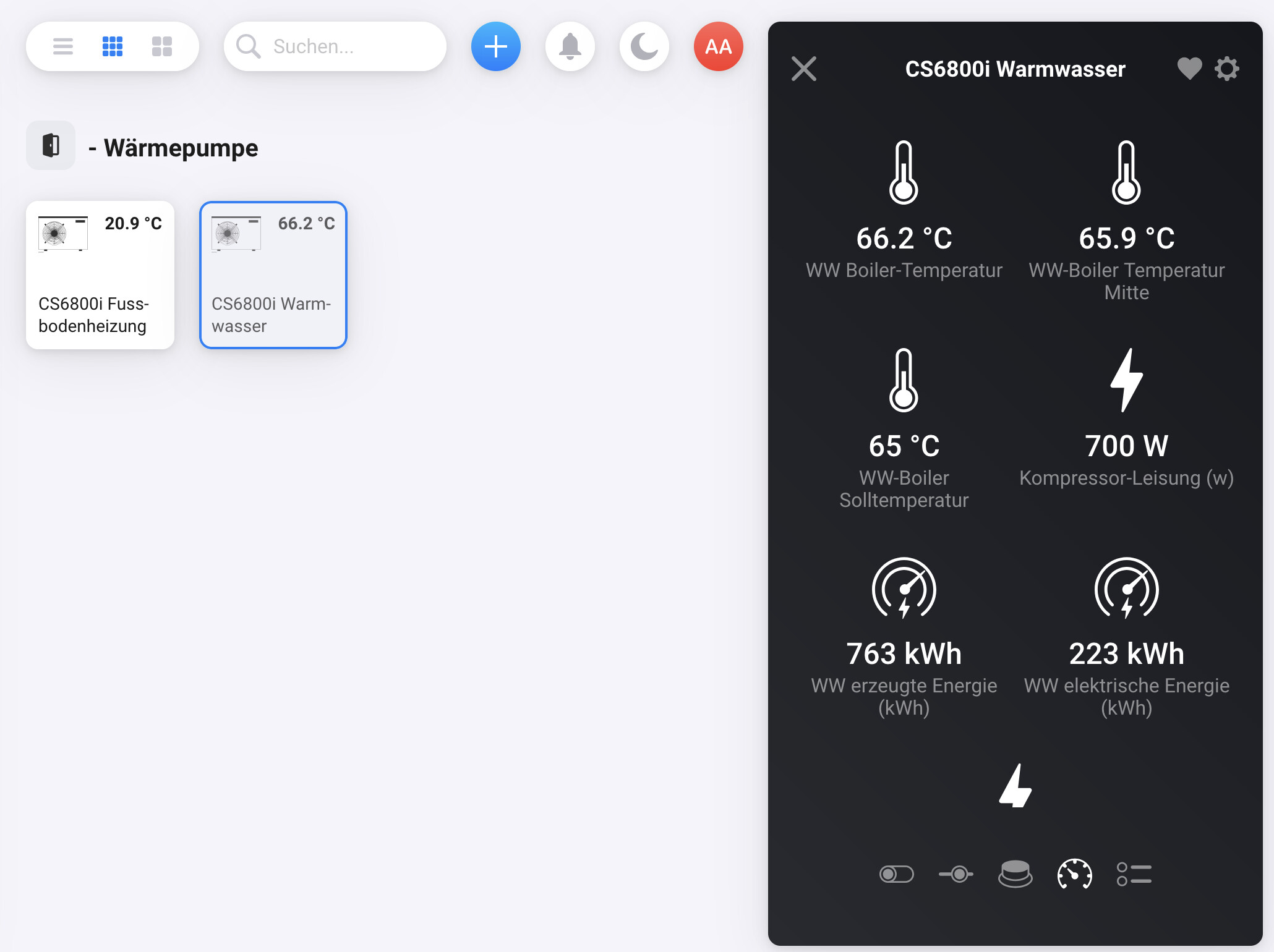
And i like the new graphical dashboard representation to see what the heatpump is doing over the day and why. E.g. today, there was enough solar power to increase the water temp to 65° at noon time.

1 Like

Oh wow. I’m diving into this. Hopefully i’ll manage to make similar flows. For me this is far from easy or straightforward, but i want it to work. Probably a x-mass break project.

Thanks for sharing these examples.

2 Likes

@Alexander_Adam1 I’m in the process of configuring my Buderus gas boiler and have encountered similar problems to yours. I already have the EMS-ESP configured, the Broker, and the MQTT Client. The MQQT Hub app is also installed. The EMS-ESP shows me the parameters for the Buderus boiler and the RC310 weather-based controller.

Can you show me how you use the MQTT Explorer to find the values ​​you’re interested in and then create a tile in Homey? Perhaps you could send a short video of how you do it? I’m not a programmer, and lines of code are magic to me.

Sorry, but I migrated meanwhile to Home Assistant. This work via MQTT like a charme and was configured in 5min…..

Use the Mqtt Explorer to take a look into the Broker data. So you know the topic (the path) and how the data is stored. In most cases, the values are directly stored in a topic. Then it’s easy to import into a Homey device. Sometimes values are stored as JSON. Then you have to adapt device settings and add a conversion to read a value from the JSON.

You can read along the app thread and ask there if you have questions. Please try Mqtt Explorer first to have a base we can help.