I recently purchased a Homey Pro with the intention of transferring my home automation from Smartthings. I am trying to create a Flow that sets a raw zwave parameter on a when clause. The devices I’m using are a Third Reality Contact sensor and a GE Motion Occupancy Dimmer Switch.The switch supports three occupancy settings, Manual, Vacancy, Occupancy. In manual mode the status of the motion sensor is ignored. Vacancy mode turns off the light if there is no motion. Occupancy mode turns the light on with motion and off when it detects no motion. I am looking to change the Occupancy setting via sending a raw zwave command.
The switch is in a bathroom. I have the switch set to occupancy mode, so it turns the light on when I walk in and off after five minutes of no motion. If I want to take a shower the motion sensor is blocked so the light turns off after five minutes. To get around this I have a contact sensor stuck to the door. I want to use the status of the contact sensor to modify the Occupancy setting value and change it to manual when the door is closed, then change it back to occupancy when the door is open.
I found an OpenZwave Github repo that provided the raw values I need to modify. Based on this, the configuration ID I need to modify is 3, with a size of 1 byte and value of 1, 2, or 3 corresponding to manual, vacancy or occupancy respectively.
If I open the switch device settings, scroll down to zwave raw device configuration parameters and type in 3,1,1 then click save, it correctly sets the occupancy setting to manual, disabling the motion sensor from controlling the light. If I change the parameter to 3,1,3 and save it, the setting is changed back to occupancy and the motion sensor again controls the light.
To replicate this behavior in a Flow I set up a basic flow with a When clause set to “Contact alarm turned off” and a Then clause set to Send zwave raw command 5 3,1,1 Five is the node ID obtained from the settings for the switch.
This set up does not work. Given I can set the same raw command within the switch device settings and it performs as expected I am unsure what I’m doing wrong when sending raw zwave commands in a flow. I’m hoping someone here can provide guidance.
the raw z-wave command is fully raw though, not just configuration command class like the advanced settings input is, so we also need to define that it has to be configuration command class (0x70), and also want to set (0x04) a value to that command class:
hexadecimal command you need for value “1”: 0x70 0x04 0x03, 0x01, 0x01
but as there was a time that hex didn’t work (Homey Pro 2023 made it all 0’s for a reason, not sure if it was fixed yet), so here is also the decimal values: 112, 4, 3, 1, 1
I’ve learned my ways after almost 7 years of playing (a lot) with Z-Wave.
0x04 is just the “set” command
0x05 is the “get” command
0x06 is the “report” command
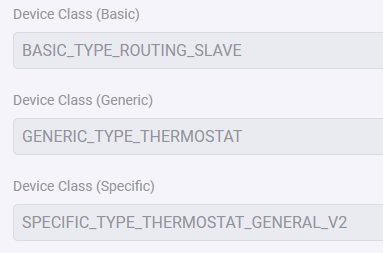
Your device isn’t even supported in Homey currently by any app? or did I miss it.
So how are you able to control it at all?
(The basic z-wave device implementation Athom has is purely for on/off switches and dimming.)
Those 3 values are always present in the default interview any controller does for z-wave.
Homey only doesn’t do anything with those values, if there is an app or not.
The “off” option is just a thermostat mode, so if there really was an app (you will get a message if there isn’t during inclusion, but you can also see it on the device icon (no app means it is the z-wave logo)).
It (most likely) would have been part of one of the 3 options (off, heating/comfort and economic/away) your thermostatic has.
Hello!
I need some help with this.
I have a few HeatIT Z-trm6 thermostats, which I use in the power regulator mode.
I am able to configure it from the device settings, but there are no flow cars to set the parameter “power regulator active time”. So I would like to set it via a raw data command.
The unit manual (User manual Heatit Z-TRM6 (English - 12 pages)) tells me that the parameter ID is 25, the parameter size is 1, and let´s say I want to set a value of 4 (relay closed 40% of the time).
The node ID is 61.
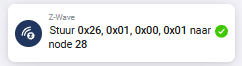
ChatGPT tells me to format is as follows: 112,4,25,1,4. When I try it, it does not work:


 and help!