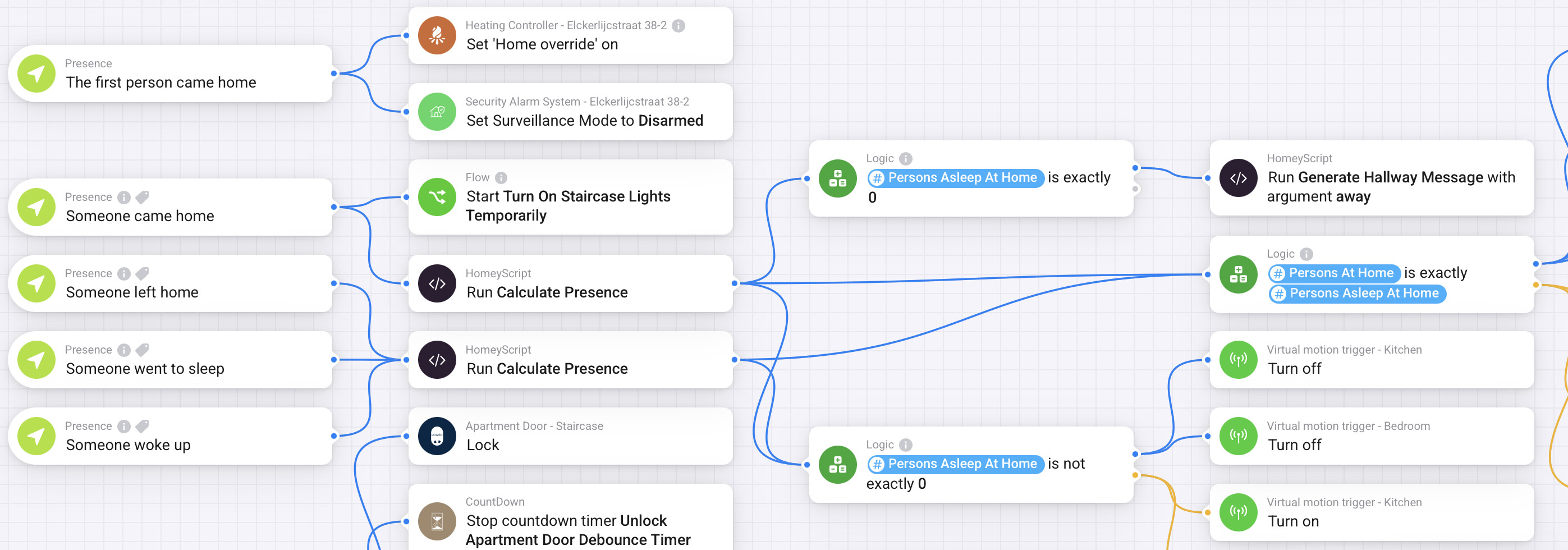
I need your help. Normally, there are three of us living in our house. However, our daughter isn’t home much anymore because she’s studying, and my wife is often abroad for work.
In short, there are three of us, two of us, or even just one person at home.
I currently have the Presence app and the Locative app running on our iPhones, and they work really well. Homey knows exactly who’s home when, so it knows whether there’s one, two, or three of us.
Obviously, I’d like the house to react differently when there’s one or three people at home.
The best example of this is a sensor on the stairs leading downstairs. My lights on the first floor and attic turn on automatically, so when I walk down the stairs and am home alone, everything upstairs should automatically turn off.
You’d think that would work if there’s no movement on the first floor or attic, but I often find that very unreliable.
In short, who can help build a flow based on 1, 2 or 3 people at home?
Okay, thanks for your explanation, Wim. I can follow this if one person comes home and stays home. But what if another person comes and, for example, someone leaves for a while? I still have to figure out that flow.
It was valuable to read your response, and it’s funny that two Dutch people have to communicate in English.
Yes, but I’m not done yet. Now I want the house to react differently when my wife and I are home, so whether we’re together or when my daughter is also home. This is because when my daughter is home, the lights in the hallway and bathroom need to be dimmer. That bothers her in her room. But when she’s with her boyfriend, we prefer the lights to be brighter.
In short, it’s not necessarily about whether one, two, or three people are home, but also who.
You might want to have a look at Flowbits. The app basically allows you to define modes/states for your house.
You would still need to build the logic for setting the desired state/mode depending on who is home, but once done, you can adapt all your flows react to the mode/state your house is in, rather than have the logic be repeated in different flows.
hey, for my flows, I made a script that just counts the number of people at home, the number of people asleep, and the number of people at home and asleep on the fly and creates tags for them to be used in your flows. I used to work with variables which I updated on every presence event, but I found it to be unreliable and I much rather just calculate the values directly before I need them, so I know they are always correct.
To set it up, just go into the scripts section and create a script called Calculate Presence(.js). Then paste this script:
The great advantage of this script is that people can just mark them selves asleep and awake, and at home or away independently. So people can be asleep while they are not at home, or asleep while they are home and it wouldn’t impact for the flows that depend on “Persons Asleep At Home”. So the automation regarding presence can be kept super simple. Just mark someone at home when they arrive home, mark someone away when they leave, mark someone asleep when sleep mode is enabled, and mark someone awake when sleep mode is disabled. No need to perform any other difficult checks there.
You came home after your phone already went into sleep mode? No problem.
You left the home but the phone is still in sleep mode? Not a problem.
You go on holiday but the phone keeps marking you asleep and awake? Also, not a problem.
You already left your parental house, but occasionally stay over? Again, not a problem.
I wrote a full tutorial on how I Implemented presence detection using iPhones shortcuts app in Homey. You can read it here:
I’ve also written a full tutorial on how I implemented motion sensors in my house and connected them to Virtual motion sensors to gain full control over the timeout values, and the ability to turn the whole sensor on and off. In this tutorial I use the Circadian app for my lighting schedules. The Circadian app has the ability to switch between manual, automatic and night modes, which might be useful in your use case as well. But you can also just as easily use the above setup without the Circadian app if that’s not what you need. You can read the full tutorial here.
Maybe this setup combined with the script can also help you out.
Question also trying to use thes home functions. on my phonit works great and always detects. On my wifes phone (samsung) it only detects she leaves or is home 10% of the time :S not sure if there is away to improve this? or another app for snesing presence?
Owntracks (Android) + Location & Presence (Homey) works very well, next to Macrodroid (Android) sending webhooks to Homey.
Both have possibilities to define multiple geofences/waypoints and to define their diameter.
We only have iPhones in the house, so I don’t know exactly how it works with an Android, but I think Peter has good suggestions.
Furthermore, I can say that it has been working very well for us for months now and I am very happy with it. There are three of us living in the house, and recently I was at home alone with a few colleagues and I went out for a moment to get some food, and immediately the rest were sitting in the dark, and I knew the system was working well.