Some of my Matter-over-Thread devices became unavailable after a while — always the same ones. A few of them are Thread routers, and I suspect that once one of those routers dropped, some nearby end devices followed.
After rebooting Homey everything usually came back, but once I had to restore Homey from a backup.
I started making a few changes to test their impact. Things look stable now, but it’s still too early to call it “fixed”. I also can’t say which change (or which combination) actually made the difference. For reference, here’s what I changed:
Added a handful of Thread router smart plugs so each battery device has at least two routers nearby, and placed one router plug close to Homey as well.
Reduced Wi-Fi transmit power on my access points by one step (from Powerful to Good).
Forced 2.4 GHz channel width to 20 MHz (instead of 40 MHz).
Disabled beamforming on 2.4 GHz.
Moved Homey farther away from my nearest access point (now ~1 m; previously ~50 cm).
Worth noting: my Thread network under Apple Home was rock solid without any of these changes. That makes me think Homey’s Thread radio might be more sensitive to interference (or simply weaker) in my environment.
Next step for me is to migrate to a more “pro” network setup (more control, proper segmentation/VLANs for IoT, cameras, etc.).
Just a small update after a longer period — I don’t have a lot of new findings to share, but happy to pass on some of the experiences I’ve had along the way.
Since I stopped auto-updating and started keeping a closer eye on what’s in each update before applying it, I feel more in control of my setup. I shared some thoughts on that in this comment in the podcast thread.
It’s a bit unfortunate to see these challenges showing up primarily on Homey — both Athom and IKEA deserve better, and I’m sure they’re working on it. Matter has so much potential, and getting it rock solid would be a win for everyone.
One thought I’ve been playing with: since Zigbee and Thread share the same radio on Homey Pro, I’m curious whether offloading Zigbee to a separate coordinator via Zigbee2MQTT would free up the radio enough to make Matter/Thread more stable. Just a theory at this point — but might be worth exploring.
This morning some of my devices were unavailable again. The strange thing ist that one of the devices is a Wifi device that isn’t Matter and has an app to work. So for this device, no Thread and no Matter problem can be the cuplrit.
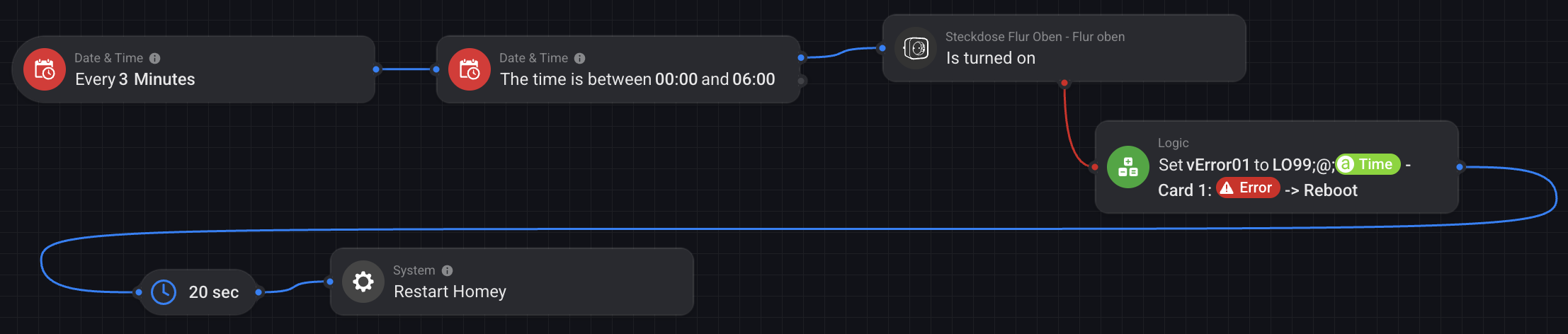
And in my logs I’ve found a strange Message (I log errors and the error message the card throws)
Matter is not available ???. This is definitively a Homey Problem and has nothing to do with Wifi interferences.
When I restart my Homey, all devices come back within some minutes, and actually I have to do that every morning, as every morning some devices are missing and my heating did not start
Also, comparing the logs to backups … the first time a card throws an error ist always the first action after the backup. Even worth, I had to send my Homey back to Amazon as the USB connector had some problems. The devices that drop off now, were not restored on the new device by the backup and were completely missing. Coincidence ?
Thank you for the hint. I already activated the the Power User experiment and I also created a flow to restart my Homey by clicking virtual button. I did not automate it until now as I wanted to collect an error log.
Today I’ve created an official ticket for the support. My ticket is very precise and I attached the log I created. It is friendly and formal, but also makes very clear that this is not acceptable for users for a 400 bucks device that officially states to support Matter over both transport protocols. If Matter is not stable they should sell it as Matter compatible (beta) and I never had bought the device.
Today, after I have the logs and I created the ticket I created the following flow that I hope will work as expected. The plug is one of those that are always concerned.
I’ve had the same problem with my Homey mainly based on Matter devices. After contacting the homey support I get the following hint:
Could you try installing the latest experimental update on your Homey?
This experimental update includes a fix where Matter devices sometimes show these kind of issues.
You can enable experimental updates by going to https://tools.developer.homey.app/tools/settings.
After enabling experimental updates, please update your Homey to version 13.2.0-rc.2.
After updating your Homey, you can disable experimental updates again, this way your Homey will go back to stable releases when the next one releases.
After updating, my matter devices are reliable connected.
I installed the latest update when it came out, as it was supposed to fix Matter-related issues. During the first night, my Homey did not reboot, which was very encouraging. Unfortunately, in the following nights, Homey started rebooting again every night.
I usually have a few spare devices connected to Homey and placed in a room called “Stock”. These are devices such as smart plugs that I keep in a box, so naturally they show the red warning icon and are unavailable.
I decided to remove all these spare devices from Homey completely, and since then I have not had any nightly reboots anymore.
This is a very strange and concerning observation. It seems to suggest that once a device — possibly a routing device — becomes unavailable, other devices may start to be affected as well. To me, this looks like a routing-related problem. That would be unexpected, because Thread is supposed to be self-healing by design.
Since this morning, my entire Thread network has completely collapsed. None of the approximately 25 devices are working anymore—and I can’t pair them either.
13.2.0-rc.2 didn’t help at all, either…
This really sucks!
If the Thread Network becomes corrupted you may have to disconnect the hub for 30 Minutes and eventually unplug all routing devices as second step to kill the corrupted network and to make sure a new network is created from ground up. I had to do this once on another platform.
Support has gotten in touch:
“I can see some under voltage warnings, the power adapter of your Homey Pro may be faulty.
Could you test your repair or using your Thread network with a different power adapter, for example, a smartphone charger?
Make sure the adapter provides 5V and at least 2A (2000 mA). Please do not use an adapter with an output below 2A, as this can cause instability or data loss.”
I went ahead and did that, after everything went down again this morning…
That would certainly be a nice explanation… let’s see if it helps.
aim realy frustrated! 14 Thread Devices, 11 of them are Smart Plugs from Eve which working as Thread Router in a Family House with 165m2 with 3 Floors…after some changes on Homey Pro 26 (power supplier-cable-place of homey-router network changes..) it works 3 weeks without failure till i add a new thread device and the problems starts again…sporadically the thread network break down, devices lost the IPV6 address and Ping Test to the affected devices reports..
Well, i am fed up…aim again in contact with Athom…they inform about the standard changes…nothing helps at all…yesterday night it was worst..lost 5 Thread Router…i decide to install the RC Version 13.2.0 after some Homey Reboot don’t helps to bring the Devices back online…After install the RC Version, i disconnect the homey, wait 10min. and restart, now all thread devices are online, we will see how long..aim sure if one of them crash all goes down and the healing function of the thread system did not work, so thread collapse will be perfect!
I have no more ideas what i can do, aim britty sure the problem comes not from my Unifi network because before i used Apple Thread Network and it works without any problems and in most cases a reboot of homey fix the problems! I also do not use the zigbee interface on homey pro 26 (thread-zigbee channel problem-radio-multiprotocol???)…
My Network is Unifi 2,4Ghz Wifi 20Mhz Channel 1-6-11 and zigbee Hue Bride Pro Channel 25, Thread is only running on the Homey Pro 26 Channel 25…maybe both on same channel is a problem???..has anybody experience regarding the channels, should i swap the channel from the zigbee hub Hue Bridge Pro?
…well, 13.2.0-rc.5 did not solve my problem at all, yesterday evening again device failures (Eve Energy Plug and not battery devices lost)…reboot of homey solve the problems, i change now again the place from homey even closer to the center of my house to make the distance between the Homey and the Thread Router (Eve Energy Plugs) less..
I’m using even cheap devices without any problems; I have 10 of them installed with zero issues.
Work with Matter 16A WiFi mini Smart Switch Pass-through Disconnect Dual Control Outletorks Remote Control Timer HomeKit Alexa.https://pt.aliexpress.com/
Last update (v13.2.0) broke my matter devices as well.
GH’s as border routers on the same VLAN.
It seems like it eventually picks up the devices but it takes days.
I’m wondering if Homey is to quick to dismiss things from GH or well. Might be GH that’s slow..
But has anyone figured out a way to see logs for this in Homey?
Can’t even see why it’s offline. It just it.