Back for another try

Hi everyone,

I was a Homey user some time ago, then moved to Hubitat after leaving Homey. At that time, my Homey (White Sphere) was unfortunately not very reliable for me, whereas Hubitat proved to be extremely stable. However, Hubitat had its own downsides: the dashboard felt outdated, and support for European devices such as TRVs was missing. I stayed with Hubitat for quite a while because the platform itself has real potential, hoping these gaps would eventually be addressed.

When Matter was announced, Hubitat communicated that it would support it. In practice, however, the current implementation relies mainly on vendor-specific drivers, and important device categories (like TRVs) are still missing. This led me to gradually rethink my setup.

Over time, I transitioned step by step toward Philips Hue and Apple Home. Both systems have been very positive experiences overall. Hue, in particular, is impressive: the built-in logic in the bulbs and the way dynamic scenes work is something I haven’t seen matched elsewhere. Its main limitation for me is the lack of proper backup options, but aside from that, it’s an outstanding system.

Apple Home was more challenging at first — not due to device connectivity or stability, but because automations initially felt very limited (“When this, then that”). It took me some time to discover how powerful it can actually be. By converting automations to scripts and using third-party apps to add additional triggers and conditions, it’s possible to build surprisingly complex and very reliable automations.

One major advantage of Apple Home is its controller handling. In my setup, I have two Apple TVs, two HomePods, and one HomePod mini. Apple Home automatically selects the active controller, and if one goes offline, another takes over seamlessly. From a resilience perspective, this works extremely well.

That said, Apple Home is still less powerful than Hubitat or Homey when it comes to advanced logic and complex flows.

A few years have passed since I last used Homey, and I’m hoping the platform has evolved significantly. I’ve learned a lot from past experiences and now want to avoid dependence on a single hub. With that in mind, I’ve decided to give Homey another try and have ordered a Homey Pro (2026).

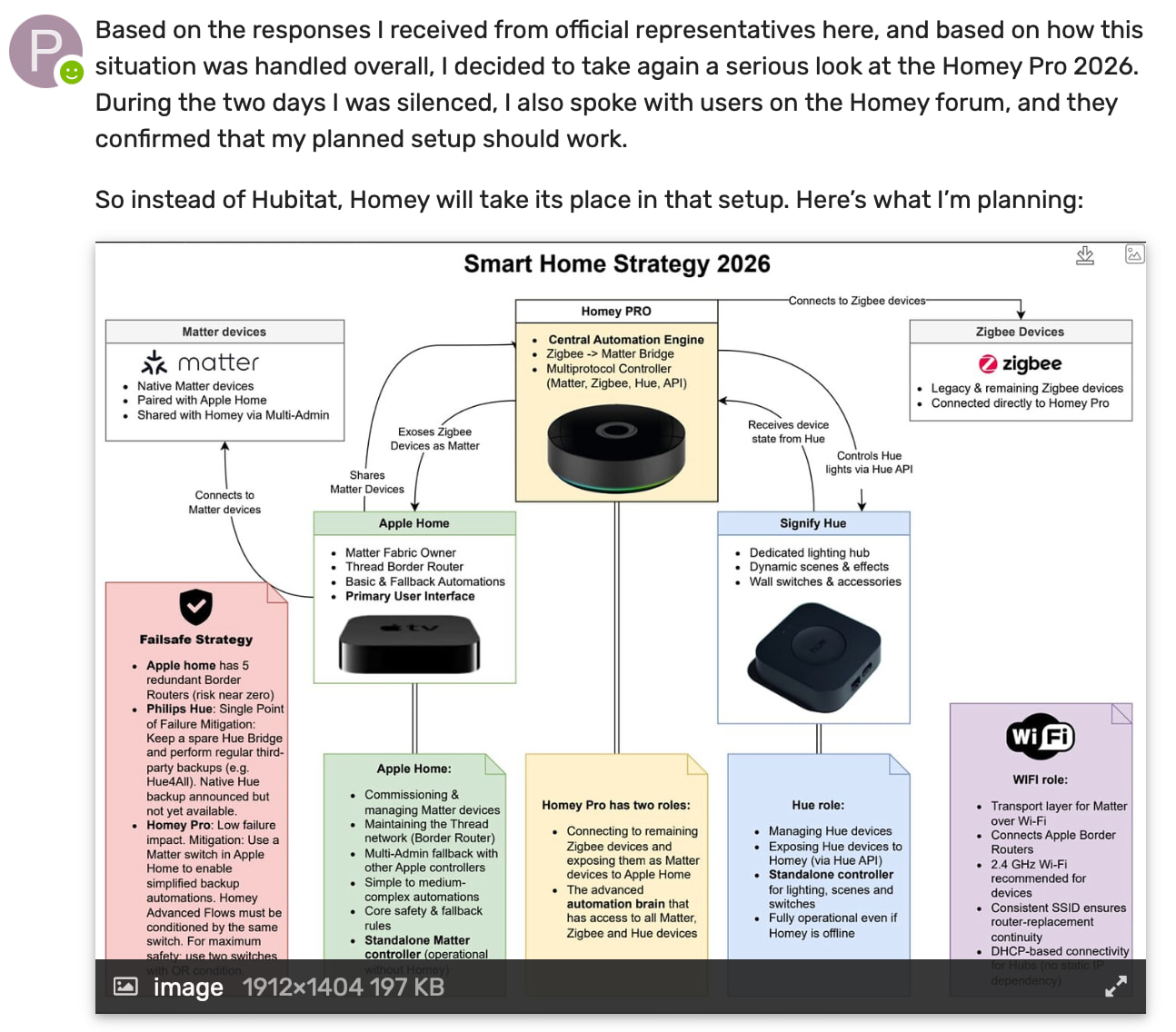
I’ve also developed a broader strategy around redundancy and interoperability, which I’ll share next. I’d be very happy to hear your thoughts and feedback.

Looking forward to the discussion!

1 Like

Good morning @Pascal_Nohl - you posted the following on the Hubitat Community this morning, indicating that users of the Homey forum had commented on your planned setup. So I decided to visit this forum to learn from their opinions.

Unfortunately, it appears that my post is just the second (after yours) in this thread, so the comments must be on another thread in the Homey forum that I am unable to find. Could you please post links to these comments so we may all learn from them?

2 Likes

This is a very professional approach!
Too complex for me at this time but I downloaded the picture for future use…
Thanks !

After your comment, someone replied right here. :grinning_face:

That said, I do find it somewhat amusing that a Hubitat Ambassador follows me over from the Hubitat community into another forum to verify whether feedback exists.

Yes, I received feedback. That’s how forums work. People reply, people comment, people react—sometimes publicly, sometimes indirectly. You don’t seriously expect that every reaction or technical discussion automatically turns into a neatly linkable public thread, do you?

And no, I won’t start providing a list of links to every place where Homey or competing platforms are discussed. Anyone who has spent time in multiple smart-home communities knows very well how feedback circulates and why not every discussion is easily discoverable—or publicly traceable.

So rest assured: the feedback exists, it was technically relevant, and it was sufficient for me to validate my thinking, why else should I order a Homey Pro. To be precise, I was initially looking at the Homey Pro Mini and was advised not to buy the Mini due to its 1 GB memory limitation, which could become a show-stopper for the kind of setup I’m describing. Ah.. I asked the question before creating the final draft, weird ? That’s all there is to it.

Thank you, I appreciate that.

You’re welcome. If you come back to it later, I may have tested this setup under real-world conditions by then and would be happy to share feedback or help you with the setup.

Clarification: Homey Pro failback concept

The Homey Pro failback is only outlined at a very high level in the draft and is apparently not very clear, so here is a more precise explanation.

The idea is to use one Matter switch (SW1)—or for a more robust failback, a second Matter switch (SW2)—on the Apple Thread network. This network is considered fail-safe, as it is supported by multiple cooperating border routers (in my case, five).

For core automations, a basic automation is created in Apple Home (which is more limited in logic capabilities). This automation includes a condition such as:
If SW1 is OFF (or SW2 is OFF), then …

On Homey, a more advanced flow is created, using its more powerful automation engine. This flow includes the complementary condition:
If SW1 is ON (or SW2 is ON), then …

If Homey fails or becomes unavailable, simply changing the state of one switch immediately activates the Apple Home automations. This allows the system to continue operating—possibly in a degraded mode, but still functional—without requiring a backup restore or manual reconfiguration.

The second switch may be overkill, but it adds resilience: if one switch fails or becomes unavailable, the failback mechanism still works (OR condition).

I did not find a reliable way to switch (fail over) automatically between Homey and Apple Home. That would, of course, be the nec plus ultra, but at least this approach allows for a controlled and predictable manual failback.

Edit:
A suggested solution that I got on another forum is to use two shared Matter outlets. Apple Home acts as the watchdog by periodically switching Outlet A ON (e.g. every 60 minutes). Homey has a simple flow triggered by this event and responds by switching Outlet A back OFF. Apple Home checks the state after a defined delay (e.g. 10 minutes). If the outlet is OFF, Homey is considered operational. If it remains ON for multiple consecutive checks, Apple Home assumes Homey is unavailable and activates the fallback by toggling SW1 (and SW2).

Outlet B can optionally be used as a secondary confirmation or future extension, but the core failback logic already works with Outlet A alone.

The Homey Pro arrived !!!
Here are my first considerations—some might be final, others not. I knew the 2026 model would still lack an Ethernet port (who came up with this poor design?), but I didn’t order the expensive official brick. A cheap 8€ one from Amazon does the job just fine. I guess Homey could buy them for 3€ in China, so why not just add it to the package? The puck itself feels high quality and has a pleasant design, though.

The onboarding process was very nice and I felt well-guided. However, soon after, many of my devices showed up as “unreachable” in Apple Home. My immediate suspect was the Homey Thread radio (Interferences). I thought “no problem, I don’t need it,” and tried to turn it off. No luck—there is simply no way to do this. After some research, it seems the Thread radio is bound to the Zigbee radio.

I figured switching channels might solve it, but again, no way to change the channel in the standard settings. I had to use the Developer Tools URL. Even there, you can’t manually select a channel; there’s just a “Reset” button. Click and hope. I had to click it 6 times before it finally jumped from channel 25 to 15. It’s basically a guessing game.

Eventually, the Thread network self-healed while I was out walking the dog, and all devices returned to Apple Home. Still, I really miss a simple toggle to turn Thread or Z-Wave off. Why pollute my house with waves I don’t need?

On the positive side: I connected my Zigbee smoke detectors and exposed them via Matter to Apple Home—that worked perfectly. Adding Matter devices from Apple Home to Homey was also very straightforward and a great example of multi-admin working as it should: I just went to the settings of a device already paired to Apple Home, pushed “Turn on Pairing Mode,” copied the code, and pasted it into Homey. Easy.

But here is the dealbreaker: The Flows. I created some simple Advanced Flows (e.g., button press = light on/off). They worked fine at first, but three hours later, when I wanted to show my wife, nothing happened. The devices were definitely connected (the “Identify” light blinked), and I could control the lights manually in the app, but the flows just wouldn’t trigger. Interestingly, Apple Home reported every button push correctly.

This morning, the flows are working like a charm again. This reminds me of my bad experience four years ago when flows ran more randomly than stable. I’ll check this over the next few days. If they don’t run 100% reliably, the Homey goes back to the sender. It would be a shame because my schema from above works well, but it has to be stable.

Hello everyone,

I’ve been running some tests with Homey for a few days now. I still have about 7 days left in the return window, so things are starting to get a bit tight.

I connected a handful of Zigbee devices and a few Shelly Gen 1 devices over Wi-Fi directly to Homey and then shared them with Apple Home via the Matter bridge. In parallel, I shared almost all of my Matter devices that are paired with Apple Home (with two exceptions) with Homey using Matter multi-admin. Overall, this worked very well and was surprisingly easy to set up.

The two exceptions are probably not Homey’s fault:

  • The first one is a Matter over Wi-Fi device. For multi-admin sharing it apparently needs to be within Homey’s direct Wi-Fi range, but it’s installed further away and embedded in a wall. I decided to leave that one for now.

  • The second one is a Matter-over-Thread relay from SwitchBot. Like their other relays, it’s poorly implemented: it’s not a native Matter device but a device with a built-in Matter bridge. I’ve learned my lesson there — I don’t want to end up with dozens of bridges. That’s not the direction I want to go.

I migrated all my automations from Apple Home to Advanced Flows. Doing that made me realize how complex my Apple Home automations have become over time, simply because Advanced Flows make everything much more visible. Unfortunately, I also realized that beyond the nice visual representation, Advanced Flows don’t add a huge functional advantage for my use case.

I asked myself what I would want to do in the future and how I would implement it in Homey — and then whether the same thing would be possible in Apple Home. In most cases, the functional difference turned out to be rather small. For me, the Homey Pro feels quite expensive mainly for a nicer interface.

So far, I’ve seen a lot of positive things and many aspects I really like. The price would be acceptable for me — but today I had a blackout moment: about half of my devices were suddenly unreachable in Homey, while all of them were still available and controllable in Apple Home. After restarting Homey, all but four devices came back. After a second restart, everything was reachable again. Unfortunately, one heating control flow didn’t run because the end devices were reported as unavailable.

I’ll monitor this very closely over the next few days. I need a home automation system that is reliable above all else. If Homey turns out to be less stable than Apple Home or Hubitat, I will most likely return it before the return period ends — especially since, in my setup, Homey is more of a “nice extra” than a core component.

As a pure Zigbee-to-Matter bridge, Homey is simply too expensive for me. For the same amount of money, I could buy 8–12 Matter-over-Thread devices and replace most of my remaining Zigbee devices entirely.

That’s not how it works, both Homey and the device need to be connected to the same network. Homey will not correct directly over wifi to the device.

Thank you for the information. I wrote “apparently” because I found that statement on an internet forum, which said that for Thread there is no issue if the shared device is not physically close to Homey, but for Matter-over-Wi-Fi commissioning the device needs to be within Homey’s direct Wi-Fi reach. :wink:

That said, all my other devices of the exactly same type and manufacturer are successfully shared with Homey and are located on the same floor. The one device that does not work is on another floor. It works perfectly in Apple Home, and Apple’s Border Routers, Homey, and the device are all on the same subnet. The device is also in the same Matter Fabric ass the others.

So from a network perspective, everything looks correct, which is why I found the behavior a bit confusing.