In this thread we can discuss running Homey Self-Hosted Server on macOS.
Installation
Learn how to Install Homey Self-Hosted Server on macOS.
Known Limitations
None at this moment.
In this thread we can discuss running Homey Self-Hosted Server on macOS.
Installation
Learn how to Install Homey Self-Hosted Server on macOS.
Known Limitations
None at this moment.
I was trying to setup Cloudflare tunnel to my self hosted homey, but that gives:
While forward is working and set to localip:4859

i can’t login to the server on my mac, my credentials are invalid. Or i’m stupid and have somewhere missed what i should fill in or there is a problem, I use my credentials (email+password) from my account.
On the ios app al works fine
The local web app requires a user with a local password.
Visit https://my.homey.app, navigate to Settings → Family & Guests to create a local username & password for your user.
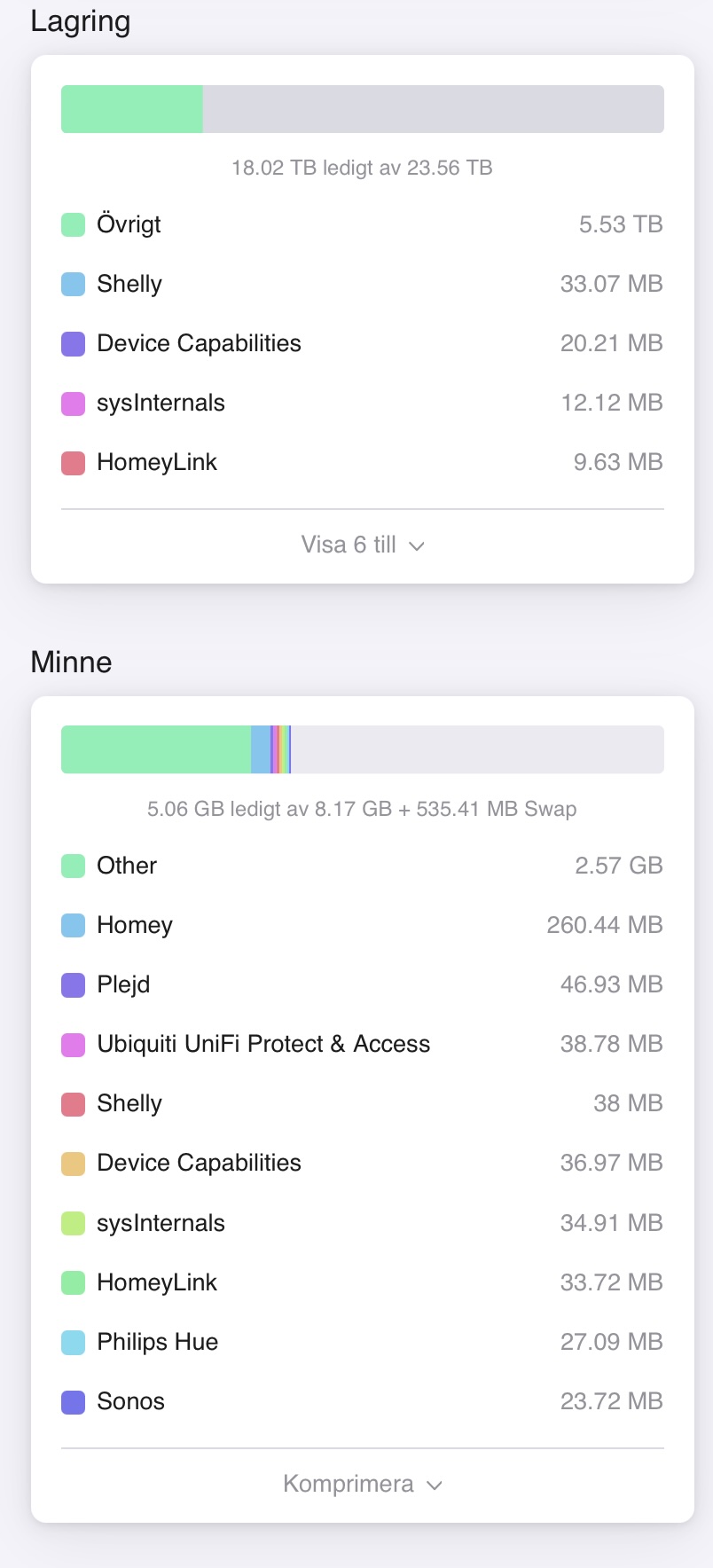
Is there no memory limitation anymore? It can use the full memory of your mac?
getting the following error
You can’t use this version of the application “Homey Self-Hosted Server.app” with this version of macOS.
Running Sequoia 15.6 on M2 Mac mini
Guess I’ll upgrade to Tahoe…..
I keep getting the Error: Not in Setup Mode. I had previously set up a self hosted server on my Mac, but then deleted it, but now won’t let me start over. How can I reestablish?
Why is the memory allocated for the server limited to 4Gb in the Mac version ? I have 24 Gb in the Mac mini. If this is true and unable to increase the memory for the server I just wasted € 1500 for the Mac mini. In the Qnap version it shows the total memory of the Qnap device i.e in my case 8 Gb.
I made a try with two setups. One one the QNAP NAS 8 Gb ram and one on a Mac mini 24Gb ram. I had as several others problems with low ram on my HP2023. The allocation of ram on the Mac seams to be capped to 4 Gb
The allocation on the Qnap are as I understand, what you have you get.
The Qnap version is very stable.
The Mac version is a disaster, eating memory just increasing size for Homey up to 1 Gb before restarting the SHS on the Mac its back to around + 300 Mb but on Qnap its rock solid on approx. 250 Mb. Also after a restart on the SHS Server on the Mac several apps are not running so you need also to restart the inside the SHS app to get it to work.
So I don’t understand why the memory is capped on the Mac version.
If memory would be capped that would take away all the positives…
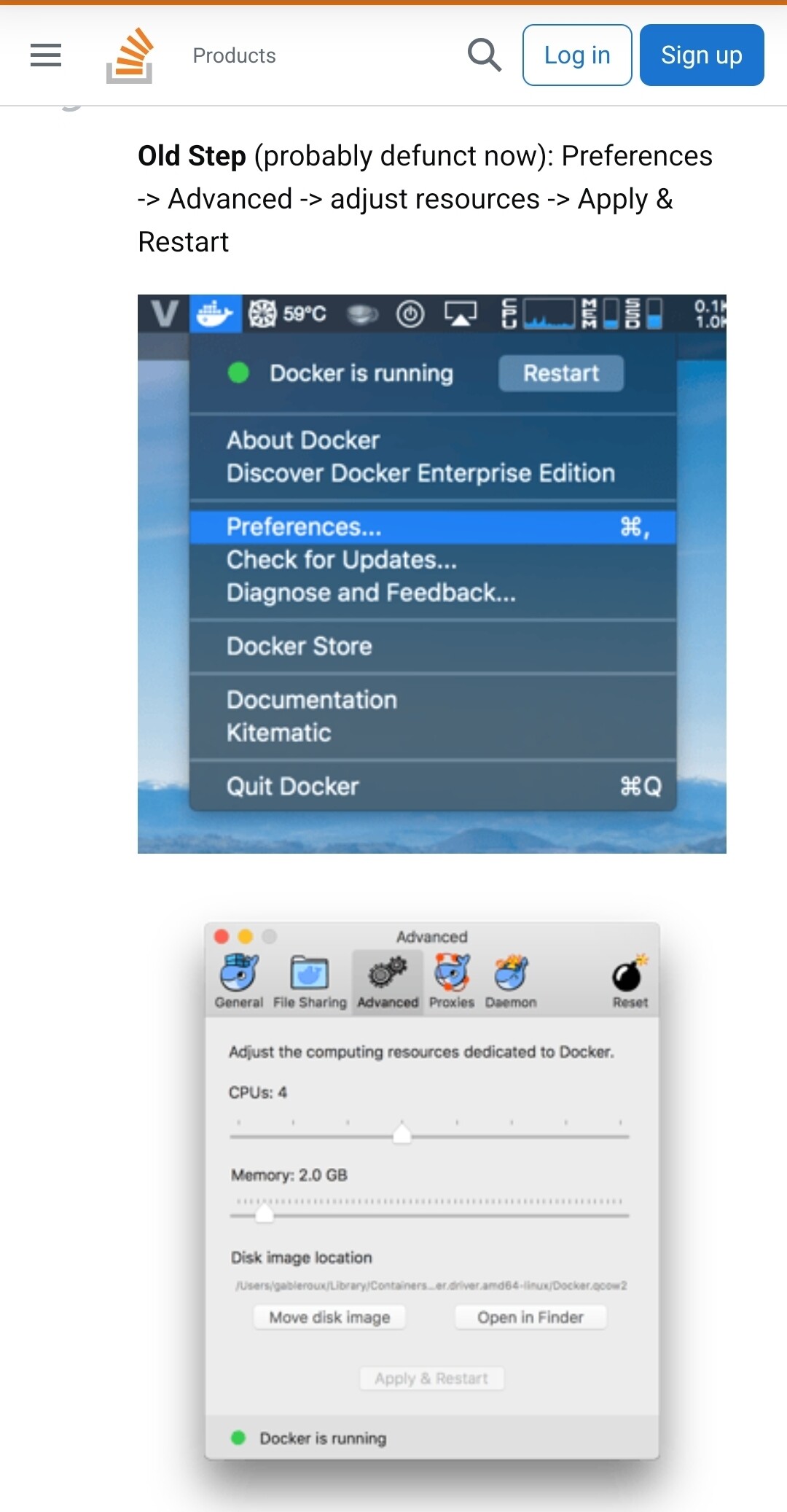
I expect that is more of a docker thing though.. I expect you can change that…
In the meantime I left my bed this morning at 06:15, it’s now 11:45 and I have migrated almost all my flows.
Only weird thing I encounter is that Indo not seem to be able to link the Alexa app … hope I can solve this since my home automation relies heavily on the speech Alexa does for me..
Same here on machining m4 with 26.2
Restarted the installation process several times. Always the same error. Funnily after some time meanwhile I have more than 5 self hosted servers in my account (even after deleting these) and still none of them working.
Find the “config” or “edit” button on the Mac I’d say:
.
I just found a possible howto:
You can do this via the command line. For example, to change the machine to 2cpu/6144MB RAM run:
docker-machine stop
VBoxManage modifyvm default --cpus 2
VBoxManage modifyvm default --memory 6144
docker-machine start
You can then check your settings:
VBoxManage showvminfo default | grep Memory
VBoxManage showvminfo default | grep CPU
And for docker-machine inspect to report the correct state of things, edit ~/.docker/machine/machines/default/config.json to reflect your changes.
.
or by GUI, something similar to:
Source:
https://stackoverflow.com/questions/32834082/how-to-increase-docker-machine-memory-mac
So I did try to do this but I was not able to download the image to use for container.
Is there a guide for the setup ?
I submitted a support ticket for this issue and this was the response I received:
In the mobile app can you add it. There you can enter setup mode.
If this also doesn’t work, I unfortunately can’t help you further as this is out of our scope. Please ask our community to find a proper solution.
*
For now this is all I can do for you, which is why I’m closing your ticket.*
#1: you can’t add the self-hosted server if the host doesn’t enter setup mode
#2: I was thinking about purchasing the new homey pro, but not if this is the support they offer, here’s a product, now you all go figure it out and fix it
NO
Uhm this is a user forum, just ask what you’d like to know and maybe you’ll get some help.
Your “improvement propositions” really should be addressed to Athom 
Merry Xmas and cheer up 

This is meant in a positive way:
There is a reason the SHS was launched as a gift to “the nerds. Personally I think it is a great solution and it is already running and doing what it needs to do for me.
But I think you will notice that a level of knowledge on docker docker / self hosting wil be needed.
Be careful on doing this if you are not aware how this stuff works, the homey pro/mini/cloud/bridge are created to be used outing the box as a seamless experience.
SHS is not, it is also very new so some issues can be expected. Tread carefully !
for far more control, probably far better performance, and almost certainly far less support, docker instructions + orbstack (proprietary drop-in docker desktop for macOS) might be an alternative route
possible side effects could include: seamless superior electron-free fruition, headaches, wasted Sunday afternoons
Same here.
I’m experiencing an issue with the self-hosted Mac version of Homey. When I connect remotely, I run into connectivity problems. When I’m on the local network, it works much better.