Hello,
What is the default web local login for the web interface portal with Self hosted server?
I did login through the IOS app but there is no option to add or modify a local user?
Thanks
Hello,
What is the default web local login for the web interface portal with Self hosted server?
I did login through the IOS app but there is no option to add or modify a local user?
Thanks
You can create Local Users on https://my.homey.app on Settings → Users.
Settings > Family & Guests  Thanks, works!
Just installed it through docker, worked pretty quick but I cannot seem to login to the webui (locally)
Is this intended, planned.. ??
Please first set up the Self-Hosted Server via the mobile app and afterwards create a local user via the Family & Guests menu 
Thanks Abe
Login thought web app is not accepting my credentials. Mobile App / homey web logins are fine.
@Doekse can’t find this option on iOS mobile app  It just creates an invitation links.
You can add local users via the web app
@Techniman but I can’t login into web app, and the solution was to create a local user. what I’m missing there? thank you!
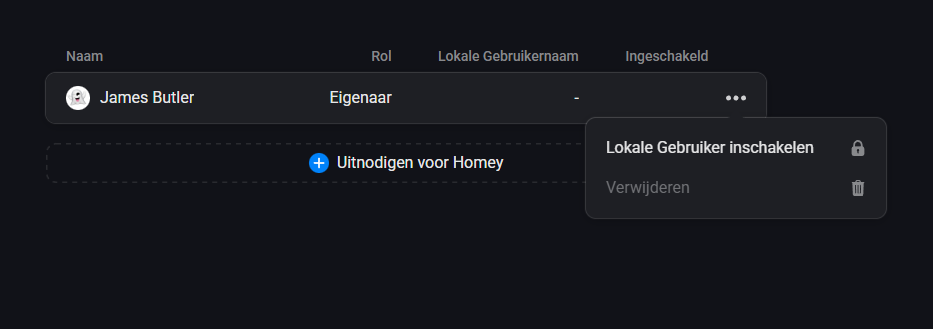
found it, https://my.homey.app/, the menu option is for an existing user and it’s named ‘enabled local user’
You’d first create a separate local account to be able to login locally.
I was wondering about this too.. login in was impossible through the local login
but once connected through https://my.homey.app you can enable it by hitting the 3 dots at the selected user
yes.. you need to enable it once inside homey
see above
I can’t login with my admin account. Why should we create a local account?
That option was much requested: logging in locally is cloud independent.
It’s a choice.
Does this mean that SHS can run without Internet access once in is setup and a local user is created and used?
I doubt it. The subscription has to be verified at Athom somewhere I suppose.
Yeah it’s a bit fuzzy still. When you buy a lifetime license, it should be possible to use it with the web app without any Athom server.
The mobile app however, with the Dashboard & Energy tab needs to authenticate to Athom’s servers once in every 2 weeks.
I hope Athom is continuing making the “everything local” statement reality.
This is what Abe responded with to my question:
which still doesn’t tell to me it will run “forever” without needing Athom servers somewhere at certain intervals.
Hi,
short question, is the webinterface for advanced flows now running local with Homey SHS? Or do I still need the cloud for creating and managing advanced flows?
Thanks
Peter