Homey randomly reboots

I have my Homey for around 16 days now and it keeps rebooting on random moments. I can’t seem to figure out what is going on. Its currently running the latest firmware 12.10.0, its connected to wifi (3 meters away from router), I’m using the Homey dongle and it has a couple of 433, RTS and Zigbee devices (Ikea/Agara) connected next to my Enphase Gateway and Inverters.

Is there a way to get some more light on this situation, is there a log that can be looked into or an app that can log stuff? (and how to set it up) As I currently have no clue how to fix it.

This is typical for either a bad power supply, a bad power cable, or both. The ones you get with Homey are notoriously bad in quality, so try replacing them.

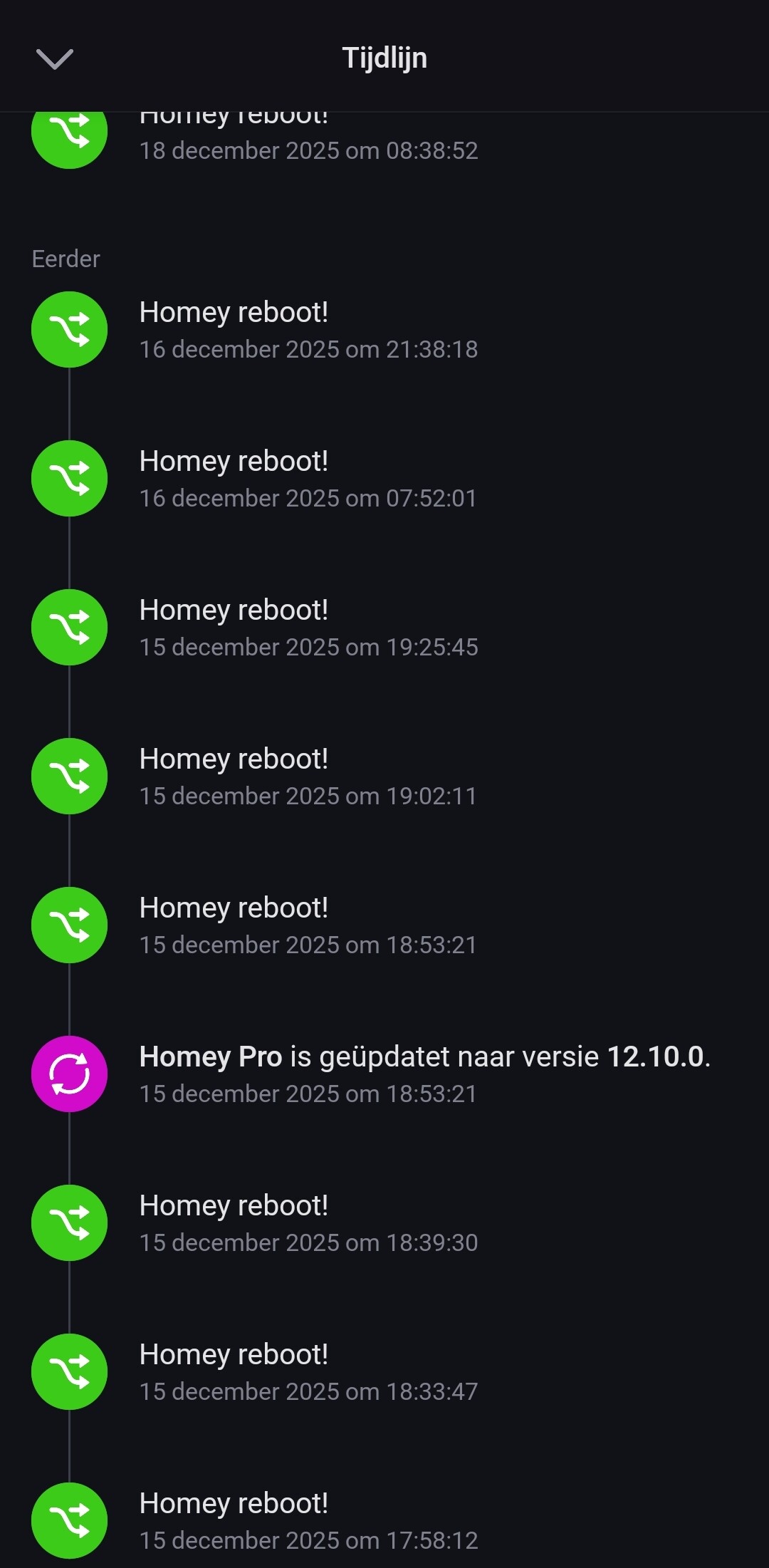
When Homey pro reboots in normally doesn’t add an entry to the timeline, so I assume the timeline entries are from a flow you made to get an clearer picture about this issue? One that triggers on the ‘Homey has started’ when flow card?

If that is not the case, check you’re flows there might be one that issues the reboot. In the past even I had forgotten I made such a flow under specific conditions.

Yes, that’s is correct, as Homey does not notify me about a reboot normally. Indeed, I created a flow that triggers the timeline entry after a compleet reboot with a notification to me as owner. This to give more insight in the frequency and to find out if there are any memory or CPU peaks, but nothing turns up there if I analyse the apps afterwards (but it might not be visible in the graphs if Homey crashes right away)

@robertklep I can try that. Is it just unstable or what is it? As the required amps is 2A and the transformer should be able to deliver 3A. Recommend same specs or would you recommend oversizing? (Because they are low quality or does the Homey actually require more power?)

I was going to say that the output should be 5.2V, not 5V, but the official charger that came with my HP2026 states 5V, 3A. A charger that can deliver more A means it probably outputs a more stable voltage when it comes near to its maximum current, but I think the original chargers are just of bad quality, so they drop the voltage too quickly, causing issues with Homey.

Specs changed between the 2023 and 2026 model. Also refer to this post and Athom’s response below it:

The 2023 model indeed needs the 5.2V power adapter.
Though after one and a half year of use, I am getting very incidental undervoltage situations. Typically after a firmware upgrade.

1 Like

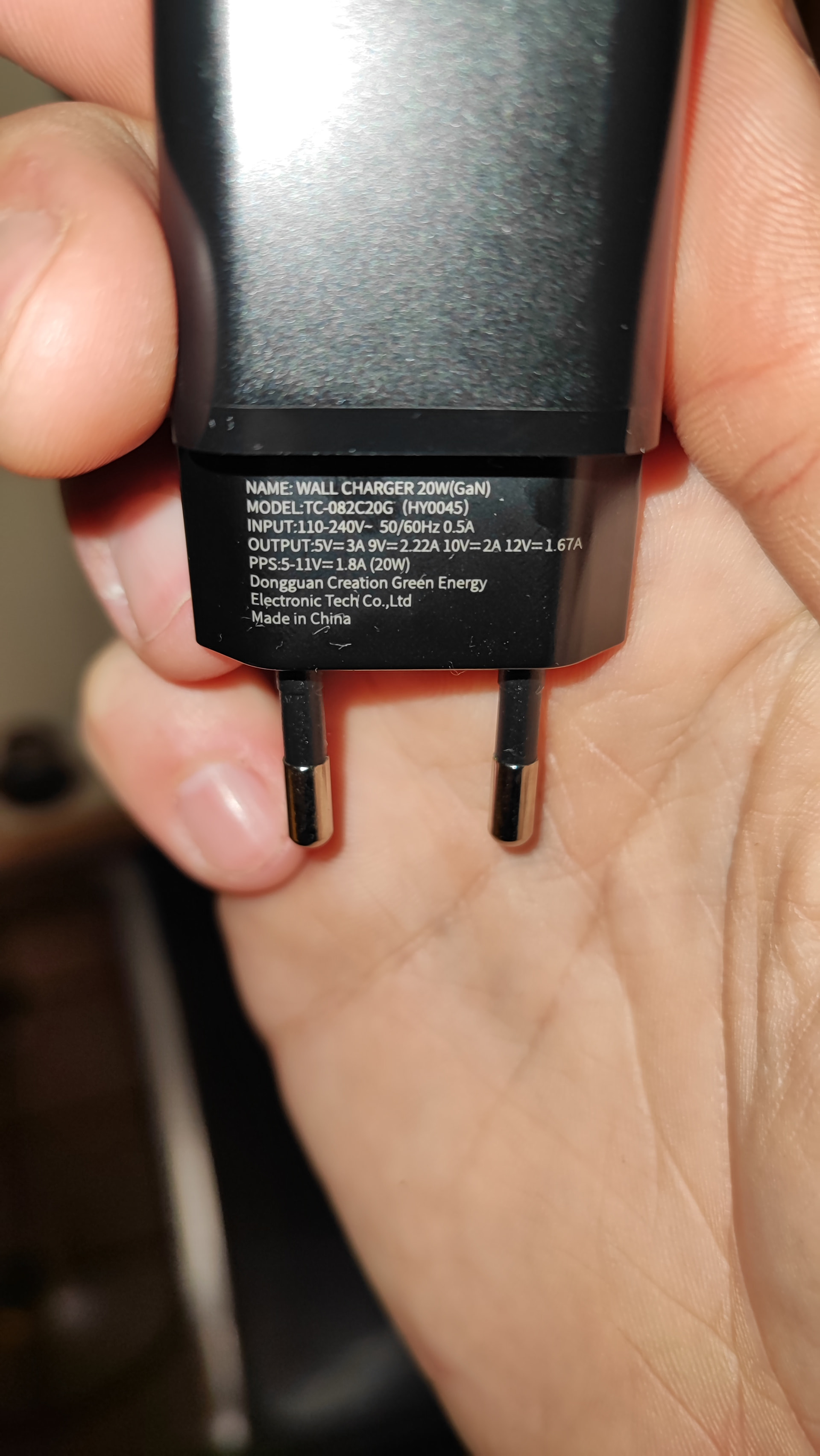
@robertklep Interesting, these are the specs of the adapter that came with the box of my 2023 model. If 5.2V with 3 Amps is required, this one is by definition underpowered.

Looks exactly like the one I got with my HP2026 (well, not exactly the HP2026, but the Special Edition).

According to answers on the post that @SunBeech has linked to, 5V should be okay, but given that your Homey is only 16 days old and it’s rebooting randomly, I would suggest contacting Athom and asking about this.

1 Like

I’ll copy the answer from the other post;

We originally switched to a 5.2 V / 2.1 A adapter because early CM4 revisions used a less stable power-delivery circuit. Although this was improved in later CM4 revisions, we continued shipping the 5.2 V adapters for consistency.

Since all CM4 units currently shipped now use the revised power-delivery circuit, we have moved to a 5 V / 3 A adapter.

1 Like

So it’s randomly rebooting for a different reason… :face_with_peeking_eye:

Model HY0045 is indeed the same as the Homey Pro 2026 (SE).

Model HY0028 is the one that used to be bundled with the Homey Pro 2023:

But as @robertklep suggests: best to reach out to Athom for support on this matter.

1 Like

Im having the same problem and the 2026 variant is only 2 days old. Share if you have more info.

Should have picked “Homey Server”:rofl::sweat_smile:.

I’ve filed a report at Homey Support. They’ve send me a reply with 2 options. First, try a clean firmware install via USB support and if that doesn’t work, backup the Homey and Factory reset. They want me to see what happens to my Homey when there isn’t a single app or device connected.

@BIRDY FIY, I’ve done the first step tonight, no succes, reboots within an hour after being up again. So factory reset it is, but it will have to wait, no time for now. (Home automatization with Homey so far doesn’t make things take less effort, quite the opposite…)

Yeah, I just checked as well and it already restarted 3 times. Thanks for sharing Homey’s reaction — very kind of you, by the way.

As for Homey’s response: I moved to the new Homey because I’d been having ZigBee problems for a while on the 2019 version. I changed the power supply, restarted, reinstalled, removed a couple of devices, but the issue persisted. I interviewed the devices and also tried refreshing them in the developer tools. Unfortunately, none of that helped.

I reported this to Homey several times throughout the year, and the response I constantly got was: “Try a clean firmware install.” To me, that feels a bit like “Have you tried turning it off and on again?” haha.

So I did some digging and came to the conclusion that maybe the number of devices I have was too heavy on the CPU or RAM. That’s when I thought it was time to upgrade. Luckily, that actually fixed that issue — I was able to re-add devices that I could no longer connect to the old Homey.

Unfortunately, the new Homey Pro 2026 keeps rebooting, and every time it reboots it loses connection to some random ZigBee node. So I’m back at it again, hahaha. My device is already factory‑reset, so you can spare yourself the time. I’ve also reported the issue to Homey.

And to wrap up with something positive: yes, even with Homey, home automation can be cumbersome. But honestly, they’re still a cool company with a great idea. I really hope that doesn’t change.

P.S. In Insights, there are several useful variables available — such as CPU load, memory usage, CPU temperature, CPU clock speed, and the undervoltage ratio. You can use these to see whether we have any similarities that might help pinpoint the issue.

At the times when my Homey restarted, I haven’t been able to identify a clear correlation. The only notable moments was a couple of instances where the CPU load reached 103% and a cpu temperature spike, but this isn’t consistent with the other restarts, so it may not be the root cause.

:rofl: Good luck and enjoy the holidays

I’ve tried factory reset, but it just doesn’t work. It keeps getting stuck on 1% for hours and after multiple tries I just plugged it in and see what happens. And as I thought, nothing, still fully functional with all apps and devices.

However, I’m using my 120w phone charger now and so far I haven’t had a single reboot in 23 hours. Normally it was around 4 - 7 every 24 hours. So I’m kinda crossing my fingers now that either the OG wire or adapter is just bad, broken, cheap or all of them.

PS. I’m usiing the app sysInternals to monitor both CPU and Homey itself. However, no abnormalities, temps at 57-63 isch celsius depending on load(but it rarely goes above 15%), RAM is steady at 50%.

Is it still going strong , or are still experiencing the restart? I tried using a 65watt usb c charger and it did restart once.

Homey response: We’ve noticed that when the migration goes too fast, these issues you’re reporting can occur. Could you please try the following procedure?.

Please connect your Homey Pro 2026 to a PC/Mac and reset your Homey Pro to Factory Settings. After resetting your Homey Pro, please wait 15 minutes and leave the device alone, so all networks can initialise correctly.

To me this is unlikely but i really dont want to factory reset again. I have devices that are difficult to reach and it takes an half a day to perform such a task.

I actually wanted to use POE adapter but now i have some doubts if power is such an issue.

Its still going strong, I received a new adaptor and cable from Homey, but that one was even worse rebooted 17x in the first 24 hours, almost tripling the amount of reboots. Its back on my phones charger since 25th and still going without a hitch. Excluding these 24 hours on the 25th, no issues.

So either my Homey requires too much power or I’ve now 2 busted adapters. I’ve replied Homey to figure out their next move, but with the holidays and weekends, I haven’t received a reply yet.

Mine does not restart that often, but it did not stop restarting even after hooking it up to a 65watt laptop charger. So i dont think thats the power usage. Lets see what we might have in common. Do you have allot of zigbee devices? On my old homey 2019 I had allot zigbee problems. No restarting i think. But on 2026 i see the red breathing led indicating homey has crashed did you notice this as well?

No, not at the moment, only just 4 plugs, 2 lightbulbs and 1 LUX sensor. Next to that 1 RTS screen, and around 16 Kaku/CoCo devices (variating from plugs, build in switches and dimmers) I’ve also created some virtual devices and I have the Homey Energy Dongle installed, but this was all after the reboots started.

Experiencing the same, but with a stronger charger it happens rarely - every third day ‘ish.

After the automatic reboot it “works” - I can connect from the app, but there are warnings on all devices and I cannot connect to them.

I then need to have the device unplugged for more than 20 seconds (power drain?). When plugged in again everything is working.

The issue is the same with different chargers and cables. Only difference is with a high capacity/fast charger…

It seems like a bug in the software, or…?