We got a house which already had Heatit Z-smoke detectors installed. They were added to the Homey system, but there are no flows to it. All I can find is that all of them have been assigned to Group 1.
I am completely new to this and I feel like a fire system is very crucial to have up and running properly. Is there someone who have set this up for these devices that I could copy or something?
I guess what I would need is:
All sirens to go off after X amount of time after the first one (Would this still work if Homey went offline?)
Push “Reset Fire” in the app to turn reset it. (I already have a virtual unit added in homey called “Reset Fire” but I cannot see it is connected to anything.
Phone notification when something is happening (I think I already got this working)
Welcome to the forum and to the Homey ecosystem. In order to answer your questions correctly, it is important to understand what Homey is, and what it not. Homey is designed as a product that adds a layer on top of “smart” devices that allows them to talk/communicate with other devices, so you can automate certain flows that would otherwise be manual operations for the sole sake of convenience. Homey is not designed as a device that replaces or substitutes main functions of devices that are considered critical for the proper functioning of your house. Homey relies heavily on network/internet availability and was not subjected to the same rigorous testing to make sure it complies with laws and regulations for devices such as central heating, lighting, fire and co2 detection and other household appliances. Therefore, when designing your smart home, you should always make sure that the main functionality of a device should work independently of Homey, and only use Homey as an extension of that.
This includes things like:
Making sure lights can be turned on/off by a light switch when Homey is down.
Making sure you can set thermostats and that thermostats can regulate the HVAC without Homey.
Making sure that smoke detection works properly and that alarms will go off in every room when smoke has been detected, even when Homey is down.
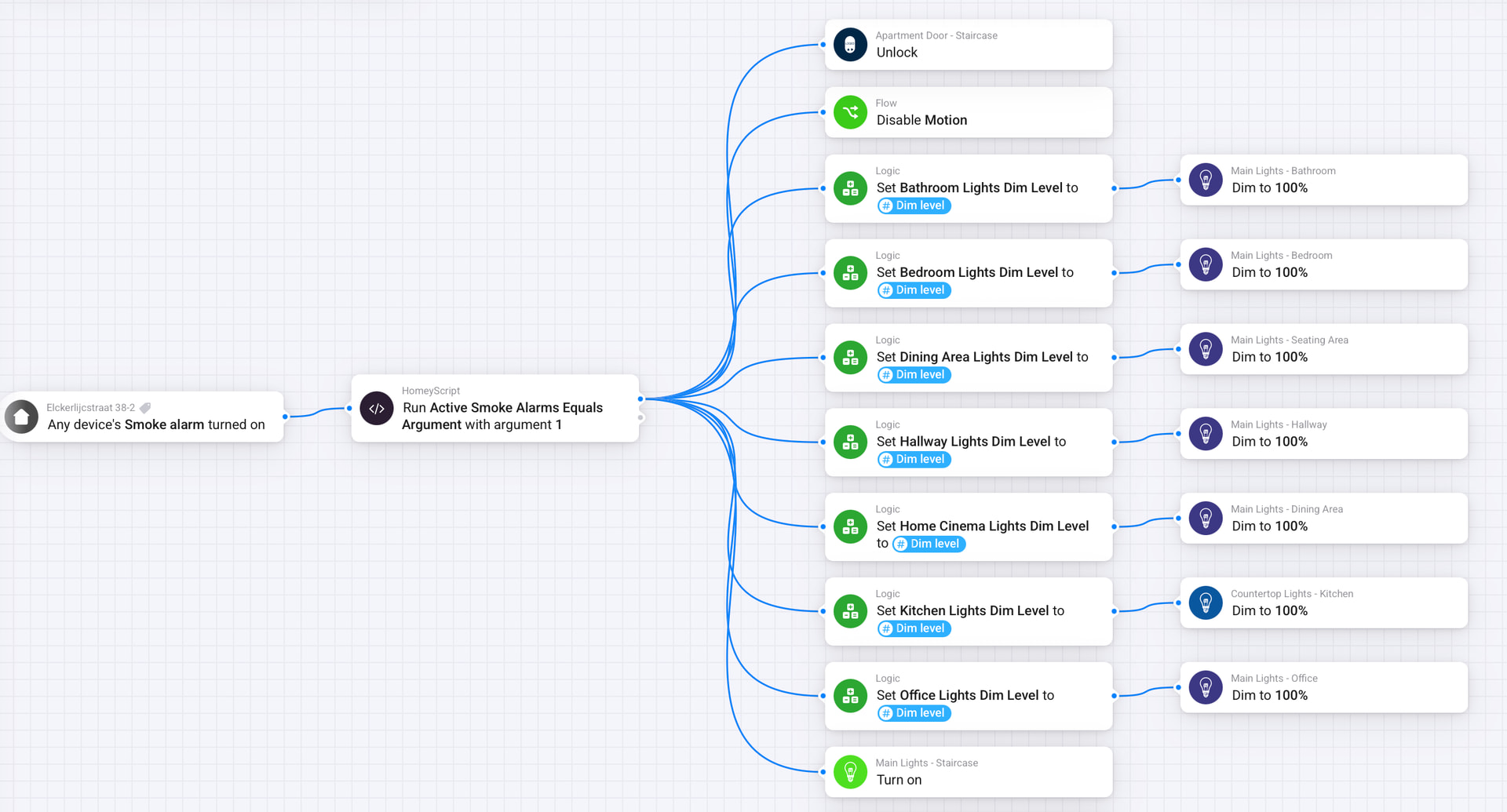
Now on top of this, you could automate things that are less critical, but could be considered convenient. Like: When smoke has been detected, turn on all lights, unlock all doors, turn off the HVAC, and send a push notification to all residents.
So to answer your questions:
All sirens to go off after X amount of time after the first one (Would this still work if Homey went offline?) No, this is considered main functionality of the fire detection system and is vital that it works even when Homey is down! Consult the manual of Heatit smoke detector how to properly configure serial connections between each smoke detector.
Push “Reset Fire” in the app to turn reset it. (I already have a virtual unit added in homey called “Reset Fire” but I cannot see it is connected to anything. Yes, you can create a flow like that for your convenience. When you install the Heatit Controls app, you can add each of your smoke detector to homey. When you have serial connection setup properly, I think that turning off one fire alarm will turn off all fire alarms, so you can just open the Homey app and go to one of the smoke alarms and turn it off from there. You could also create a flow for that so you can turn it of from an iOS or Android widget.
Phone notification when something is happening (I think I already got this working) Yes, you can do this really easily with a flow. Just tie the “when any [smoke alarm] turn on” to the “then send a notification to [user]” card.
Probably something more? You can do many other things as well, I for instance have a flow to turn on all lights, and unlock the doors as well when smoke has been detected. see screen shot:
@Aakra
So the first part of your flow could be simplified by using the “When any device’s [smoke alarm] turned on” card.
But I have a question about the 40s delay? Why would you want to wait 40s to do this? If this is only in case of a false alarm and you want to allow yourself 40s to turn off the alarm manually before all the alarms will turn on, then this is not gonna be enough, because with this simple delay, the alarms will still go off after you pressed the reset button. What you want in that case is a so called debounce pattern. You need a timer that can also be cancelled, and you’d want to cancel the timer when “any devices [smoke alarm] has turned off”. You might want to look into the “Countdown” app, or the more elaborate “Chronograph” app for this.
Yeah, my intention was to give me time to cancel it if it were a false alarm. Not sure if it is much needed though.
I do have both Chronograph and Countdown installed, but I am not sure how to create the debounce pattern with it. I was suspecting I had to do this to cancel the timer.
Maybe I figured out the Chronograph.
I have created 3 different flows with a timer starting, and if finished, sirens go on and light etc. If I activate “Resett Brann” then it stops the timer, or turns off sirens.
Should it be looking something like this? I am a bit uncertain if the “All Røykalarm are turned on” is correct but there was no option for “A Røykalarm turned on”, in flow 2.