I just migrated from Homey Pro 2019 to Homey Pro 2023.
I have a few flows for Z-Wave plugs that writes to a database if the device has been turned on/off or the power has changed.
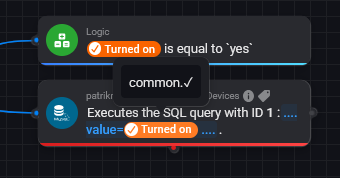
Power is not a problem but the “Turned on” variable for each device has stopped working and when I hover the error message instead of “true” or “false” it only says “common.x”. This worked before.
Is the pro 2019 turned off? Sounds obvious maybe, but it’s crucial.
Restart the Homey Pro 2023 if you didn’t already, preferrably by cutting the power for 10 minutes.
Now wait for a while for the mesh network to recover, give it half an hour or longer.
If necessary, perform a “Heal” @ developer tools.
If an individual device continues to malfunction: briefly disconnect it’s power, or perform the interview/repair again from the device menu.
For battery powered devices, you’ll have to wake those up before interview/repair by pressing the pair button briefly, and keep pressing he pair button briefly every other 2s (ish) during the process.
Yes I turned if off before migration. I had the famous invalid node first, so I factory reset and then used a backup. Second time around the Z-Wave devices were looking good and I was able to turn them on/off. Currently only 2 devices are unknown in Dev tools. It is systematic across the board. ALL Z-Wave plugs do not have the “Turned on” parameter anymore regardless of App/Brand. Power is reported correctly. I have done a few PTP (15 min+) but the problem persists. I have power recycled some of the plugs and it does not help. I think heal would only help if it was chaos in Z-Wave network, but it looks good (apart from 2 devices) and all other devices have the Power parameter.
Thanks!
Edit: Just for test I could access other “Logic”-variables in other flows, like Playing for a Sonos device, so Logic (app) seem to work fine.
Also, the same problem with Turned On is present for Zigbee (Aqara and Nous) as well.
Edit 2: Looks like the Turned on is working in brand new flows for that device. I’m not eager to rewrite hundreds of flows though…
Have Athom cancelled all real support? “As much as we’d love to help, we focus on general support and can’t assist with custom use-cases. For tailored advice, visit the Homey Community forum, where experienced users might be able to help.”
@Peter_Kawa Maybe a stupid question, but my old Homey is shut down and offline. Would it help if I removed it in the Homey app as well (the dropdown menu for choosing which Homey to work with)?
Thanks!
Edit: I also tried with brand new flow and brand new variable, still the same problem - so I cannot even recreate the flows but I’m stuck.
No, that shouldn’t influence anything.
Powering off the ‘old’ Homey is just to make sure not two controllers are trying to control the same set of paired zigbee / z-wave devices.
Maybe migrating to Better Logic variables is the workaround.
Can you check if those DON’T use emoji’s in your flowcards?
If adding another app isn’t on your bucket list :
a good alternative can be using numeric variables, and just use a 0 or a 1 as boolean values.
@Peter_Kawa, Yup I think you are right, right now it was either going full Better Logic or create fake bools in Logic (0/1) that can be used properly. I opted for Logic (not being so dependent on other apps), so I’m creating a like 100 deviceX_isTurnedOn right now. It will work but its tedious. Right now I’m most interested in if this is happening to everyone (firmware) or if it’s a bug from migration…
Do you have the same problem?
If you create an advanced flow, and put a
Then-card, Simple (Sys) Log: Add <message> to the Timeline and the Log.
Where <message> is a boolean variable you have since earlier.
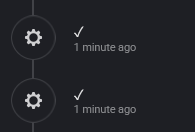
Will it send true/false to the system log/timeline when run or send crazy signs (✓/⨯) instead?
Between HP2019 and HP2023, Athom has changed the value that represents true and false in Boolean variables from the stringstrue/false to the symbols✓/⨯, breaking scripts and flows that depend on these values.
I asked about this inconsistency on Slack in December 2023 and was told it was already mentioned to Athom in August 2023, but since then it hasn’t been fixed and we can probably conclude that Athom simply doesn’t care about this.
Yes, indeed Robert. However, solving this problem now requires a practical approach, which I believe is best achieved through a script that directly addresses the issue …?
edit#1: And, yes, it is Athom Homey Pro (Early 2023).


 and
and  outside of boolean variables.

 :
:


 It’s good to verify.