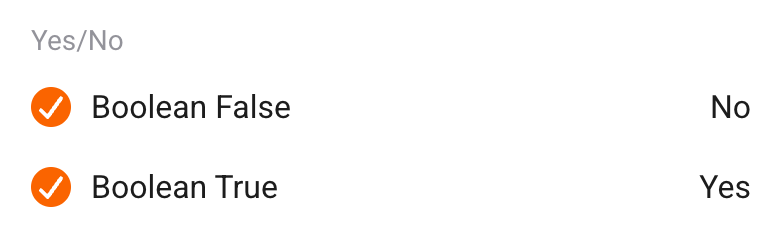
I found that booleans are treated differently then before. I can’t tell exactly since when but I recently updated from Homey Pro 2019 to Homey Pro 2023 and with that from Version 8 to 10.
When I send a boolean to my Node Red dashboard or to a java script, I can no longer test for true or false but have to check if the passed character is ‘✓’ or ‘x’.
Thus I’m wondering if someone else discovered the same behavior and especially how I can change to the previous behavior.
I can reproduce it, and it’s pretty annoying. I posted a question about it on Slack: Slack
EDIT: @Caseda told me this was already reported to Athom back in August, but apparently hasn’t gotten any priority. For now, you can try using something like this in a flow card:
Hi @robertklep I migrated to Homey Pro 2023 yesterday and ALL my Logic variables are corrupt now. If I use Logic to evaluate them to true/false/yes/no it works, but all flows where I could use them previously are not working anymore. I tried the above solution but I cannot get it to work. Example (MySQL):
There are even more possibilities. You could use a function that addresses them all:
/**
 * Checks if the provided value is a boolean representation.
 * @param {string} sValue - The value to check.
 * @returns {boolean} - Returns true if the value is a boolean representation, otherwise false.
 */
function isBool(sValue) {
  if (typeof sValue !== 'string') {
    // Not a string or boolean - convert to string or handle error
    sValue = String(sValue);
  }
  const sNormalized = sValue.trim().toLowerCase();

  const aTruthyValues = ['true', 'yes', 'on', '1', '✓', '✔'];
  const aFalsyValues = ['false', 'no', 'off', '0', '✗', '✘'];

  if (aTruthyValues.includes(sNormalized)) return true;
  if (aFalsyValues.includes(sNormalized)) return false;

  // Unknown value: notify and treat as false for safety
  // log / send something
  return false;
}
@Ruurd_van_der_Noord, @robertklep I have rewritten Ruurd’s fine script now to create a tag with a 0/1 value (if I created a new real bool tag it was AGAIN set to /✘). I can now use that tag in my MySQL update statements. This is cumbersome but it works! My fear now is, if there are a lot of calls to this script will there be unique tags or will the state be overwritten. Like if I have 2 devices change power consumption the same second, there will be 2 calls to this function, will the tags be separate?
Thanks!
Edit: Maybe I actually need to create like 150 numeric variables for 0/1 for each device in order to be safe…
Thanks for your comment, no … there is no way to call a script/function in within a Homescript as far as I know. Copy&Paste in a Homeyscript CODE card is the only way until now.
Or … of course you can do all you want in a Homeyscript only routine for your devices etc.
to find Homeyscript cards within your Flows I made a script that finds these cards (it distinguishes between CODE & SCRIPT cards)
// -!-!-!-!-!-!-!-!-!-!-!-!-!-!-!-!-!-!-!-!-!-!-!-!-!-!-!-!-!-!-!-!-!-!-!-!-!-!-!-!-!-!-!-!-!-!-!
/* create a lists of all FLOW NAMES^, or FLOWS with FILTERED CARDS
 * Ruurd van der Noord - 2025-09-22
 *
 * ^I use a C# app to check the Flows I saved with the "ALT EXPORT
 * function" in the Homey web app to check if all available
 * Flows have been saved.
 */
//-!-!-!-!-!-!-!-!-!-!-!-!-!-!-!-!-!-!-!-!-!-!-!-!-!-!-!-!-!-!-!-!-!-!-!-!-!-!-!-!-!-!-!-!-!-!-!


//-!-!-!-!-!-!-!-!-!-!-!-!-!-!-!-!-!-!-!-!-!-!-!-!-!-!-!-!-!-!
//-!-!-!-!-!-!-!-!-!-!-! DEFINES !-!-!-!-!-!-!-!-!-!-!-!-!-!-!
//-!-!-!-!-!-!-!-!-!-!-!-!-!-!-!-!-!-!-!-!-!-!-!-!-!-!-!-!-!-!
const iCODE_LEN = 15; // length of the Code showed if Card has CODE
const aStandardFlows = Object.values(await Homey.flow.getFlows()); // Get all standard flows
const aAdvancedFlows = Object.values(await Homey.flow.getAdvancedFlows()); // Get all advanced flows
const aAllFlows = await getAllFlowsRaw(); // Object.values(oAllFlows);
const STATE = {
  CODE: "CODE", // show CODE samples
  SCRIPT: "SCRIPT", // show script MAMES
  OFF: "OFF" // no filter show all Flownames
};

let bScriptCard = false;
let bFilter = false;

let oState = {
  state: STATE.OFF,  // current state
  evaluate() {
    if (this.state === STATE.SCRIPT) {
      bScriptCard = true;
      bFilter = true;
      sFilter = "homey:app:com.athom.homeyscript:run";  // Card with cardname like "name": "getWP-GM"
      // return true;
      return STATE.SCRIPT;
    } else if (this.state === STATE.CODE) {
      bScriptCard = false;
      bFilter = true;
      sFilter = "homey:app:com.athom.homeyscript:runCode";  // Homeyscript CODE CARD
      // return false;
      return STATE.CODE;
    } else if (this.state === STATE.OFF) {
      bFilter = false;
      sFilter = '';
      return STATE.OFF;
    }
    else {
      log("Unknown state");
    }
  }
};

//-!-!-!-!-!-!-!-!-!-!-!-!-!-!-!-!-!-!-!-!-!-!-!-!-!-!-!-!-!-!
//-!-!-!-!-!-!-!-!-!-!-! SETTINGS -!-!-!-!-!-!-!-!-!-!-!-!-!-!
//-!-!-!-!-!-!-!-!-!-!-!-!-!-!-!-!-!-!-!-!-!-!-!-!-!-!-!-!-!-!

oState.state = STATE.SCRIPT; // SCRIPT | CODE | OFF
oState.evaluate(); // apply settings

//-!-!-!-!-!-!-!-!-!-!-!-!-!-!-!-!-!-!-!-!-!-!-!-!-!-!-!-!-!-!
//-!-!-!-!-!-!-!-!-!-!-!-!-!-!-!-!-!-!-!-!-!-!-!-!-!-!-!-!-!-!


//-!-!-!-!-!-!-!-!-!-!-!-!-!-!-!-!-!-!-!-!-!-!-!-!-!-!-!-!-!-!
//-!-!-!-!-!-!-!-!-!-!-! RESULTS !-!-!-!-!-!-!-!-!-!-!-!-!-!-!
//-!-!-!-!-!-!-!-!-!-!-!-!-!-!-!-!-!-!-!-!-!-!-!-!-!-!-!-!-!-!

log(`## State: ${oState.state}\n## Filter: ${bFilter ? `-> "${sFilter}"` : STATE.OFF}\n## allFlows: ${aAllFlows.length}\n\n`);

for (let oFlow of aAllFlows) {
  // log(oFlow.name);
  if (!bFilter)
    log(`${oFlow.name}`);  // show the names of the scripts in the cards    …// \nJSON.stringify(oFlow.cards, null, 2)`);
  if (bFilter && oFlow.cards) {
    oResult = filter(oFlow.cards, oFlow); // run Filter & show results
    if (oResult !== null) {
      const sJsonString = JSON.stringify(oResult, null, 2);
      const sStrippedString = sJsonString.replace(/"/g, ''); // removes all double quote characters
      log(sStrippedString);
    }
  }
}

//-!-!-!-!-!-!-!-!-!-!-!-!-!-!-!-!-!-!-!-!-!-!-!-!-!-!-!-!-!-!
//-!-!-!-!-!-!-!-!-!-!-!-!- FUNCTIONS -!-!-!-!-!-!-!-!-!-!-!-!
//-!-!-!-!-!-!-!-!-!-!-!-!-!-!-!-!-!-!-!-!-!-!-!-!-!-!-!-!-!-!
/**
 * Retrieves all flows including advanced flows, merged into a single array
 */
async function getAllFlowsRaw() {
  // Combine and return arrays of flows and advanced flows, removing duplicates
  return _.union(aStandardFlows, aAdvancedFlows);
}

/**
 * Filter all Flows
 */
function filter(oCards, oFlow = {}) {
  // Filter entries based on bScriptCard and sFilter
  const filteredEntries = Object.entries(oCards)
    .filter(([sKey, oCard]) =>
      oCard.id && oCard.id.includes(sFilter) &&
      (bScriptCard ? oCard.args?.script?.name : true)
    );

  // Build filtered object
  const filteredoCards = filteredEntries.reduce((obj, [sKey, oCard]) => {
    obj[sKey] = oCard;
    return obj;
  }, {});

  // Count filtered cards
  const iCount = filteredEntries.length;

  // Construct string of card names separated by ", "
  let sCardNames = '';
  let sCode = '';
  let oCode = {};

  if (bScriptCard) { // Card has SCRIPT NAME
    sCardNames = filteredEntries
      .map(([_, oCard]) => oCard.args.script.name)
      .join(', ');

    // Right-trim trailing comma and space if any
    sCardNames = sCardNames.replace(/, $/, '');
  }
  else { // Card has CODE
    // get Samples of Code from Cards
    let sCodesamples = '';
    let i = 0;
    for (let oCard2 of Object.values(filteredoCards)) {
      if (oCard2.args.code) {
        i++;
        sCodesamples += ` #${i}${oCard2.args.code.substring(0, iCODE_LEN)}`;
      }
    }
    //
    /**/
    if (sCodesamples !== '') {//(iStartPos !== -1) {
      sCode = sCodesamples;
    } else {
      sCode = '"Code" not found';
    } // get the code
  }

  if (iCount > 0) {
    return oFlow.name + (bScriptCard ? ` (${iCount} -> ${sCardNames})` : ` (${sCode.trim()})`); // ${iCount} ->
  } else {
    return null;
  }
}
Not sure whether it is useful for/works in your case, but the Better Logic Library app lets you create custom functions. These functions are available for calculations in BLL’s flowcards. The result of the function is stored in a tag, which can be used as input for downstream flowcards.
Below an illustrative example of a function for calculating absolute humidity and how it can be used in flowcards.
@SunBeech I forgot about Better Logic, that’s a great way to do it!
Right now, my biggest fear is that my created tag will not be trustworthy as it may be overwritten (?) by other flows calling the same tag-creating homeyscript.
So I have swallowed my pride he he and started creating a “fake” boolean to send to my database and other stuff. It’s a textvariable with either “true” or “false” that can be inserted without problems in for example SQL.
Many thanks for all ideas and code from Everyone, really appreciate it!
Last question from my side… I’m just trying to understand if this is a rare bug from migration or if everyone on this firmware has this issue now. But why would Athom deliberately remove true/false/yes/no and replace it with non-usable signs instead?
Do any of you have the same problem?
If you create an advanced flow, and put a
Then-card, Simple (Sys) Log: Add <message> to the Timeline and the Log.
Where <message> is a boolean variable you have since earlier.
Will it send true/false to the system log/timeline when run or send crazy signs (✓/⨯) instead?
I don’t know I do understand you correct. … although there are different characters/signs to represent a boolean value, the characters that represent true, and those that represent false belong always to the same value. Variables like in Homeyscript are local ( in the script), “tags” can be local for a flow, or global as part of the Homeyscript app. In scripts variables follow Javascript conventions. Homey variables (those you can view, create and change in the Flow page) can be read and changed in Homeyscripts with the methods provided.
Hi, when I do a flow as described above, instead of getting a true/false/yes/no that I can send to a database, to the timeline or have Sonos read it out loud it will give a ✓/⨯ character. For instance that will not work anymore if you have a flow that makes Sonos read out specific booleans.
Last question from my side… I’m just trying to understand if this is a rare bug from migration or if everyone on this firmware has this issue now. But why would Athom deliberately remove true/false/yes/no and replace it with non-usable signs instead?
Do any of you have the same problem?
If you create an advanced flow, and put a
Then-card, Simple (Sys) Log: Add <message> to the Timeline and the Log.
Where <message> is a boolean variable you have since earlier.
Will it send true/false to the system log/timeline when run or send crazy signs (✓/⨯) instead?
This sort of stuff is the reason why I stopped using Homey, just too many issues like this that get reported but never get solved because nobody seems to care.
The talk here is about the representation of Booleans (^), it does not change working with the logic it self.
For me Homey works or I ^work around it …
In a broader view:
Languages like Erlang represent Booleans as atoms with true and false values, whereas others like C traditionally treated booleans as integers before introducing explicit Bool types.
Homey uses an interesting approach mixing textual and symbolic representations for Booleans. Based on the typical usage in Homey’s scripting and flow automations:
Truthy values include strings like “true”, “yes”, “on”, “1” and symbols like ✓,
Falsy values include “false”, “no”, “off”, “0” and symbols like ✗, ✘
This allows Homey to interpret Booleans flexibly from various input formats, likely because Homey integrates diverse devices and user inputs that might represent Boolean states differently. Some users have noted that Boolean values passed from Homey to external tools like Node-RED dashboards are sent as symbols like ✓ or x rather than strict true/false literals.


 /✘). I can now use that tag in my MySQL update statements. This is cumbersome but it works! My fear now is, if there are a lot of calls to this script will there be unique tags or will the state be overwritten. Like if I have 2 devices change power consumption the same second, there will be 2 calls to this function, will the tags be separate?