Hi all, i have a problem with logs of the power.
It measures the wattage good but doesnt log it For insights.
Anyone knows what to do?
I have been changed from homey 2019 to 2023 the 2019 homey did it well, see the year graph.
I’ve had the same issue after upgrading. Try to find another graph. In my case “Vermogen” changed to “Stroomverbruik”.
I’m still having problems with my Shelly Bluetooth devices in combination with Homey. I’ve gone through the troubleshooting guide and saw the following message: “Make sure Bluetooth is enabled, the setting Enable RPC is enabled, and that Enable Bluetooth gateway is disabled.” However, in my Shelly devices with firmware 1.7.0, it’s not possible to disable the Bluetooth gateway. Does anyone have any ideas on how I can disable the Bluetooth gateway or otherwise solve the problem?
I have a 3EM (not PRO) and it shows as three phase instead of one unit which make me have to group them into one. Planing to buy another but looking at 3EM 63W Gen 3, anyone knows if that one also shows as three units or only one unit?
1f733ca4-d06a-41aa-8b4a-37f809c6a9d0
When I came back from vacation every Shelly device is not available thru homey. but with the Shelly App and by cloud. Tried everything suggested in the Installation and troubleshooting guide, tried the flow but in the last 3 days nothing changed. Always: EHOSTUNREACH. Have no f*cking idea what else to do…. Help please.
Are your Shelly devices WiFi devices? If so, maybe a restart of your router and WiFi access point(s) helps.
Regarding the diagnostic report ID:
When you’ve really read post 1 and sent an diagnostic report, you’d email the app maintainer; they don’t read posts on this forum:
.
This most probably means the local IP addresses of the Shelly devices might have changed during your absence. Make sure to reserve IP addresses @ your DHCP server for all wifi devices connected with Homey.
Hey thanks, but I restarted EVERYTHING more than once…
“Feel free to send me a diagnostic report from the app settings. Based on this I can at least confirm it’s indeed network issues. Do this by restarting the app, wait until the devices show as unreachable in Homey and send the diagnostic report from the device settings. Afterwards post the crash report ID in the support topic here together with extra information about your issue, like the firmware version, app version, Homey version and Shelly devices you have connected.”
So I’m pretty sure I shut post my ID here or did I read something wrong?
Thanks for your tip, but no IP Changed, everything is fix and I can reach them by IP (browser) but homey is not able to reach or see them.
I recently replaced a couple of Wifi Shelly’s with Z-Wave Shelly’s. Unfortunately those don’t support short/long push on my pushbutton-style switches. The only cards I see are “turned off” and “turned on”. Is there any chance this can be added? I was planning to replace more devices, but with these limitations I have to reconsider.
Here is an example of any Wifi Shelly:
Hello everyone,
Meanwhile I experience a different issue with the shelly i4 wifi switch resulting in the same reconsiderations. I just tried installing the Shelly i4 and after Some fidling the Homey and Shelly have static ip adresses. But unfortunately not all functions Seem to work properly. I can choose action events but it does not work. See excample, nothing happens what ever input I give on the switch.
However when i change the flow teplacing the action event with ‘input 1 turned on’ it does work. But in this case it is not possible to use long press for dimming lights.
I saw in Some threds that I should not choose the Shelly device but choose ‘action events’. But that option is not available during the flow making.
I hope someone sees what i’m doing wrong otherways ill just need to go back to z-wave or zigbee devices.
Thanks!
Do you use push buttons or flip switches?
I use push button
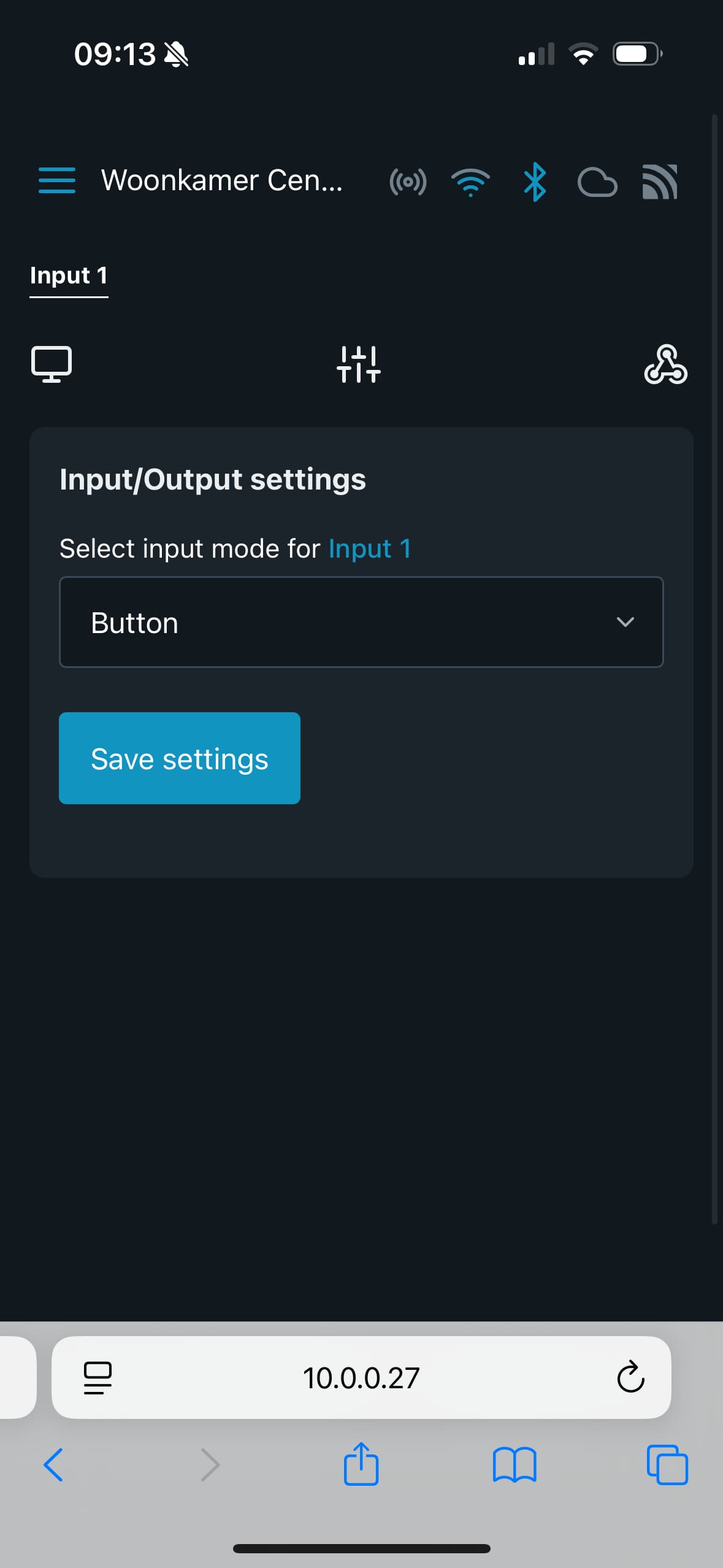
Have you configured the Shelly correctly in the web interface? Could you post a screenshot?
It should look like this:
You can also try sending webhooks:
http://10.0.0.15/webhook?event=WoonkamerInput1Kort
Event condition can be changed to “long push”
Ah Thanks mister Kroon! After changing these settings in the web interface to button the device works perfect! I still have to get used to web interface, Shelly app interface and Homey. I don’t always know what interface I need to adjust. Thanks a lot!
Hello,
I would like to install a Shelly Pro 2 to connect to my heat pump (smart grid).
When I analyze all the information I’ve gathered, I only find Wi-Fi solutions. This Pro 2 also has a LAN connection.
Can I access the Shelly Pro 2 via LAN with my Homey Pro 2023?
Please read post #1 of this topic on how to reach the developers.
(Spoiler alert: they don’t monitor this forum)
It really doesn’t matter when devices use Wifi or LAN, as long as devices use the same subnet, like 192.168.1.x
Dude, it is literally written in the first post under Troubleshooting #5 not buried anyway. Maybe you should read the whole first post before you come to this forum to fuck of people who are looking for help?
So I wrote them the report per mail and then posted here… Jesus Christ.