Which version of the Reolink mobile app are you using, and is it on iOS or Android?
(post deleted by author)

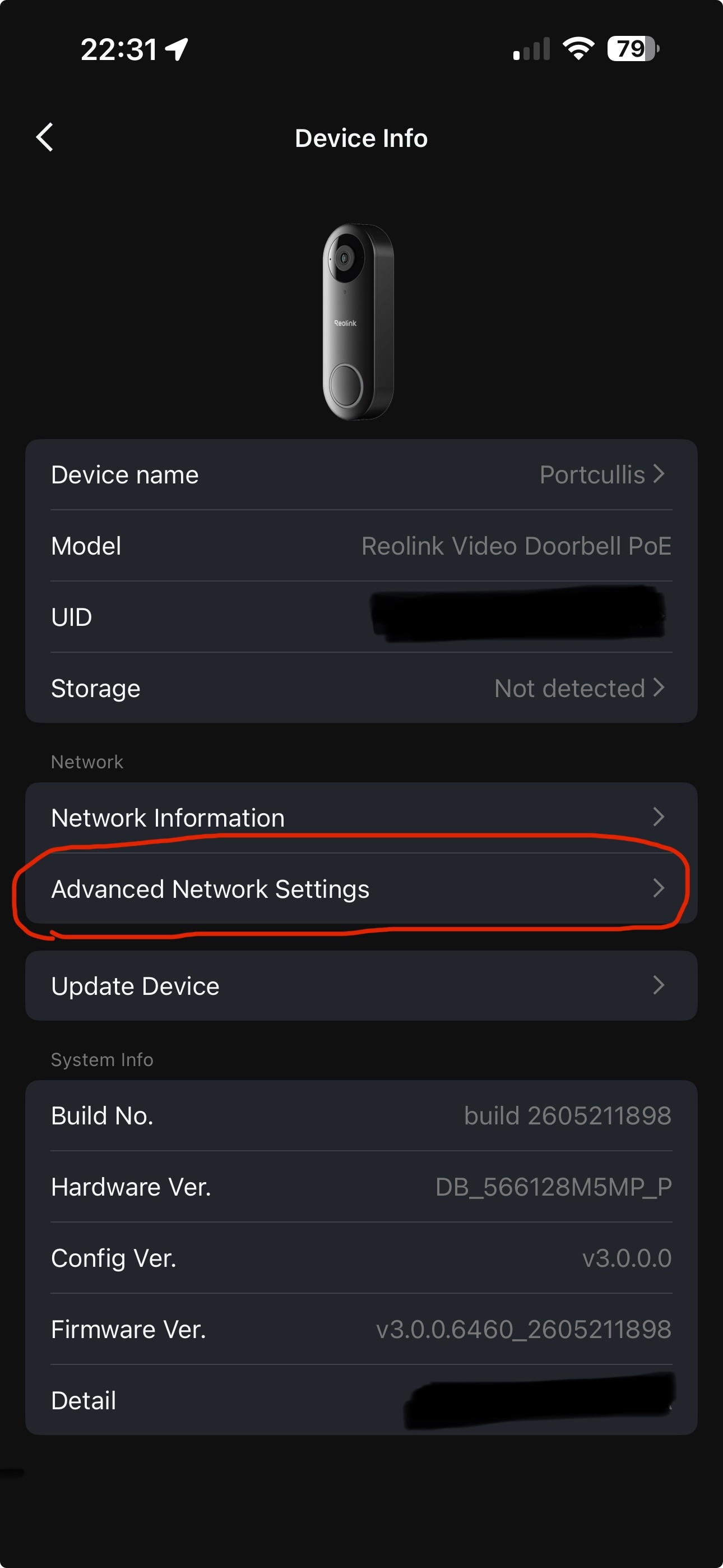
My smart-aleck brain wanted to say “sucks to be an android user”. But as that is entirely unhelpful, and not in the spirit of the forum… Can you please provide screenshots of the Network Information page, and the page prior to the one in your above post screenshot, as I don’t have an Android device to test on unfortunately (it’s more than likely there, just hidden away somewhere).
Can you also check that the user you are logged in to the camera as has admin privileges, if not advanced settings would not be available.


Is the doorbell battery or mains transformer powered?
It’s this one, currently on battery power Reolink Video Doorbell 2nd Gen | 2K Battery Doorbell Camera
Battery powered devices do not have the Advanced Network Settings, as running TCP servers would drain the battery in no time. So it communicates with the NVR (or Reolink Home Hub) via a P2P protocol on port 9000.
So you won’t be able to add the battery doorbell directly to Homey. But you should be able to add your NVR to Homey, and add the doorbell as a child device of your NVR.
I have all my PoE cameras connected directly from my Homey Pro (as well as recording to NVR) but I have an Argus 3 Ultra solar/battery camera that I connect to my NVR and then connect to Homey as a child device of the NVR.
I hope that’s helpful?
It does have a wired power source (or the capability to connect to one, anyway). as per the website:
“*24/7 recording is available only when the doorbell is used as a standalone device. Recordings will be stored on its microSD card.
When the doorbell is connected to a Hub or NVR and remains in Wired Power Mode, these features are accessible, but only motion-triggered recordings will be kept on the Hub or NVR.
For a compatible mechanical chime, a RLA-PK1 power kit (sold separately) is needed to enable Wired Power Mode.”
I’m not looking for 24 hour monitoring (and according to the above, it’d like to build flows based around people ringing the door or being at the door
You can, as far as I am aware, only connect the battery powered doorbell to Homey through an NVR or Home Hub. Once connected to Homey through an NVR/Home Hub you can then build flows based upon doorbell press and person detection events.
You can only connect the PoE (which I have) or the powered WiFi doorbells directly to Homey. But flows can be used for either connection methods.
Seems from the specs abd reviews of the new 2nd gen that it can record directly (both on-motion and continuous) to a microsd card Inside the device itself, and use nvr as backup Reolink Doorbells: 2nd Gen vs PoE vs Wi-Fi Breakdown
Yes, that is correct, you can record to both. But the original question was about connecting to Homey, which for battery devices can only be done through an NVR or Home Hub for Flows based on motion detection and/or doorbell press.
The battery cameras don’t support ONVIF, since this is usually used for NVRs which stream continously, which isn’t possible since that would drain the battery within a few hours. If you have the “2nd gen” camera, it appears to use battery and is not supported by Homey.
According to Reolink:
Thank you for contacting Reolink! This is Edgar from the Reolink Support Team.
We would like to clarify that the Reolink Video Doorbell WiFi supports several network protocols, including HTTPS, IPv4, UPnP, RTSP, RTMP, ONVIF, SMTP, NTP, DHCP, DNS, DDNS, FTP, and P2P.
These supported protocols allow integration with certain third-party platforms and software that are compatible with them. However, direct Homey integration depends on whether Homey supports the available protocols and the specific setup required.
We apologize for any inconvenience caused by the compatibility limitation you encountered.
If you need further assistance, please feel free to reach out to us again—we’ll be here to assist you further.
I appreciate your patience and look forward to your response.
Have a nice day.
Best Regards,
Reolink Support Team - Edgar
@Koktail have you had a chance to look at what might be needed to get the 2nd gen doorbells working?
And according to the mods of /r/reolink , you can set it to ‘wired mode’ where it will do always-on recording to the microsd card in the unit (which i imagine uses more battery, but it can be done) Reddit - Please wait for verification
I’m not sure how connected this is to the ability for Homey to have access to the doorbell via rtsp or https, but I have a follow-up message in to REOlink support.
Battery cameras do not support RTSP. Some of Reolink’s battery cameras can be used with Homey, but only through an NVR or HomeHub (as they are mains powered and can run the TCP services like RTSP and HTTPS). Battery cameras use a proprietary P2P protocol that uses port 9000, and they only communicate with the NVR or Home Hub when they are woken by activity, then go back to “sleep” to conserve battery power.
I have an Argus 3 Ultra batter camera with solar panel. The only way I can use it with Homey is by adopting the camera on my NVR, then connecting my NVR to the Reolink Homey app. This should also be true for your doorbell, as long as @Koktail has included support for the gen 2 doorbell in the app.
Heard. And apologies for any part of my replies that might sound argumentative. I’m trying to understand the roadblocks (and it appears that REOlink are starting a beta for adding Home Assistant support for the 2nd gen so Homey should be next i hope? Reddit - Please wait for verification )
REOlink have a bunch of different models that are similar with different functionality and not much clarity between them so…
Don’t get your hopes up. The Homey app is developed by a third-party agency and Reolink have no involvement in the development.
Hello @Koktail
Battery % charge on Argus 3 Ultra connected to Homey via RLN36 NVR no longer seems to be updating in the device card properties… unless I perform a restart of the Reolink app in Homey. Therefore my flow that is meant to alert me to low charge or fully charged off its solar panel no longer works.
Diagnostic report: 1199340b-1e01-4df7-bf37-80a77315a6fe


Please note the time in the screenshots top left. The battery % charge in Homey shows 30% even though the actual charge is 49%, as shown in the ReoLink mobile app. Then restarting the ReoLink Homey app and it then shows the correct % charge.
As it’s polling the NVR for the camera’s last known value, there shouldn’t be any battery discharge issues with polling more frequently.
I have an RLN-36 NVR connected to my Homey Pro. Recently I have noticed getting this error message whenever I try to open the device card for it, even if I do a repair and successfully re-authenticate it I can re-open the device card and still get the same error message.
This may have relevance to my previous post about my Argus 3 Ultra battery charge state not updating unless I restart the Reolink app on my Homey Pro. As being a solar powered camera, it only connects through the NVR.

