Try selecting the Sub stream.
What model camera is it please?
Try selecting the Sub stream.
What model camera is it please?
It’s Floodlight Duo PoE
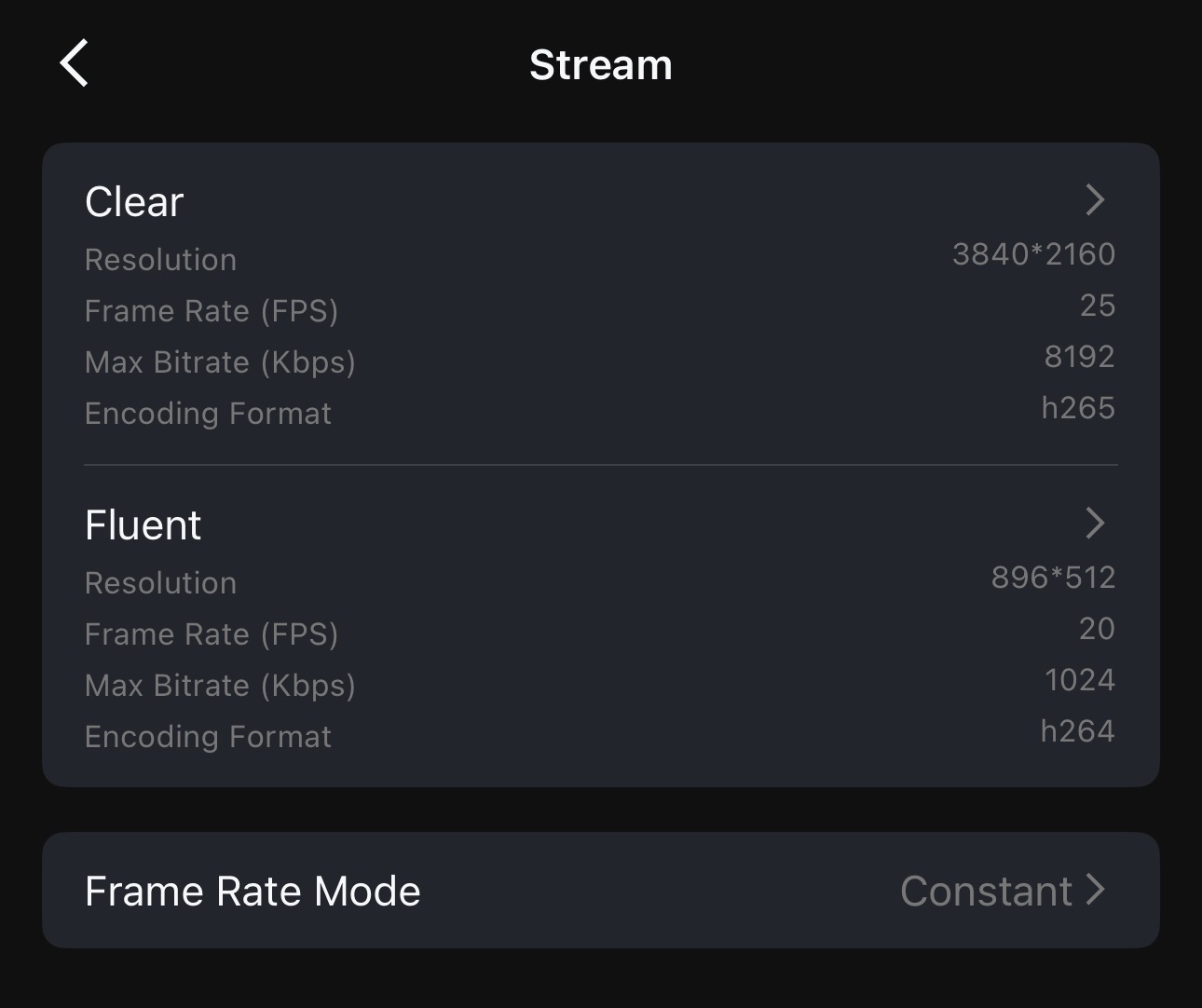
Apparently some of the newer 4K models don’t support H264
There are two options
Clear
*40961536
FPS 20
Max Bit 8192
Encoding h265 (can’t be amended)
Fluent
1536*576
FPS 20
Max Bit 1024
Encoding h264*
Any ideas how to prioritise Fluent?
Ok, the main feed is visible when I’m inside the device itself, but it is not visible as a preview on the dashboard
Sub stream is just black when inside the device or on a dashboard
I have several TrackMix PoE 4K cameras. And they have the codec locked to H265 for Clear and H264 for Fluent.
And I have a couple of them displaying on Dashboards that are pretty much constantly showing on several different devices around my home, all of completely different hardware (a Fire Tablet, a Shelly Wall Display XL, and on my iPhone). The camera views open blank black at first but then start showing the stream in real time no problem.
In the Dashboard go to edit mode (the little pencil icon top right) and then on the camera widget tap the dot dot dot menu top right and select Edit Widget. Bottom option on that page is Display, when you can select the stream.
If that doesn’t work, try removing the camera widget from the Dashboard and then re-add it with the feed you want selected during the set-up of the widget.
Additional: The reason the camera displays blank black at first is because Homey converts the live video feed to WebRTC so that it can be displayed on both the mobile app, and in browsers. Before Homey did this conversion to a WebRTC feed, the cameras would only display live video streams in the mobile app. There is an article on this on Homey’s web site. It is possible that if your Homey instance is struggling for resources, or has a configuration issue, that the conversion to a WebRTC feed is having a problem. You could try rebooting your Homey, and checking the Memory free and CPU usage using the browser version and going to Insights and searching for system.
What hardware are you running Homey on? And are you running the latest firmware?
That is not correct, the web app was able to display still images of cameras (and it still works that way on my Homey Pro 2019). It only wasn’t able to display live streams.
I have corrected my previous statement for the pedantic 
I just released v1.2.2 to production : Reolink | Homey
Bugfixes
Latest firmware
35% ram free. 50% space free.
Nothing I have tried to resolve this has worked
That includes, rebooting Homey. Rebooting the camera. Deleting the camera and re-adding it.
Changing to Sub in an existing widget. Deleting the widget and trying again.
NOTHING works for this device.
My Reolink system stops sending detection events to my Homey Pro 2023 after every 2, 3, or 4 days.
By detection events, I mean person, vehicle, and animal detection. The cameras continue to work normally in the Reolink app, but Homey no longer receives these detection notifications until I restart or reconnect the integration.
Both my Reolink Recorder (NVR) and my Homey Pro 2023 are connected via a wired Ethernet connection, so Wi-Fi should not be a factor.
Is anyone else experiencing the same issue? If so, have you found a solution or workaround?
I can but only dream of having so much free RAM and storage space
When you say latest firmware, do you mean Homey Pro firmware, Camera firmware, NVR firmware, Homey ReoLink app software version?
And what were your system resources like before the upgrade?
Have you modified any flows or dashboards, or added any new devices, or installed any new apps in between your system resources comparison that has you concered?
Like the famous Johnny 5 once said “Input! Need input!”
PS. What hardware are you running Homey on? (Homey Pro 2023, Homey Pro 2026, Homey Pro Mini, Homey SHS, Homey Cloud?)
I actually had to put restrictions on when and the number of times it was sending me push notifications, as it was working a little too well.
And in another flow for my back door contact sensor, I have it set-up to disable the person detection flow if I am at home and open the door so it doesn’t spam my mobile when I go out to feed the birds or sit in the garden.
I do have 2.5Gb Ethernet with a 10Gb redundant fibre optic back-haul for my LAN (which I freely admit is a bit nuts for home use ) The point being I don’t have any bandwidth or networking issues likely to cause problems. My only problem is the Homey Pro 2026 having such low spec resources (but maybe I’m just expecting too much from it…)
Note: It is worth remembering that even though the Ethernet adaptor (even the official one) whether on the Homey Pro 2023 or 2026, is 1Gb… it is restricted by the USB 2.0 speed limit of 480Mb/s on the Homey’s USB port. Multiple 4K camera streams all going to Homey to be converted to WebRTC feeds can start to congest that bandwidth, depending how many cameras you have.
Additional thought: Have you tried connecting any of your cameras directly to Homey, instead of through your NVR? Although I have my RLN36 NVR connected to my Homey for my Argus 3 Ultra solar battery camera to be supported (and hopefully the app providing NVR stats like HDD space, CPU & RAM usage and Temp on the NVR device card in Homey at some point… nudge nudge, wink wink @Koktail). But I have enabled HTTPS, RTSP & ONVIF on all my PoE cameras and connected them directly to Homey, which provides better results. Also, how are your cameras connected, WiFi or Ethernet cable?
Do you have selected connection type “'Static” within network settings of the camera?
I just released v1.3.0 to test : Reolink | Homey
Features:
Homey Pro 2023 on latest stable version (I don’t do the experimental updates)
Reolink Home Hub Pro on latest version. I don’t use an NVR.
Both cameras have the latest firmware installed, including the Doorbell whose firmware updated only yesterday. No issues with Homey for the Doorbell.
Both cameras are the PoE version and are connected via the Home Hub
Reolink app is on 1.2.2
My Pro 2026 has double the RAM of the 2023… and I still have less free  But no problems with the live feeds or person detection or anything like that. So that would suggest resources on the Homey are most likely not the problem.
I don’t have any experience with the Reolink Home Hub, as I have the RLN36 NVR. So I can’t comment on that.
You could try enabling HTTPS, RTSP & ONVIF on your PoE cameras and connect them directly to Homey instead of through your Home Hub. This wouldn’t affect the functioning of your Home Hub as the cameras would still be connected to it for recording. I have my NVR added to Homey for it’s ability to link my Argus 3 Ultra solar camera to Homey (as that can’t be direct connected to Homey) But the rest of my cameras are PoE, so I have them direct connected to Homey while simultaneously recording on my NVR. This has been working flawlessly for me ever since I moved then to direct connect to Homey. Just a thought, worth considering any way.
Hi Koktail
I was on vacation and couldn’t/didn’t want to deal with this. But now I’m back. Using the Reolink app (not Homey Reolink), I checked and adjusted the network settings. Both cameras are on the same subnet mask. Of course, each camera has its own IP address. For testing purposes, I connected both cameras to the same network via the Fritz!Box. I also completely deleted and reinstalled the Homey Reolink app – your latest test version. Then I added only the Home Hub Pro as a device and only the one camera at the main entrance. However, Camera 2 is still being triggered. As a test, I also set up a push notification with a screenshot from Camera 1 when a person is detected. So I receive a screenshot from Camera 1, but it’s always triggered by Camera 2. However, I haven’t added Camera 2 to Homey Reolink at all. What else can I do or test?
In the Reolink app’s network settings, I can also change the connection type. It’s currently set to DHSP; should I change it to static? DNS is set to Auto DNS, but I can also change that to static DNS. None of this means anything to me, but if it ultimately solves the problem, I’ll try everything.
I would be very happy if there were an option to wake up a camera. Or does anyone here know of such an option?
Hi Simon Kai,
Are you referring to a battery-powered camera? I’m not sure if that would be good for the battery, but you could create a flow: Camera 1 moves a short distance to the left every 5 minutes. Then the camera receives a signal and executes it. This should wake the camera up every 5 minutes. Alternatively, you could send a screenshot to nowhere; that would also wake the camera up. However, the battery consumption would probably increase significantly.
At what interval does the camera go back to sleep? You’ll need to set up the flow with the appropriate time interval so that the camera doesn’t go back to sleep.