Got it working again. It displayed a lot of weird values in the flowercare app and tried to update it. It couldn’t so I removed it and readded it to the flower care app.then it updated and got the right values. Deleted it from the flowercare app and added it to Homey and it was found! So I guess updating did the trick.
Thanks for this app 
I have a couple of question I was hoping you could answer.
I’ve made this quick and dirty flow to test the app

Now, I would like it to report something like:
Temperature: 12C (10-32C)
Luminance: 938lux (600-20.000lux)
Nutrition: 558µS/cm (350-2.000µS/cm)
Moisture: 29% (15-60%)
Is this possible? Would it at least be possible to have the report also include the set ranges in some way? The best might be to expose the sensor value along with the sensor max and min thresholds in order to get the report in one’s own language.
Thanks!
Hey, I’ve got something like this. In the notification message, I add the current values, which are stored in the variables belonging to the sensor, in my case named “Plant groot”, by adding these variables to the message.
So, where you see a blue tag in the message card, the value it holds will be printed in the message.
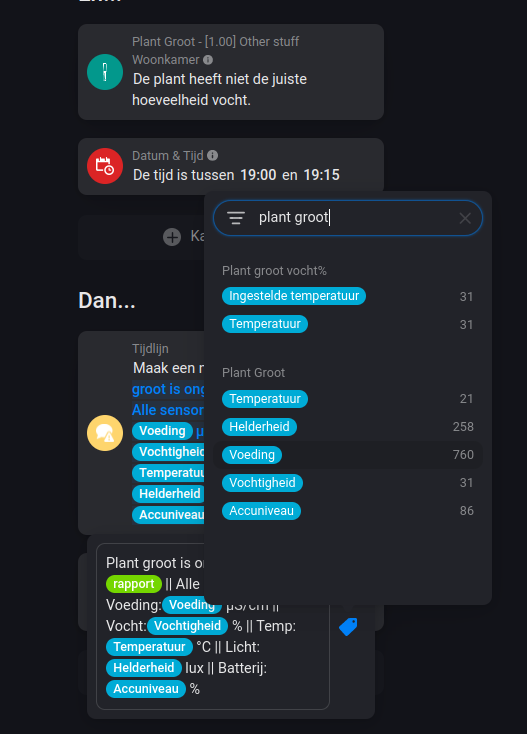
Thanks. I’ve been looking at the variables, so I made something like yours. Added in sun events in order to not get messages about low light and temperatures at night, but it would just be nice if the “report” variable would be more customizable 
Don’t know. It’s not set in variables afaik (at least not in the ones we can access), so that’s a Q the developer only can answer.
You want the sensor update trigger cards (update/below/above) to also have the min max as properties inside that card? Or the report message itself?
Well… both would be more than nice! But for me it would already be very cool to have the min/max values in the report message itself.
The report message above/below threshold have the value already in it. I’ll look if can add that feature in next release.
I’ve addes an issue: Add min and max values in trigger card as parameters · Issue #101 · koktaildotcom/homey-mi-flora · GitHub
I’ve 6 Flora sensors and tried the ‘low watering’ flow. Whatever I try, it doesn’t work. So at this moment I made a simple flow which just sends me the watering level of my plants on a daily base as a workaround. This works fine (so no connection problems).
I would love to get the flow working to get a push message when watering is low. I attached my flow, as far as I can see it’s alle the same as the example flow on this tread. What am I doing wrong, it’s kinda difficult with those variables. Can someone help me (and maybe share his flow).
Why isn’t there a trigger ‘When watering level is below threshold’. This makes it much easier to make flows for dummy’s like me without using variables ;-).

in first condition change to [Tag:SENSOR] is exactly “Vochtigheid”
so the 2nd not the TAG / Label but type the name (without spaces around)
or test with at flow without conditions and report the tag “Sensor” in a notification or log.
Sorry, I don’t understand what you mean. Could you explain a little bit more what you’r trying to say?
I tried without the conditions, but then I get push messages every time the waterlevel changes (of course). It would be much more user friendly if there is a trigger without the use of variables. This should be possible since the minimum waterlevel is know. So trigger could be ‘if the waterlevel is below minimum’.
Something like this?
https://homey.app/nl-nl/flow/3SzPeC/
[2021-05-21T12:00:17.909Z] Sensor Vochtigheid - Rapport De vochtigheid (22%) is te laag. Deze mag minimaal 30% zijn.
I’ll try that one.
I did the following:
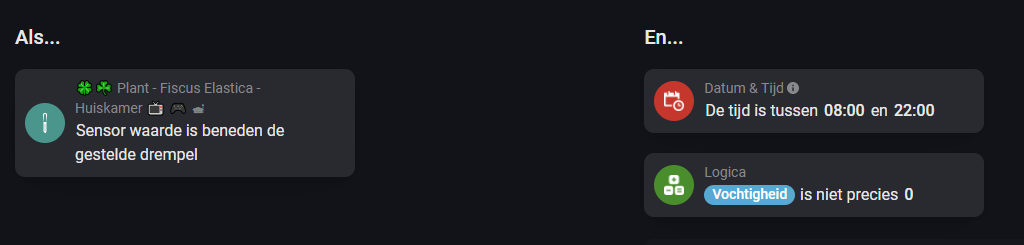
Sometimes I get a “false” reading, saying the moisture is exactly 0. This obviously isn’t true and thus I filter on it, on time too, I’m no happy camper when at 3am I’m getting notified about the moisture of my plant. On the specific settings of the device I altered the other sensor values to be at minimum and maximum, this way the only sensor which can exceed or can fall below the sensor values is the moisture sensor.
Yes. I don’t understand why by default all sensor values are measured as a trigger. 99% only want to know if watering is needed. Makes things unnecessary complicated. Or is it only me.
King guy🙃 That’s a bit the quirk of the design of Homey flows. It is what it is…
Instead of
“when sensor A reports 20% moisture, then do B”
You/we have to do this:
“When sensor A reports a value”
“AND the value of sensor moisture is 20%”
THEN do B"
About your remark of so many unneccesary sensors updates are being sent:
The devices are programmed to report any change of the monitored sensors.
What you want imho, is to program the device yourself and disable all you don’t want/need.
I shouldn’t bother too much about unneccesary sensor updates 
Another way flow to go. Without logics cards.
https://homey.app/f/Si6HhC


You should update your homey. Yours is not up-to-date: https://firmware.athom.com
Ah, thank you for letting me know. So the error is not really “unknown”. It would be great if Homey gave a more helpful error message. Or maybe even let me know before pressing the install button.
