Yes, did see a notification that the app has crashed, and diagnostic report is send to developer.
Hope he can fix the issue.
Just restarted the app and its running again.
Yes, since update to Unifi OS 1.9.0-10 Beta.
Still working fine here.
What am I missing?
When I go to ‘Manage users’ on my CloudKey and create a new user under the ‘Profile’ tab I don’t see the ‘Local Username’ field.
Also I don’t see ‘Controller Permissions’. Instead I see ‘Group’.
And I can’t figure out where to enter a password for the new user.
I’m on version 2.0.8 of the Homey Unifi app and version 2.0.26 of the Cloud Key firmware.
I don’t know what happened but suddenly the Homey Unifi App is connected. I only disabled 2FA and remote access and then enabled both again. 
Unifi Controller 6.0.45 in Ubuntu
I have 8443 as web port, is it possible to get it to work?
I have tried:
- server name, port 443
- server name, port 8443
- server ip, port 443 (got “getaddrinfo ECONNREFUSED” error)
- server ip, port 8443 (got “unexpected server response 404” error)
I have tried with or without unifios ticked, but I think I should have it ticked
I use this flow to send a text to my mobile, if the last person left and a door or window is open.
But the second time this week i’m getting the text messages, without the last person leaving. In Homey I can see the device (iPhone) connected. So Homey sees it right, but still starting this flow?
What can be the reason?
Same issue here, few minutes after restart it will crash again.
Homey probably isn’t wrong but is already connected when you check. But you don’t have any other WiFi devices besides your phones?!
I checked it immediately when i got the message. And the phone was connected to wifi. After I checked I was still getting the message (every 10 seconds).
The phones are the only devices connected to Homey on the unifi app.
Edit: i was missing a second flow to turn the flow off  . Fixed it with the second flow:
I’m trying to get the app working with Ubiquiti Controller on a linux.
I can see that others got it to work, could any of you please share how you did?
I’m using port 8443.
Some devices show up twice?
for example i see my apple watch twice.
Install the “uniquity unifi network” homey app, go to the settings of the app. Fill in the unifi controller’s details (ip/user/pass/port). Click on apply to connect and check if the state on the page states “connected” upon reload. Then add a “wifi client” device in Homey via the “ubiquity unifi network” app. Pick the device of which you want to track the state (connected/disconnected) and done
My problem is that I won’t get connected.
I have entered:
Host:IP
Username: Username
password: Password
Site: My site name
Port: 443
I have clicked the setting unifios device.
I get a lot off errors, for ex. ECONNREFUSED
I have my Unifi control on a ubuntu with web port 8443.
So config the port to be 8443 instead of 443?
Doesn’t work.
If I set port to 8443 and enabled unifios device, I get Unexpected server response: 404.
If I set port to 8443 and disable unifios device, I get connection success, but get StatusCodeError: 401 …
Ill try to change the web port for Unifi Control to 443 and try.
If you installed the unifi controller device on your own OS or from a docker container you should disable the unifios checkbox.
401 sounds like your credentials are wrong, are you using the local credentials of the controller and not the Unifi Cloud credentials? Do these credentials work when you directly visit the page on 8443?
Hoi Jort. Na veel oplossingen gelezen te hebben. Klinkt die.van jou als de meest eenvoudige. Zou je mij jou flow kunnen laten zien. Ben nog niet zo’n ervaren gebruiker. Snap niet zo goed waarom er een zandloper in je flow staat.
Goedenavond,
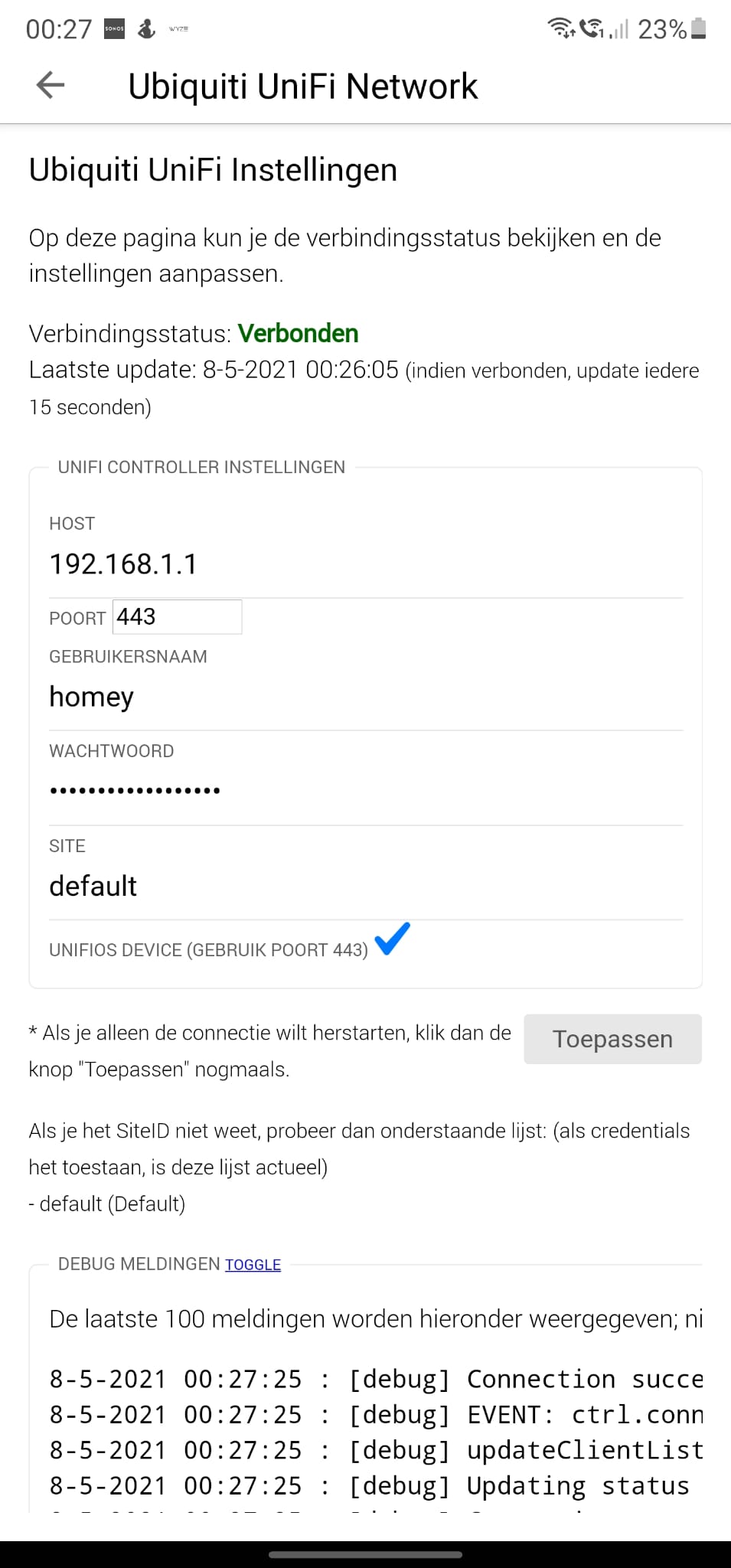
Ik heb een vraag, ik heb de Ubiquiti UniFi Network geinstalleerd.
Zelf heb ik een Unifi Dream machine, alles lijkt goed geconfigureerd te zijn tot dat de app na 5 minuten ermee op houdt.
Zie hier onder een aantal foto’s van mijn config, ik vind wel dat de debug erg druk is.
UniFiDreamMachine OS: 1.9.3 (Controller Version 6.1.71)
Mocht er iemand tips hebben hoor ik het graag!