Hello @Adrian_Rockall just to be sure before try, is the test version the 2.0.53?
Thank you,
Hello @Adrian_Rockall just to be sure before try, is the test version the 2.0.53?
Thank you,
Both release and test are version 2.0.53
Hi LX001
I see that you use a Reolink NVR. Do you have PTZ (Trackmix) or something connected to the Reolink NVR and added in Homey? I have a problem that I can’t see the PTZ Presets in Homey.
Hello @Austriacus ,
I’m walking in the same shoes more or less 
Do not go with any battery powered Reolink camera, as they are not ONVIF-compatible by default. You can add them by using some Reolink hub only. Reolink has a very detailed support page, for your convenience you can check here quickly:
Now I’m testing Tapo C230. This camera support RTSP/ONVIF according to the specification. It’s added easily to my Homey Pro just as instructed by @Adrian_Rockall. Great thanks! Unfortunately there’s two issue now: 1. I can’t see any picture from the camera 2. when I try to select a camera during adding a camera widget process than it says “No Cameras Found” when I want to select.
Any advise where and what I do wrong?
Cameras which don’t show any pictures - not very satisfying.
Camera support is still very poor in Homey.
It seems Athom is not enthusiastic anymore to develop Homey further. Just look back at the finally presented dashboard. User requested it for years - and now? A user created version of the Homey app startpage. Only a few apps to use. Seems developers don’t like it either.
Probably it’s time to look for an alternative.
Today I get 2 Reolink cameras and hub. If that doesn’t work, I give up.
Hi Adrian, the testversion worked great for a week or so. And then suddenly i don’t receive any detection . I send you the logfile. After this problem I downloaded the stable version, but that makes any difference.
Hi Wesley, i don’t have PTZ camera’s.
if Athom keep this direction and pace it would be very sad… but i’m optimistic when i see their support and communication about integrating new products/brands
overall i agree, software side is more driven by the community rather than Athom
Hi Adrian, I think I have solved the problem. I changed the the listening port for the push server setting to 8000, was 9998. Now it work fine. Could this be the problem?
I guess that could have been the problem, but not sure why if it was working.
Unfortunately Tapo doesn’t support the snapshot feature, so no pictures from them.
If there is no picture then the dashboard widget has nothing to add.
Hi all!
Today I got a Reolink package including a Home Hub and 2 Argus cameras.
I really hoped this will be my final try to add a camera to Homey; but I failed.
Probably I just need some help from a more experienced user.
What I have done:
I downloaded the Reolink app from the playstore, connected the hub with a cat7 cable to the router and added the hub to the app. After this I added a camera to the app where I noticed Reolink has it’s own WiFi to connect devices to the hub. (Is this correct?)
Finally I tried to add the camera to Homey via the ONVIF app. No camera was detected, but offered a button to manually add a device. I filled the form with IP address from the hub, my login details to the hub and several numbers as ONVIF service port (80, 8080, 554) but no device has been added. Just a error message that IP address with port is refused.
Can someone please guide me through the setup process? A step by step tutorial would probably help other users aswell.
Thank you in advance.
Peter
Finally I managed to get a blue light on Reolinks Home Hub and attach my first camera.
Now to Homey. App installed. I added a device selecting the ONVIF app. After some time 2 buttons show up. One referring to the Home Hub IP, the other for manually adding devices.
I hoped the attached hub will provide the connection to the camera, but I cannot find anything . I also cannot add a camera by IP, as connected cameras use an own WLAN and have IP addresses from this other network.
Help is still needed.
Thank you
Peter
From what I can see, battery cameras don’t support ONVIF.
Have you added the hub that appears in the list?
If it acts like an NVR then it will possibly provide some access to the cameras.
Thanks Adrian for info.
I talked to Reolink support and they told me ONVIF is available via Hub only. Probably they only referred to wired cameras. I don’t know.
Anyway. I am ready with cameras for now. Either there will be a native support of cameras by Homey within the next couple of month (wired cameras are no option for me, even if wireless cameras don’t provide all features), or I wll start looking for an alternative.
This is nothing against your good work! It depends on Homey and the vendors who are in charge.
Thank you and keep up your good work. Even it doesn’t help me, it helps many others.
Hello @Adrian_Rockall I scearch help here because i installed a Homey pro *2023 and a reolink RLC-823-S1 and I tried to connect it with the Onvif app…
The connection went well and I can have screenshots in the Homey App via Http. The problem is when I tried to activate a flow with Motion detection or person detection, nothing happend even if sensibility on Reolink app is at 100% and I receive push notifications on my phone directly via Reolink app.
Thanks for help.
you can find my setup down here (open it in another tab) (1st there is my reolink settings ans 2nd on the Homey App)
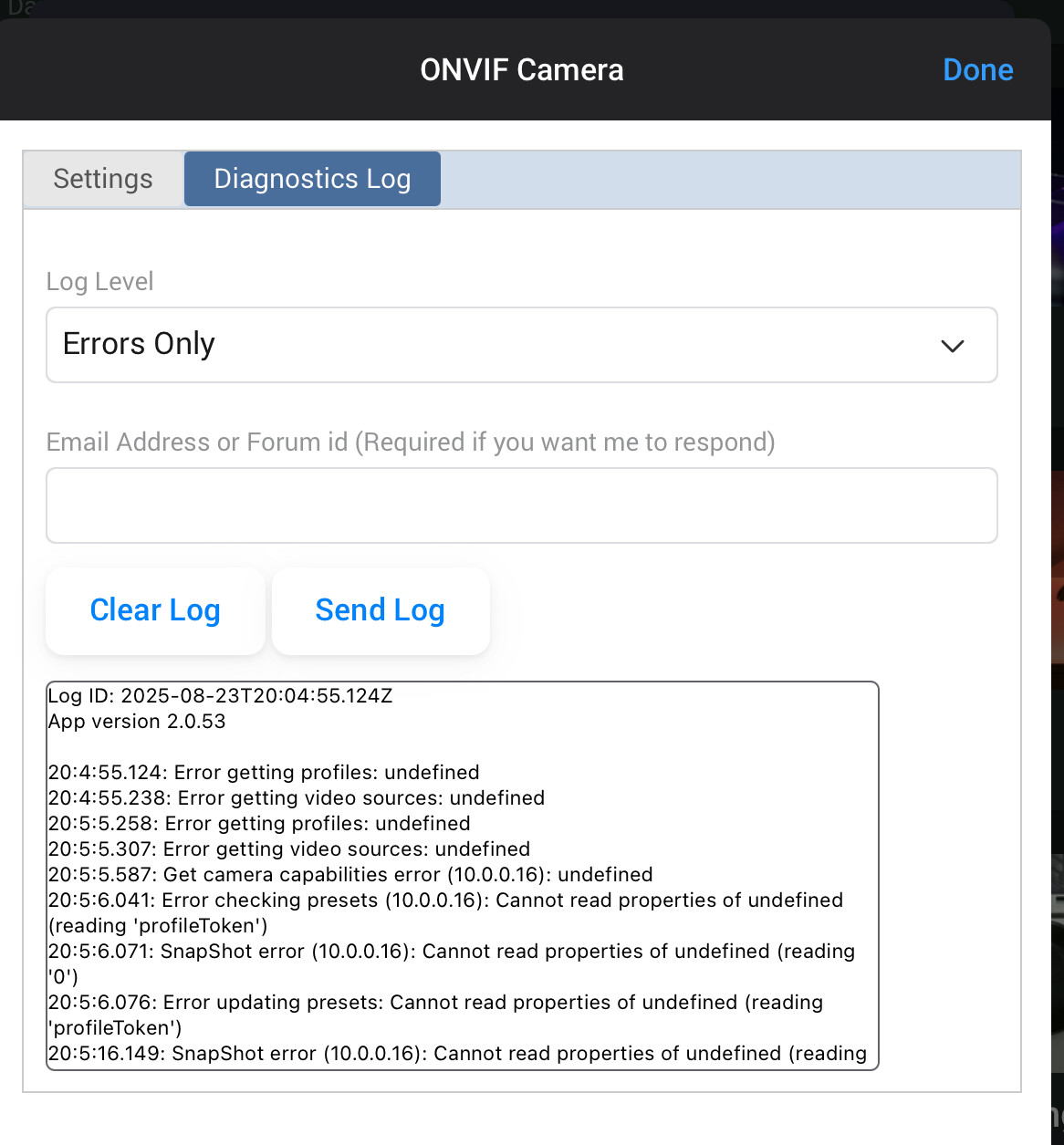
I have a Reolink NVR and had the cameras all installed and working properly. A power failure caused the nvr to get a new ip address (I’ve fixed that now) so I tried to just reinstall the cameras. Now when I try to add the cameras, it only adds a device for the NVR instead of the individual cameras.
I’ve rebooted multiple times, even reinstalled the app. Authentication is ok. Error log is below.
Am I missing something simple?
After multiple app restarts, it finally added all the cameras. I still got the error messages in the last screenshot, but they seem to be working.
Glad you got there. I have been searching the code trying to explain those errors, but I can only think that there were network errors returning bad data.
Did you try restarting Homey at any time to see if that helped?
Hi @Mike_Hen
Do u have Reolink PTZ Camera’s in Homey?