Could you look in the Advanced Settings and make sure the ONVIF Motion Notification to Use is set to MOTION (IsMotion)
Also try switching the Motion Detection off and on again just in case the connection was lost at some point.
Could you look in the Advanced Settings and make sure the ONVIF Motion Notification to Use is set to MOTION (IsMotion)
Also try switching the Motion Detection off and on again just in case the connection was lost at some point.
Hey, thanks for your response.
If i turn the motion notification off and on, the motion detection works only one time. after the detection i dont become any information from Homey that another motion ist detected.
Hmm, that’s strange. My Reolink RLC-410W is working fine.
Do have the prefer pull events turned On? (mine is set to No)
Are you waiting for the alarm to clear before triggering it again?
There is an option, Single = No, that allows the trigger event to fire every time. The default is once and then it waits for the alarm to clear before it triggers again.
Lastly, could you set the logging to Basic Information, trigger motion a few times and then send me the log.
I have set my settings the same as yours and created the same flow, but it still seems to work for me.
However I would recommend changing the flow to:
This way, you know the image is ready and it will be the image taken when the alarm triggers.
Looking at the log you sent, it seems strange that before you turn motion off and on, the termination time being returned by the camera is before the current time:
+0:0:3.079: Renew subscription response (192.168.188.26): 192.168.188.26info: [
  {
    "renewResponse": [
      {
        "terminationTime": [
          "2021-01-19T12:37:14Z"
        ],
        "currentTime": [
          "2021-01-19T14:18:45Z"
        ]
      }
    ]
  }
I really don’t understand that, but it seems to have been fixed after switch it off and on.
I use this app since almost the beginning. Haven’t updated it often so I did recently. Unfortunately after my Dahua camera reboots (it does once a while, don’t know the reason unfortunately), the event triggers are not there anymore. I need to reboot the app on my Homey.
Everything is working fine at that moment, because I see recordings in my Synology. Anyone having similar issues?
So the triggers don’t work after the camera reboots…
Have you tried just turning motion off and on to see if that makes it work again?
The app does poll the cameras to detect if they have gone offline and when they come back it initialises them it again. I guess if the reboot happens quicker than can be detected then it won’t do that.
Hey,
i can tell you that a restart/reset bring the motion detection back again. But, a image is not sending by push.
I have now reinstall the app, the device and reset the camera. i get no Picture per Push if a move is detected. Any Ideas?!
Hi Adrian… I love this app. Your doing great work… Regarding generic Chinese camera’s (or any camera for that matter) which have human detection. With my system I only want to be warned if a human is detected… From what Ive observed after trying a few makes and models (including Dahua) it appears that when these camera’s detect something as being “Human” they don’t send a standard motion event via Onvif, rather (i think) they send some sort of custom event message (or possibly no message at all)… Ive noticed in the more recent version of your app there’s now a new option called “AnalyticService”… Ive tried tested this with a variety of cameras but when a “Human” is detected nothing seems to register on Homey… I have a feeling some of these camera’s may possibly send some sort of custom Onvif event message. Is there any way to scan “all” of the data and messages that a camera outputs. Does the logging feature in your app read “all” of the data that is transmitted, or is there an Onvif tool that i can download… If i was able to discover a custom event message from a camera, is it possible to enter this message into your app and then get it to monitor it and register it as a motion trigger whenever it occurs ? thanks Russ
Do you mean when using the flow action to push the picture or the motion picture in the device card?
yes! this is what i mean. I just get the Message tha a move is detected. Before a fews days or weeks, i have become a snaphot from the camera with the Pushmessage.
If you enable Basic Information logging, then it should report all message that the camera pushes to the app. Actually that is one thing that I have just realised, that option probably only works with push notifications, but as I haven’t even thought about it when using pull points, I might be wrong.
Yep, that would be possible. If I know what to look for then i can add checks for it.
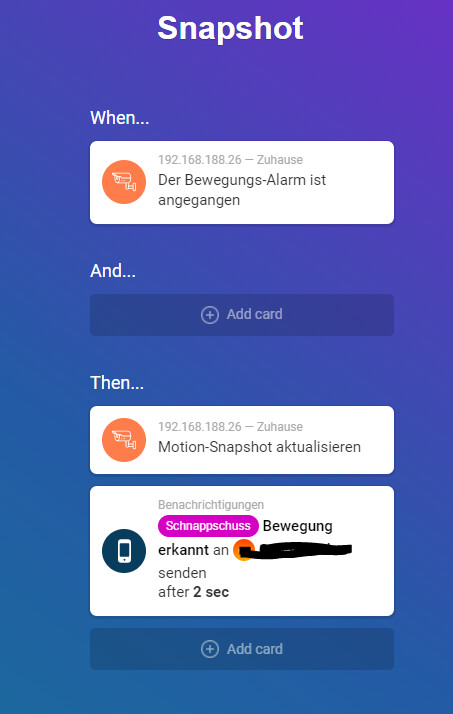
Could you share the flow so I can see how it is getting the image.
Sure:
https://homey.app/f/PUyYVs
I have try all options. This ohne has been worked before a few days.
Instead of triggering on the motion alarm, could you trigger on the motion snapshot ready. That way we know the image is ready, as it can take a few seconds to get the snapshot after the alarm is turned on.
https://homey.app/en-gb/flow/6ts7Ws/
Thanks for the quick response. So do you think there might be some data possibly being missed in the logging… I did try detailed logging the other day but I didn’t notice or observe anything when i walked past the camera… Its a generic Chinese camera but it seems to have reasonable Onvif functionality compared to others that ive tried…
Did you have motion enable in the app for that camera and was it set to use push events?
The camera will only send notifications if the app has registered to receive them. The registration I make has no filter so it should get all notifications. E.g. I get cpu usage, etc events coming in, as well as several forms of motion from some of my cameras. My IMOU camera provides MOTION (IsMotion) and DIGITALINPUT (LogicalState). That is why I added the filter as the MOTION triggers for lots of things if I enable that on the camera, but the DIGITALINPUT only triggers when the IR sensor is tripped.
The ANALYTICSSERVICE could have various responses, such as line crossing, inside area and object detection, but so far I have found a camera the provides those. It’s possible that my HikVision camera does but I fixed up that outside a few months ago and still haven’t gotten around to running the cable in yet.
I am sorry for the late response, I wanted it to happen again so I could give you the right answer.
Tonight it happened again. No triggers where hit anymore, but I was sure there has been motion, since it was recorded on my Synology.
Turning motion on and of worked. Is there another way to have this fixed more definitive?
Hi @Adrian_Rockall , Is there any chance to be able to control the spotlight function on the camera Imou Looc (IPC-C26E)?