Hello. I just added our Huawei solar inverter to Homey, all the data is read out well, but cant see data for the return energy to the grid. We have a smart meter connected to the inverter. Should I set it up somewhere, or do you know what can be the problem? Thank you in advance!
anything happening about that time on the homey device? like homey upgrade, something on the inverter or some backup
I try to do this twice per day
        const total = Number(result['energy_total'].value) * Math.pow(10, Number(result['energy_total'].scale));
        this.setCapabilityValue('meter_power', total / 1000);
        console.log(now);
        if (total != null) {
          if (this.getStoreValue('daily') == null) {
            this.setStoreValue('daily', total / 1000);
          } else if (now == '24:01' || now == '24:02' || now == '00:01' || now == '00:02') {
            console.log('reset');
            console.log(total / 1000);
            this.setStoreValue('daily', total / 1000);
          }
I think it can work, I can increase it to 250 as max device id.
hey,
you can try with the modbus app to retrieve this value so I can compare it with the app.
maybe you need to disable the homey app else we are both fighting for the modbus port.
No, nothing that I am aware of.
Would it make sense to do another check at 00:30?
not really because you will miss 30 min of battery discharge. so what happens at midnight for you?
I actually succeded to connect Wattsonic without battery to my Reco. The modbus was 255 and now I can read some values from my Reco. It is possible to choose 255 when adding a new device but then I cant change anything because om the 50 limit in modbus settings (that you will change). Is there a newer version to be found, Updated 8 month ago Version3.0.169?
And, I really want to be able to read batterys values as well, possible? I guess writing i to mutch to ask for:)
will fix it tonight and let you know
can you try this SolarEdge + Growatt TCP modbus | Homey
OMG  I can now see my battery and change to some working modes. There are a few errors but over all this it great, thanks
About the errors, I guess its because i have a Reco and not a wattsonic. If you want me to find errors i will. Two thing is the “total day yield” is diffing by about 6kw, real is 73.5kwh app says 67.7kwh. And at the picture you can se that PV1 and PV2 together should be solar power but its not. PV1 and PV2 are correct.
Thanks again

nice, solar power is also battery discharge and charging is removed from it. ( bookkeeping need to be correct)
I think it is correct → total day yield , how much did you charge you battery? discharge you get it back at some point , minus all the losses of charge and discharge.
at least I get these values from your inverter. can you send me a report.
Ok, i didn’t understand yield. 7baf1621-efef-4d1d-bfa6-576b7c87a85b
Its a 19.2kwh battery and I charge it only by solar from 41% to 90% today. I just made a variable adding pv1 and pv2.
Is there a way to change soc max and soc min? I’m having a problem with my car draining my battery. I was thinking when car charger is over 500w then change soc min to 95 or something like that? Min soc is register 40012 according to Gemini. Or is there a better way?
only see this register 50000 (hybridinvertermode) do you have some modbus register doc? plus if so you can try with it 1st with the modbus app.
Hi,
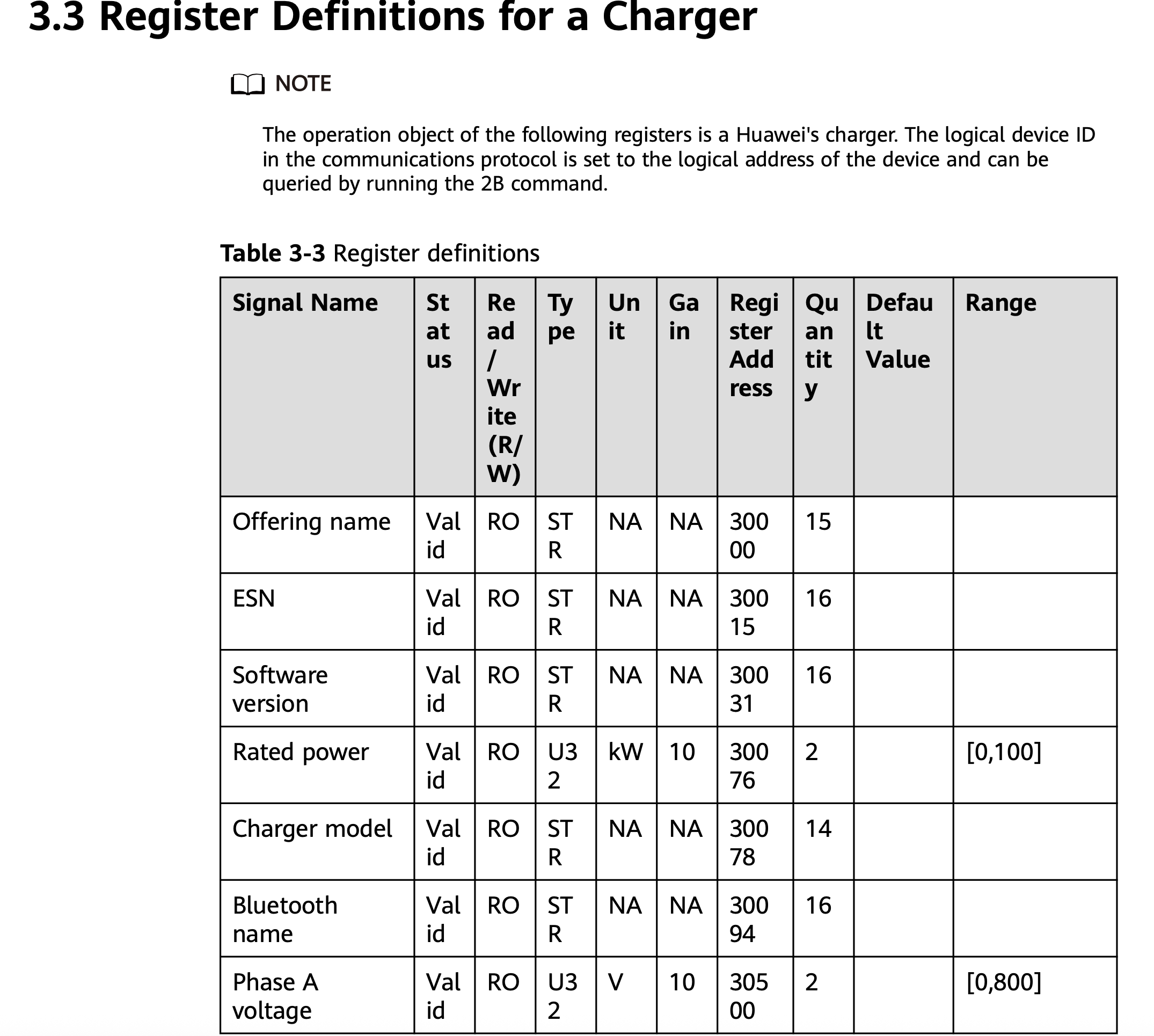
With Huawei Emma + Huawei EV charger installed, is there any way to control EV charger with modbus? And is that something that could be added to the app?
I havent seen modbus tcp documentation for Emma and it seems impossible to find.
Hi @Edwin_Biemond - The app works great together with my Huawei + battery (no Emma device), thanks for all your work!
But, the inverter looks like a battery powered device in Homey and I get a “battery low” on the timeline every night when the battery charge goes down. Is it possible to disable these warnings?
it is a setting you can disable on the homey general part of your app.
Can I? I can only find settings to disable all energy (or app) related notifications, not just from “SolarEdge + Growatt”.
I know I did but cannot find it. it was on the mobile app.
Nothing - at least in terms of flows. I do send my data to a MySQL database at 23:59:00, but as far as I can see it should not interfere with the reset.
Any option to create a flow card to manually reset the daily yield? Or at least a card to trigger when the daily yield is reset?
