[APP][Pro] SolarEdge + Growatt TCP modbus

Sorry guys,

I’m still having trouble getting the battery to stop discharging, even after trying the suggested methods in Homey.

Additionally, when I check the settings online, the values don’t seem to reflect the changes made through Homey.


However, I’ve found two ways to successfully stop the discharging using the online settings:
Setting the “On-grid Battery Discharge Stop SOC” to 99% (or the current charge level):
afbeelding
(setting to 100% seem to be a invalid option)

Setting the “Discharging Power Rate” to 0%:
afbeelding
Sadly there does not seem to be a way to change the “Discharging Power Rate” in the current version of the Homey app.

I’ve done some digging, and found that it might be a firmware change result, they added the “on-grid level” option.

Growatt did the firmware upgrade remotely yesterday. I have found the register and created a pull request #1056 to add the on-grid level I’ve also found the register and submitted a pull request (#1056) to add the on-grid level.

discussion: [Bug]: 'IGrowatt' - 'MOD 6KTL3-XH (BP)' On-grid Battery Discharge Stop SOC does not adjust · Issue #1052 · wills106/homeassistant-solax-modbus · GitHub.

Here’s a snippet of the potentially useful code?:

 GrowattModbusNumberEntityDescription(
        name = "EMS Discharging Stop SOC (on grid)",
        key = "ems_discharging_stop_soc_on_grid",
        register = 3067, #requires newer firmware
        unit = REGISTER_U16,
        native_min_value = 10, #default to avoid complete discharge, documentation says 0.
        native_max_value = 100,
        native_step = 1,
        fmt = "i",
        native_unit_of_measurement = PERCENTAGE,
        allowedtypes = GEN3 | GEN4 | HYBRID,
        write_method = WRITE_SINGLE_MODBUS,
        icon = "mdi:battery-10",
        entity_registry_enabled_default = False,
        entity_category = EntityCategory.CONFIG,
    ),

(Source: Fix #1052 For Growatt MOD TL3-XH by TonyMathiesen · Pull Request #1056 · wills106/homeassistant-solax-modbus · GitHub)

That said, would adjusting the “Discharging Power Rate” be a more elegant solution to stop the battery from discharging? Because also in the same Github discussion:

In the mail correspondence with Growatt the supporter mentioned:

“Keep in mind that these options are proportional to the Depth of Discharge (DoD) of your battery, set at 90%. Please do not change these values by more than 20%, as it could cause your batteries to over-discharge.”

I asked a bit into it, and in general he would not recommend to adjust the stop SOC levels as it also impacts other parameters. One should be cautious to avoid stressing the battery cells, and one should monitor the parameters after every adjustment.

I’m not very familiar with the Modbus commands, but I’ve seen references to a “DisChargePower” option. Could that be worth exploring?

Thanks in advance for any insights!
May be of any use; for sure it is correct what is written and some functions are NOT available when having the prio set th something else.

Prio LOAD:
The “Battery Discharge Power Rate”, “Discharge Stopped SOC” and “Discharge Period” are available for setting And please set the “Discharge Period” otherwise the operation modes will be adjusted to “Load First” automatically.

Prio BATTERY:
The “Battery Charge Power Rate”, “Charge Stopped SOC” “AC Charge Function” and “Charge Period” are available for setting.

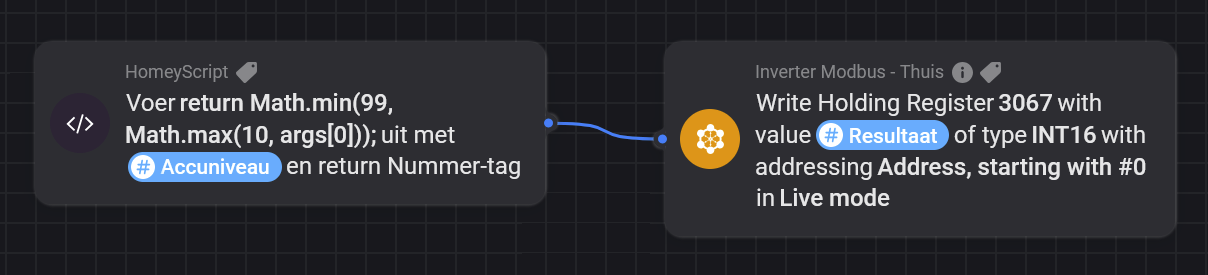
I’ve done more testing, and I’m almost certain that setting the “Battery Minimum Capacity” on my Growatt MOD 5000TL3-XH (BP) with the latest firmware has no effect. However, I managed to stop the discharging by using the Homey Modbus app and writing directly to the registers. There are two methods to stop discharging—both have quirks like @Phil_Bro above also experienced, but I’ll need to do more testing to confirm.

First method:
Set register 3067 to adjust the "On-grid Battery Discharge Stop SOC."


Interestingly, writing directly to this register doesn’t show up in the online settings (Growatt dashboard portal), but reading the register confirms that it’s correctly set. Also, if I change this setting online to a different value, I can read the updated value directly from Modbus.

Drawback:
When it’s set to the current capacity and discharging stops, the BMS/Battery goes into standby. Unfortunately, it doesn’t seem to wake up automatically when I change the setting back to 10%, but this could have been a fluke. I’ll need to test further to confirm.
I’ve also added a small JavaScript snippet to ensure the value stays between 10% and 99%, since setting it to 100% triggers a warning online

“Stop Charging SOC > Off-grid/On-grid Battery Discharging Stop SOC %”

—I’m not sure what it means, but I’ve decided to respect the warning.

Second method:
Set register 3036 to 0 (%), which adjusts the “Discharging Power Rate.”

This seems to be the best way to stop discharging. Like the first method, changing this setting doesn’t reflect in the online status, but reading Modbus confirms the value when it’s updated online.

Drawback:
While this stops the discharging, there’s still a small, almost negligible discharge.

The battery doesn’t go into standby and continues making that slight, audible whining noise. Not a big issue, and still a better outcome than not waking up from standby. But I still need to do more testing.

@Edwin_Biemond , do you think you can integrate these settings into the app?

  • Register 3067: “On-grid Battery Discharge Stop SOC” (0-99 (=%))
  • Register 3036: “Discharging Power Rate” (0-100 (=%)

Also, good news, @Gruijter has incorporated the app into the “Power by the hour” app to create better charge discharge scenes based on dynamic energy contracts :partying_face:

Still have to investigate the possibilities though.

Cheers

2 Likes

Since my setting for the ‘Battery Minimum Capacity’ works perfectly (now using it daily during the 4 hours of low pricing), I’ll be happy to contribute with some logs. @Edwin_Biemond, if you need anything, just ring a bell. VPN dail-in available as you know.

so did everyone got this new firmware? with these on grid and off grid new registers.

No I did not, I do not see anything like it in the Shine web UI.

I don’t believe that firmware updates for Growatt inverters are available to regular users. In my case, I upgraded the firmware by working with a Growatt service team member, who was able to perform the update remotely. The update was necessary due to a firmware bug that was causing an error on my system. Unfortunately, the remote update failed in my case, and Growatt ended up sending me a replacement unit with the latest firmware installed.

Another method to update the firmware is by using a USB-to-RS232 adapter, but I suspect most users don’t go that route. Too complicated. Firmware updates typically require proactive steps, so most inverters probably won’t receive them unless the user takes action. If the system is running smoothly, most people likely won’t bother with an update. Of course, all new inverters come with the latest firmware pre-installed.

The firmware version displayed on my inverter’s OLED screen is DN1.0. According to my email exchange with the support team, the DSP chipset firmware is version DNAA06, and the M3 chip firmware is version ZBDB08 (I have no idea how I can retrieve this information myself). It seems the inverter contains multiple microcontrollers, each of which can be updated with different firmware versions.

I just had the problem again and created a Diag. report, if this can help you in any way.
ed950b0e-e142-4590-aa3f-23096f8b9c17
/Poul-Erik

have a Huawei device and wanted to connect it to the monitoring app. I don’t have an energy bank, and when setting up the connection, I only entered the IP address and left the rest of the settings as default. In theory, the device was added, but unfortunately, it doesn’t display any data regarding its operation since installation.

Does anyone know where I might have made a mistake or what else I should try to access the data


hey,

does it support modbus ? , is it a s-dongle or emma? does port 502 respond?

Hello,

I recently bought a Homey Pro with the intention to use it to balance my power from solar panels, using this app.
I installed and and (I think) I configured it fine, I can see production data.
I have a SolarEdge SE10K inverter with a modbus meter (on the SolarEdge App, I can see production and balance between export and import). I can’t see this balance in the Homey App.
I set it up by clicking on the SolarEdge inverter logo, was it the wrong one?
Where and how can I activate the meter connection?

Thanks,
David

hey, select solaredge with storedge . I will detect your meters and pickup batt if you have or not.

Hi,

Searched the thread but havent found any answers yet. I have sungrow inverter and battery. Succesfully added them to homey but find it hard to build any useful flows with the available cards. I want to set discharge etc depending on price. Anyone knows if this is not possible at the moment?

I actually have a similar question to @pesken above;

Sungrow inverter and battery. I want to charge the battery from the grid during cheap hours at night, prioritize using the battery over the grid on expensive hours during the day, and avoid battery discharge during all other cheap hours of the day (prioritizing the grid).

In the device flow cards, I can find:

  • Hybrid Inverter Working Mode / Self-consumption mode > I assume this prioritizes energy from the PV, then battery, then grid

  • Hybrid Inverter Working Mode / Forced mode & Charge/discharge / Charge, discharge, stop > I assumed this combo is needed to force the battery to ‘charge’ from the grid, or ‘discharge’ to the grid, correct? What does ‘stop’ do, and why does it need a kWh value? Is that the setting that avoids battery discharge and lets my inverter prioritize grid power instead?

  • Set export limit / Enabled, disabled > no idea what this does… any pointers?

Thanks in advance!!!

Hey, you can check these holding registers but this is it.

let me know what you are missing and is in this doc, plus it writeable. Or find some impl

Hi @Edwin_Biemond,
Is there any plan to incorporate the Sigenergy hybrid inverter?

It is available on HA but no support on Homey.

/Markus

I see this indeed Sigenergy-Home-Assistant-Integration/modbus_sigenergy.yaml at main · TypQxQ/Sigenergy-Home-Assistant-Integration · GitHub

what is your setup? and do you have some vpn where I can test against?

Hello - Thanks.
I did work for a day or so, but not it is not refreshing anymore.
Latest value was from 2 days ago.

Is there something that change? Not sure if I have to reset something. Looks like it started when I configured flow to charge the car, but I doubt this would be related.

Thanks

(Ref : using SE10K with Solar Edge / Store Edge app)

can you send me a report, but if it worked before than I expect some dhcp refresh ip issue or some data issue. or you changed your firewall rules.

Sorry, but how can I do that? I am a newbie here :slight_smile:
I don’t think anything changed actually.