[APP][PRO] Smart Presence

Yes I know, but in this case it doesn’t matter. Speed 50 are max, I run that for 90 min if there’s no one at home. If someone gets home before that “Någon anlände” (Someone arrived) it will set the speed to 10 which is minimum, I always run that speed when we are at home. So if someone gets home before the 90 min have run out, all that can happen is that it will send a command to set the speed to the same speed that it’s already running. Only time there can be an issue would be if someone gets home before the 90 min have run out and then leave again, then the speed will change to 10 during the time someone are at home, change to 50 when that person leave and then go back to 10 when the first 90 min runs out.
That’s not a big issue in this case, I know that I could have made a logic card to solve this but I just didn’t care enough.

But thanks for pointing it out since it could have been a issue if I had used it for something else.

I will make a flow with all of the conditions you posted tomorrow, it’s time for bed over here.

@Sharkys

I tried your settings, but it has spammed me the entire night. It doesn’t work out for me at least, sorry.

I should also mention that this is probably nothing new, this bug can at least be a couple of month old.

I can at least say for 100% that e.g. “Person arrived” card is not always triggered.

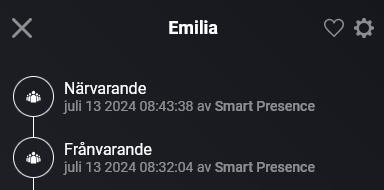
I always log to the timeline when someone arrives/leaves, as I said earlier. Looking at “Emilia” for example:

1

She is “Närvarande”, e.g. present, right now in my system. The last card that was run was that she has left at 09:02:05.

And I have always had these settings without any problems before.

For me, it seems like it’s the “Person arrived” card is the main problem.

8f991c16-7c20-4c5d-93e2-fbf8c9bf198e

If this is the case, then your device(s) are regularly loosing WiFi connectivity and you have completely different problem, not related to this app.

Btw, I do have it setup already 2nd day and get 100% reliability.

This is what I see in the log :

2024-07-13T03:20:39.448Z [log] [SmartPresenceApp] Device Emilia Arrived. Last Seen: 13/07/2024 05:20:39
2024-07-13T03:22:11.453Z Emilia: is marked as offline
2024-07-13T03:22:11.460Z [log] [SmartPresenceApp] Device Emilia Left. Last Seen: 13/07/2024 05:20:39
2024-07-13T03:52:44.206Z Emilia: is online
2024-07-13T03:52:44.211Z [log] [SmartPresenceApp] Device Emilia Arrived. Last Seen: 13/07/2024 05:52:44
2024-07-13T03:54:15.205Z Emilia: is marked as offline
2024-07-13T03:54:15.210Z [log] [SmartPresenceApp] Device Emilia Left. Last Seen: 13/07/2024 05:52:44
2024-07-13T04:00:46.062Z Emilia: is online
2024-07-13T04:00:46.072Z [log] [SmartPresenceApp] Device Emilia Arrived. Last Seen: 13/07/2024 06:00:46
2024-07-13T04:02:18.120Z Emilia: is marked as offline
2024-07-13T04:02:18.127Z [log] [SmartPresenceApp] Device Emilia Left. Last Seen: 13/07/2024 06:00:46
2024-07-13T04:19:04.835Z Emilia: is online
2024-07-13T04:19:04.843Z [log] [SmartPresenceApp] Device Emilia Arrived. Last Seen: 13/07/2024 06:19:04
2024-07-13T04:20:36.832Z Emilia: is marked as offline
2024-07-13T04:20:36.841Z [log] [SmartPresenceApp] Device Emilia Left. Last Seen: 13/07/2024 06:19:04
2024-07-13T04:31:23.643Z Emilia: is online
2024-07-13T04:31:23.648Z [log] [SmartPresenceApp] Device Emilia Arrived. Last Seen: 13/07/2024 06:31:23
2024-07-13T04:32:55.651Z Emilia: is marked as offline
2024-07-13T04:32:55.656Z [log] [SmartPresenceApp] Device Emilia Left. Last Seen: 13/07/2024 06:31:23
2024-07-13T04:47:58.467Z Emilia: is online
2024-07-13T04:47:58.472Z [log] [SmartPresenceApp] Device Emilia Arrived. Last Seen: 13/07/2024 06:47:58
2024-07-13T04:49:30.603Z Emilia: is marked as offline
2024-07-13T04:49:30.608Z [log] [SmartPresenceApp] Device Emilia Left. Last Seen: 13/07/2024 06:47:58
2024-07-13T04:54:17.423Z Emilia: is online
2024-07-13T04:54:17.427Z [log] [SmartPresenceApp] Device Emilia Arrived. Last Seen: 13/07/2024 06:54:17
2024-07-13T04:55:48.272Z Emilia: is marked as offline
2024-07-13T04:55:48.276Z [log] [SmartPresenceApp] Device Emilia Left. Last Seen: 13/07/2024 06:54:17
2024-07-13T05:01:19.026Z Emilia: is online
2024-07-13T05:01:19.030Z [log] [SmartPresenceApp] Device Emilia Arrived. Last Seen: 13/07/2024 07:01:19
2024-07-13T05:02:51.003Z Emilia: is marked as offline
2024-07-13T05:02:51.012Z [log] [SmartPresenceApp] Device Emilia Left. Last Seen: 13/07/2024 07:01:19
2024-07-13T05:07:51.944Z Emilia: is online
2024-07-13T05:07:51.948Z [log] [SmartPresenceApp] Device Emilia Arrived. Last Seen: 13/07/2024 07:07:51
2024-07-13T05:09:23.948Z Emilia: is marked as offline
2024-07-13T05:09:23.955Z [log] [SmartPresenceApp] Device Emilia Left. Last Seen: 13/07/2024 07:07:51
2024-07-13T05:16:25.198Z Emilia: is online
2024-07-13T05:16:25.206Z [log] [SmartPresenceApp] Device Emilia Arrived. Last Seen: 13/07/2024 07:16:25
2024-07-13T05:17:57.173Z Emilia: is marked as offline
2024-07-13T05:17:57.181Z [log] [SmartPresenceApp] Device Emilia Left. Last Seen: 13/07/2024 07:16:25
2024-07-13T05:24:58.618Z Emilia: is online
2024-07-13T05:24:58.623Z [log] [SmartPresenceApp] Device Emilia Arrived. Last Seen: 13/07/2024 07:24:58
2024-07-13T05:26:30.680Z Emilia: is marked as offline
2024-07-13T05:26:30.686Z [log] [SmartPresenceApp] Device Emilia Left. Last Seen: 13/07/2024 07:24:58
2024-07-13T05:39:49.272Z Emilia: is online
2024-07-13T05:39:49.276Z [log] [SmartPresenceApp] Device Emilia Arrived. Last Seen: 13/07/2024 07:39:49
2024-07-13T05:41:20.167Z Emilia: is marked as offline
2024-07-13T05:41:20.173Z [log] [SmartPresenceApp] Device Emilia Left. Last Seen: 13/07/2024 07:39:49
2024-07-13T05:50:20.908Z Emilia: is online
2024-07-13T05:50:20.912Z [log] [SmartPresenceApp] Device Emilia Arrived. Last Seen: 13/07/2024 07:50:20
2024-07-13T05:51:52.922Z Emilia: is marked as offline
2024-07-13T05:51:52.928Z [log] [SmartPresenceApp] Device Emilia Left. Last Seen: 13/07/2024 07:50:20
2024-07-13T06:00:08.679Z Emilia: is online
2024-07-13T06:00:08.683Z [log] [SmartPresenceApp] Device Emilia Arrived. Last Seen: 13/07/2024 08:00:08
2024-07-13T06:01:40.721Z Emilia: is marked as offline
2024-07-13T06:01:40.734Z [log] [SmartPresenceApp] Device Emilia Left. Last Seen: 13/07/2024 08:00:08

This behavior is not caused by SmartPresence app. It could be due to the Wifi sleep or simply your AP/particular phone misbehaving.

Is it possible that you did not follow my recommendation from example (eg. I see no stress period engaged at all):

>>>  'Away Delay': '90 seconds', <<<
>>>  'Normal Mode Check Interval': '15000 ms', <<<
  'Normal Mode Timeout': '2 seconds',
>>>  'Stress Period': '60 seconds', <<<
  'Stress Mode Check Interval': '2500 ms',
  'Stress Host Timeout': '2 seconds'

If needed, contact me via PM eventually for further troubleshooting, so that we can keep this thread clean.
For the PM - restart SmartPresence and send me log + try to ping Emillia’s IP address for duration longer then 10min (in the log I see Emilia jumps off/on within ~90sec). Ensure Emmilias phone is not used during this time. If you got ping timeout, fix please first this issue.

analysis

Thank you.

Thanks for all the help @Sharkys - very appreciated! :+1:

I am not sure I am the right one to continue the troubleshooting though. Wifi, 1 Gbit/s with ASUS RT-AX86U Pro, full speed and coverage, never experienced any package drop before at least.

I think this log says it all, Emilia is the last one to leave, 12 hours ago and at 18:09. In between, she has had connection to Smart Presence (icon enabled), but no log that she has arrived. And if she didn’t have connection - the “last one to leave” card would not have been triggered at 18:09.

evid

I see quite a lot of FW update for this model, latest one end of 05/2024.

What I’m trying to say, if they implemented VLANs, had to fix IPV6 connections, those are quite significant changes, which could then impact even one single device. I’m using Mikrotik devices and had to do a lot on Mikrotik side to identify some specific chipset issues on some IoT devices. Just saying, I would not “rule out” Wifi/connectivity isssues because “everything else seems to be fine”.

The log above I shared, says that that particular device lost connectivity to Homey / Wifi almost every 90sec, despite of settings which I suggested but seems you did not replicate successfully . Also if other devices were available at the same time (as there is no other entry except of Emilia), I believe it rules out any issues with the Smart Presense as such. You can also try to delete Emilia device temporarily to see, if this makes any difference in any of the flow triggers.

Unfortunately can’t help you more, this app is used by several thousands of users, let’s see if someone else will be able to replicate the behavior and provide logs including some troubleshooting behind, like I requested, eg. specific flows with notifications, pings to troubling devices etc.

I haven’t made the flows, stuff came in the way. But since I changed from “Someone in the household” to “Someone” it has worked just fine.

@Nico_Jansen try and change your flows and see if it helps.

2 Likes

Made the flow, time will tell how my timeline will turn out… :exploding_head:

1 Like

@Sharkys Smart Presence claims that someone left, but we haven’t been home for over 2 hours.

e02d04c4-d03d-4cc8-ae6e-c47335e4d246

Sent you mail but something happened at your household 13:25.

How does the app handle if your phone is on an other VLAN than your Homey?

You must have connectivity between Homey and the other VLAN, otherwise it will not work.

I see, is there a guide for that?
No idea how to forward that.

That’s unfortunately your device specific and require networking skills. It’s also out of Homey or this app scope.

Came across your ancient post by now - I am trying to achieve the same trigger (when device roams to a specific AP); could you show the full flow ?
I am just stuck at

- I don’t know how to select a specific AP. Appreciate the help.

I installed this app today but can’t find anywhere to add users, frome android? There are no settings at all. How is this supposed to work? :person_shrugging:

…you must add devices, I believe it’s also described in the instructions?

Ah, now I understand - I have to add myself as a device. Thanks! :+1: - and sorry for being so stupid… :woman_facepalming::smiling_face:

1 Like

I use the app for several years, but lately it doesn’t satifies me as much as before. Very often the app tells me that my wife or myself is leaving and a few seconds later it says we’re back. When i look in the log of my router we didn’t get offline with the WiFi. Very annoying because it also triggers other flows that shut the roller shutters or kill the light in the evening. We both use Samsung phones, My wife a A32 and me S23.
Does anyone has a solution for this problem?

When (eg. date) did you start observing the difference ?

Based on which logs, I wonder ? The only right indication would be the connection uptime, eg. as visible on Mikrotik routers or connect time on ASUS routers and yet this indicate connectivity between your AP and mobile device, eg. you must also check Homey connectivity itself.

Not really a solution for your specific situation, but I always suggest to implement safety checks. Eg. if phone gets offline, is the router reachable from Homey (eg. to avoid Homey connectivity issues) and similar. Also the right configuration is important but I understood from your comment that you haven’t touched your config for some unknown period of time, so it’s just assumption.
don’t feel to stupid… took me forever to understand how to setup a device; couldn’t find any instructions either