I can confirm that it is NOT a problem between module/lock, as I just tried putting “8888” on spot 8 and similar on 9 - neither the indexes nor the codes have ever been used. Still, the log is “New user code not added due to duplicate code”
Test channel: ID Lock Next | Homey — though your screenshot shows you’re already on it (v2.6.0).
Your screenshot actually pinpoints the problem: “Låsens fastvare 0.0.0”. That field is the lock panel’s own firmware as reported through the Z-Wave module — zeros mean the module can’t communicate with the lock itself. In that state the module accepts codes into its own memory (and rejects “duplicates” against old leftovers in that memory — which is why even a brand-new code on a brand-new slot fails), but nothing is ever handed to the actual lock. So both of us were half right: it’s not the radio link to Homey, it’s the connection between the plug-in module and the lock.
The fix: take the batteries out, pull the Z-Wave module out of its slot, seat it back in firmly, and reinsert the batteries — the lock should announce the module. Don’t use the keypad menu’s module reset — that can unpair the lock from Homey. Afterwards, press “Refresh from lock” in the app and check the Update page: “Låsens fastvare” should now show a real version like 1.5.x. If it does, add a test code — and if it shows something below 1.4.9, your lock panel’s firmware is too old for module 1.6 and needs ID Lock’s own updater. The next app update (2.6.1) will detect this 0.0.0 state and warn about it directly on that page.
Thanks for trying that. Since re-seating didn’t change it, I need three data points to pin this down:
Which lock is it physically — ID Lock 150 or 202 Multi? (It matters: the app label says 150/202, but the two panels behave differently, and everything we know about firmware versions comes from the 150.)
On the Users page, tap “Sjekk koder på låsen” and tell me what it says — how many codes it finds, or the error if it fails. This reads the code slots directly through the module, so it tells us whether the module↔lock connection works for codes at all (independent of the version display).
Program a brand-new code at the keypad, confirm it opens the door, then run the scan again — does the app now see that slot as occupied? If yes, the link is alive and 0.0.0 is a version-reporting quirk; if the scan can’t see it, the module really is cut off from the code registry.
Then go to Diagnostics, enable verbose logging, press “Oppdater fra låsen” once, and send me a new diagnostic report — it captures the lock’s raw version answer, so I can see whether it truly reports zeros or my parsing misreads your model’s reply.
It’s a 150, and we’re in business now after fw-update! “Sjekk koder” however doesn’t seem to so anything, but I could just add what I knew was slot 1, and delete it again.
I can confirm now both deleting and adding codes work edit seems more quirky, and pulling the codes, but that’s not critical function.
I will investigate a bit more..! A tip: it does not seem “door was unlocked” is triggered by manual/button unlock from inside, unless it is also activated for timeline logging.
I have this flow, and it did not trigger until I asked the app to include button-unlocks in the timeline logging:
First of all, thanks for a fantastic app—I love it.
I have a question—perhaps I’ve misunderstood something—but the app says the lock’s firmware is 1.0.1, whereas the ID Lock Updater says I have version 1.5.9?
I’ve run the Updater a few times, but that hasn’t helped; I’ve also tried removing the batteries and the Z-Wave module, then putting them back in, but that didn’t work either, still version 1.0.1.
Am I misunderstanding something, or is something wrong?
Hi Goran — thanks, glad you like it! Nothing’s wrong, you’re just looking at
two different chips:
The ID Lock Updater shows your LOCK’s own firmware (keypad/motor), updated
over Bluetooth. 1.5.9 is the latest — you’re fully up to date there.
The app’s “Z-Wave firmware 1.5” is the separate Z-Wave MODULE that plugs
into the lock. It has its own version numbering that happens to also start
with 1.5 — unrelated to the 1.5.9 above.
The app’s “Lock firmware 1.0.1” is the app trying to read the lock’s own
firmware through the Z-Wave module. That reading is only accurate once the
Z-Wave module is on version 1.6 — on the older 1.5 module it shows a
placeholder, not your real 1.5.9. Safe to ignore it.
Short version: your lock firmware really is 1.5.9 and it’s the newest. Removing
batteries/module won’t change the 1.0.1 line — only a Z-Wave module on 1.6 makes
the app report the real number.
Has Athom rejected the app? No — I actually haven’t submitted it for certification yet, so nothing has been rejected. Keeping it on the Test channel is deliberate while I finish the last hardware validation (the 101/202 variants and the Z-Wave firmware-update feature). A public release is still the goal.
Will you lose your setup? No. ID Lock Next is its own app with its own app ID, and going from Test to Live keeps that same ID — your paired locks, flows and settings carry over untouched. The only difference is that updates start installing automatically instead of via the test link.
Athom also has no mechanism to “force” two apps to merge. Worst case, if a public listing were ever declined, the app simply stays on Test — which keeps working exactly as it does today; apps you’ve already installed don’t get removed. The only scenario where you’d re-pair is if you chose to move your lock to a different app.
Jon Harald Øymyr: not yet — fair nudge, and I intend to reach out. For clarity: ID Lock Next is a ground-up rewrite, not a fork of no.IDLock. No code is copied; his and the contributors’ work was a valuable reference for the lock’s behaviour, and they’re credited in the README. I’m open to collaborating.
On “two similar apps”: you’re right that Athom prefers one app per brand. My case for a separate listing is that Next covers what the original doesn’t — Zigbee module support, full PIN/user management, OTA firmware updates, an audit trail (the original is Z-Wave only). But one great app through collaboration would be a fine outcome too.
An often used code has suddenly stopped working, there has been no interaction with app or settings.
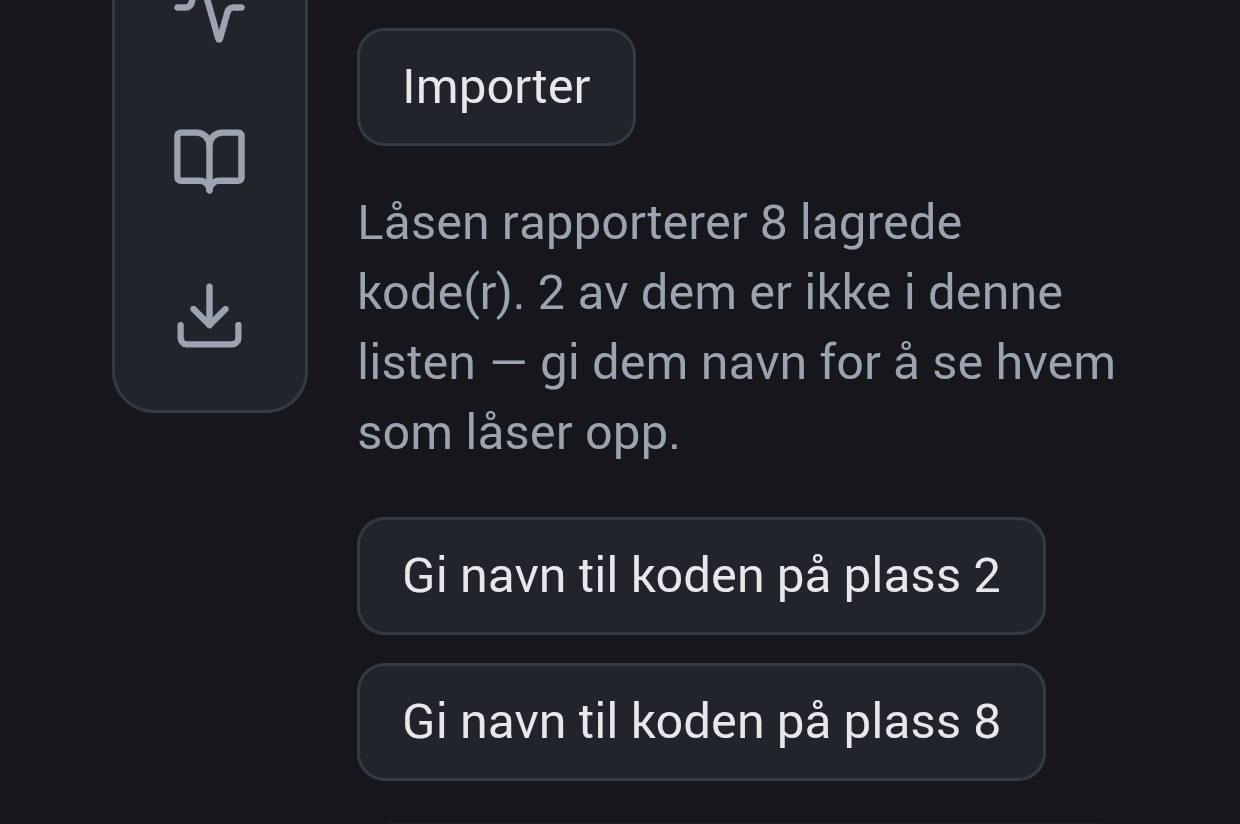
2 previously used(and deleted) spaces are suddenly reported by the lock as in use - i named them, synced and deleted them again. But when polling the lock, they come back. So in reality, deletion doesn’t seem to work at the moment. 2 and 8 comes back no matter how many times I delete.
EDIT: did some more testing, gave 8 a name and a code. It worked. Deleted it, and it no longer worked - but still gets reported as un-named code when polling the lock, so it seems to be a register/reporting issue, not an actual deleting-issue.
Thanks for the detailed testing, Tore — your conclusion is exactly right, and your slot-8 experiment proved it: deletion genuinely works on the lock, it’s the reporting that lies.
I found the cause. The scan reads all 25 slots back-to-back, and on a sleepy battery lock an answer can arrive late, get lost, or be repeated — and the scan trusted the order answers arrived in rather than checking which slot each answer was actually about. That lets a deleted slot inherit a neighbouring occupied slot’s “in use” answer, which is why 2 and 8 kept coming back no matter how many times you deleted them. Your module has also previously shown some stale internal bookkeeping around slot 8, so the fix defends against both.
The next update (2.6.5) fixes this: the scan now verifies which slot every answer belongs to, and any “unknown code” gets a second, separate read before it’s offered for naming. If 2 and 8 still come back after updating, please enable verbose logging on the Diagnostics page, run one scan, and send a diagnostics report — the scan now records exactly what the lock answered per slot, so that report will settle it for good.
On the code that stopped working: the app never deletes or changes codes on its own — it only writes when you add, edit, or delete a user. A few questions to narrow it down: Was that code managed in the app or programmed at the keypad, and do you know its slot? Did it stop working around the time you deleted the two unnamed slots? (If it physically lived in slot 2 or 8, deleting those would have removed it — one honest possibility, and re-adding it fixes it either way.) Also worth checking that Away mode is off — code+* at the keypad toggles it — and whether the Overview page still shows the lock-firmware warning from before.
Thanks for the thorough response and troubleshooting!
The code that stopped working seemed absolutely out of nowhere, and the slot was still occupied and named. It was slot 3 all along. It was added through the previous app, and never attempted deleted. It worked without problem until it suddenly didnt, i triple checked the code was punched right. I “changed” the code in the app to what it already was, and now it works. Very, very strange.
I’m the only one with any kind of access to the app and master pin, and hadn’t done or checked a thing the days before.
I will report back with some logs if it happens again - thanks a bunch!
OK, so I updated the app and pulled codes - the good news is 2 and 8 are gone! The weird news is that status is “the lock reports 4 codes”, while clearly showing 6 synced codes(outside master):
I have installed v2.6.5 and the import of users from the lock works perfect
A small thing i notice is that the versionnumber is not the same in on the apps foreside (v2.6.5) as in the apps inside (it says v2.6.4), not a big deal
Thanks for the detailed follow-up — this is genuinely useful testing, and there’s good news across the board.
The ghosts are gone. Slots 2 and 8 staying deleted after your scan is exactly the confirmation I was hoping for: the 2.6.5 fix (the scan now verifies which slot the lock is answering about) did its job.
Your slot-3 mystery makes sense now. The Z-Wave module inside the lock keeps its own table of codes, and the door panel keeps the real one. What you saw — a code that had worked for ages suddenly dying while the app still showed it as stored, then “changing” it to the same digits fixing it — is a textbook case of those two tables drifting apart. Re-saving pushed the code through to the panel again. It was added through the old app and nothing in this app ever touched it, so no action of yours (or mine) caused it — but it proves that failure mode is real on your lock. So in 2.6.6, whenever the lock reports a slot as empty even though a synced code exists there, the app now warns in red and suggests the exact remedy you found yourself: open the code and save it again. One honest caveat: if the module itself still believes the code is stored, no scan can spot the problem from outside — but the moment it notices, the app will now say so instead of staying quiet.
“Reports 4 codes” under 6 synced ones — the scan was being strict, but the text wasn’t being honest. The same strictness that killed your ghosts (refusing to count an answer that’s about the wrong slot, or no answer at all) means some slots end up “couldn’t verify this time” — and the old summary silently dropped those from the count, which reads as a contradiction. In 2.6.6 the summary says it outright: “The lock reports 4 stored code(s). 2 synced code(s) did not answer clearly and could not be verified this time.” Same data, but the count and the list finally tell the same story.
Also, small one: you installed 2.6.5 but the settings page said v2.6.4. That was a build-order bug on my side — the version label was baked in one release behind. Your install was genuinely 2.6.5 (the vanished ghosts prove it). The page now asks the app for its live version instead.
2.6.6 is on the Test channel now. If a code ever dies out of nowhere again, grab a diagnostics report right away (Diagnostics tab) — since 2.6.5 it records what the lock answered for every checked slot, so we’d see exactly what happened. And one thing I’m still curious about: does the Overview page still show the warning about the lock panel’s firmware (the 0.0.0 one), now that scans and codes clearly work?


 edit seems more quirky, and pulling the codes, but that’s not critical function.