Thermostats are added to HA with HA Tuya integration? What did you adjust to get right temperatures?
And thermostates are added to Homey with the HA app, not via Mqtt?
The HA app uses the entity settings from HA (min, max, steps). And it uses the service to change the temperature.
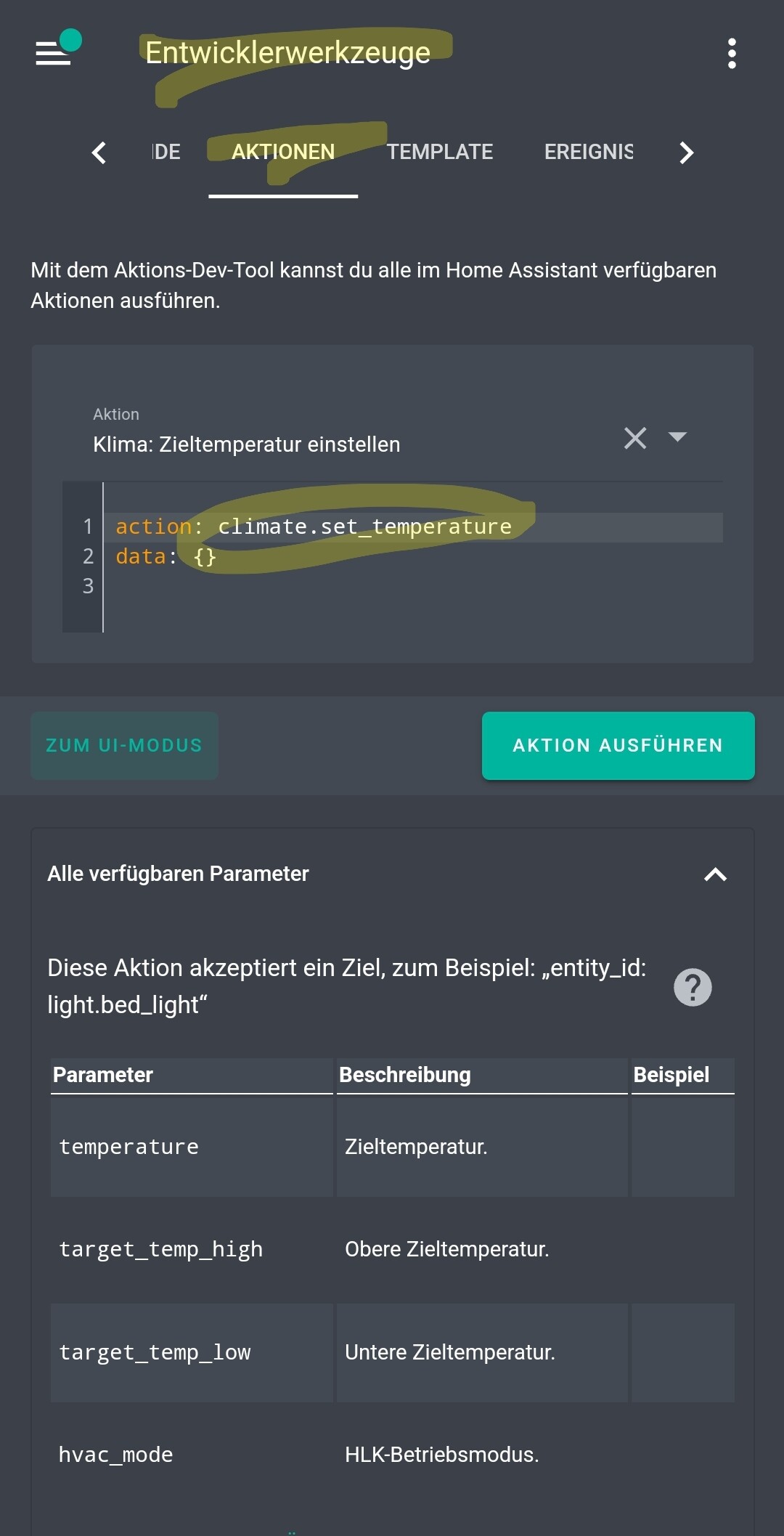
You can try the service in HA developer tools if that works.
Is seems, the service call itself errors at Tuya integration. So please check the service call in HA if that works. Thanks.
In HA thermostats are added with Tuya Integration + Tuya Climate Multiplier Edit from HACS. Actually there are both version of the device in HA however these integrated with Tuya Climate Multiplier work properly e.g. show proper temps
Homey sees these HA integrated Tuya thermostats via HA Community App. Two of them work perfectly OK (controlling actuators at my water radiators) and the last one - for floor heating behaves strangly …
What I do not get is why the first two of them are fine and the other one does not allow temperature to be decreased… It however allows temp to be increased with no problems - my thinking is that max/min/step setting are fine (plus they all work perfectly OK under HA…)
EDIT: I have re-checked how the “bad” thermostat works under HA and I discovered that I get sam e error. What is strange I get it only when I try to decrease temperature below currently set temp. Will check the settings of the min/max in HA Developer tools first and get back.
You can try the service in HA developer tools. Select climate.set_temperature and choose your entity and set the temperature. I have only a german screenshot from HA mobile app…
when I get to developer tools to the place you have indicated (actions/climate.set_temperature) and try to set target temp to the floor heating I get an error:
Thx for a great app! For about 16 days ago I had to delete the entitys on my Verisure Door sensors (they run on HA) and add them again. Was there any change in the code? I’m running Experimental, maybee it’s best to return to stable?
What does it mean? Is it a HA integration?
Then it’s up to HA or the integration. The HA community app only reads the entities and its state and attributes.
I’m not sure what went wrong, I always update HA to the latest, and for about 16 (+/-) days ago, none of my doors was detected open when HA did say they where. Homey just didn’t detect it. When going into the device in Homey, removed the entity, and added it again, it worked. I also changed the app version from the Beta to the stable version, but that was after the entity delete/add in the device in Homey
No idea…
Was it a custom device with manually added entities?
Has entity name changed in HA?
If a sensor was added as device, it’s showing an error message if entity is unavailable. As manually added entity there is no message because one incalid entity would make the whole device unavailable.
Normally Homey tries to reconnect if connection is lost. At least it’s doing a reconnect after ~15min if connection check fails.
Perhaps HA stopped broadcasting entity states.
Next time please check:
device detailsnin maintenance view if device details are shown
check log in maintenance view, perhaps with extended logging if updates are received
Hello, I’m trying to use my HA as a bridge for unsupported Z-Wave devices in Homey Pro. This App works great! I have searched and has been mentioned in other threads regarding Fahrenheit temp reporting inaccurate. The workaround is to put HA into Celsius? I rather not, if possible, is there another solution or would be an app update to rectify this?
Thanks!
Please check your entity in HA developer tools if it provides an unit attribute to show that °F is used.
In this case, the HA app should convert to °C.
If your HA entity does not provide a unit, you can add the capability manually (in addition to an existing device or to a custom device). There you can add a converter routine where you can convert from °F to °C manually.
Hi, loving the app and using it for one light, which I cannot connect to Homey and only runs in Home Assistant. I have the light on a timer and the issue I’m having is that sometimes the light comes on, other times it doesn’t. In the Homey app it will show as on, but the actual light isn’t. I can then click on the Homey icon a few times to switch it on and off, and at some point (after about 2-3 on/offs) it will switch on. If I do it via Home Assistant and click on the light icon, it switches on at the first attempt. Same thing can happen when switching the light off (ie light shows as off, but isn’t). So somewhere there is a disconnect between Homey and Home Assistant. Any help would be appreciated.
There can be a lot of reasons.
Some questions to get closer…
the HA entity is a light entity? or is it a switch?
do you have other entities added to Homey? Do they work or is the error happening to all?
To try:
If you try to switch via Homey device and it doesn’t
create a diagnostics report for the app if that happend
check if the app crashed (in app details)
check app insights (memory and CPU) if there are peaks
You can check the app log in repair view of any device
There you should see a log line with the service call. And perhaps an error. And if there is an error sending to HA, you also should see the error message. That’s why I wonder if the issue is on Homey or HA side.
You can also try to execute the service call in HA developer tools and check if that works all the time.
Thank you Ronny for your prompt response. First time I’m diving this deep into logs. It appears that the issue is not with Homey but more with Home Assistant. I have only only light in Ha, my pool lights which are DMX. To complicate things further, I need to use an DMX over ArtNet plug-in from HACS to make them work. After a lot of research, this seems to be the only way to make DMX lights work with Homey. I will dig deeper into the HA logs to see if I can find the error. Many thanks for your help.
dynamic mode list and button for alarm control panel.
Based on the HA entity features, the mode list is changed to show only possible values. In addition, the “trigger alarm” button is also removed if th eentity does not support this feature.
The button “reset alarm” remains because that’s a standard element and not part of the features.