Run internet speed tests using Fast.com and use the results in your flows.
Fast.com is a free, ad-free internet speed test tool created by Netflix. It automatically measures your current download speed to help you quickly determine if your Internet Service Provider (ISP) is delivering the bandwidth you are paying for, especially for video streaming.
I have exactly the same problem… except I’m running only one Homey Pro 2026 with a couple of Pi-Hole servers that are running Unbound recursive DNS as their upstream resolvers.
I too had the evil overlords Netflix blocked. At first I got the same error as you did @Peter_Kawa, so I whitelisted api.fast.com and the test then ran, but with Zero bytes on the Download result. Then I remembered why I had been running manual speed tests with Ookla’s Speedtest for years… ever since I fell out with Netflix and blocked them ha ha, because the servers Fast’s test connect to are Netflix and that’s why I got 0 bytes download. To be honest, I have found Ookla’s Speedtest to provide more consistent results, but I haven’t tried many others for a fair comparison.
Internet Speed Test Results:-
Download: 111.57Mbps
Upload: 275.1Mbps
ISP Location: London, GB
Time: 20/05/2026, 01:26:08
@Peter_Kawa@Drako74 yes correct it’s part of Netflix. However this was the only Speedtest which I could run via a API. So you might consider unblocking Netflix?
There’s a Speedtest.net alternative but it requires a binary to be downloaded. Unfortunately with homey shs there are way too many binaries to be downloaded and can’t be a guarantee that that works
I have to say that for me both work reliable.
My homey only reaches 90mbits but that’s due to a 2.4 ghz iot network
1: FIX: Speedtest failed flowcard was not properly set
If you find any issues, send a diagnostic report
Note: Before sending a report make sure to reproduce the issue so the issue will be visible in the report
Via Homey Mobile app:
More - apps - Fast.com Speedtest - settings wheel right top - send diagnostic report (put your email in the input field to make it easier)
Via Homey Webapp:
Settings wheel bottom left - Select Fast.com Speedtest - Click on send diagnostic report
You can install this version by clicking the link above and press install (do not remove the app, only press install)
1: FIX: Speedtest failed flowcard was not properly set
If you find any issues, send a diagnostic report
Note: Before sending a report make sure to reproduce the issue so the issue will be visible in the report
Via Homey Mobile app:
More - apps - Fast.com Speedtest - settings wheel right top - send diagnostic report (put your email in the input field to make it easier)
Via Homey Webapp:
Settings wheel bottom left - Select Fast.com Speedtest - Click on send diagnostic report
You can install this version by clicking the link above and press install (do not remove the app, only press install)
The update to version 1.3.3 seems to have broken something. The previous version was working fine on automated hourly tests, logging results and alerting me if there was a significant drop in bandwidth.
The speed test utility of Fast.com primarily uses fast.com for the user interface, but the speed test traffic runs over nflxvideo.net for the download/upload test data.
So as long as you allow the first 2, the rest can be blocked to prevent them from serving you ads and other content. (Yes I’m sad I know… but I work with domain names and DNS, so a few whois searches found a list of their backend domains used by their CDN.)
Note: Before sending a report make sure to reproduce the issue so the issue will be visible in the report
Via Homey Mobile app:
More - apps - Fast.com Speedtest - settings wheel right top - send diagnostic report (put your email in the input field to make it easier)
Via Homey Webapp:
Settings wheel bottom left - Select Fast.com Speedtest - Click on send diagnostic report
You can install this version by clicking the link above and press install (do not remove the app, only press install)
My app update and change log flow was a bit slow logging it… but I ran the old version, updated and then ran the new version, and it’s working absolutely great Thanks @martijnpoppen
 Measure upload speed
 Measure Download speed
 Get ISP location
 English
 Dutch
Dutch German
 french
 Italian
 Swedish
 Norwegian
 Spanish
 Danish
 Russian
 Polish
 Korean
 Arabic


 Apps made by @martijnpoppen
 or just open the pull down.


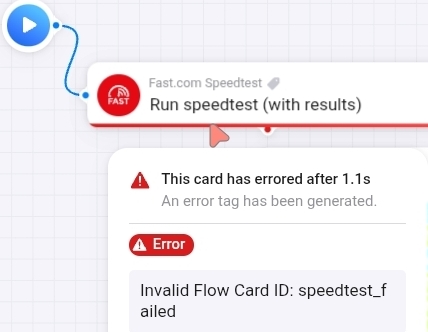
 , it’s due to AdGuard blocking


 TEST:
TEST:  If you find any issues, send a diagnostic report
 Note: Before sending a report make sure to reproduce the issue so the issue will be visible in the report
 Via Homey Mobile app:
 Don’t want to be part of a test version? Install the live version →
  LIVE:
LIVE: 
 My first thought, but this doesn’t work:
 What does work:


 Thanks
