@Adri1 to investigate that I need a diagnostic report
And did you contact Homey support ?
Rapport eufy
f49a085b-9544-486c-a6b5-c1677329d8b0
@Adri1 I don’t see any issue
Also no crash in the app
If you still see the database error I really urge you to contact homey support it’s out of my hands
@Raptorial you could upload a sound to Homey, use the Soundboard app to play it and then use the Google Chromecast app to stream the sound to a Google speaker/Hub. You should be able to use Sonos too but I don’t have any Sonos so I haven’t tried it.
I ended up purchasing the HB2 since I only use the HomeBase for my two doorbells and have no intention of other Eufy devices.
I can confirm that my screenshots in Homey now is working - contrary to when my E340 was stand-alone. The HB2 solved my issue of non-updating screenshots.
Thanks for all of your help 
@Marc_Hammer great to hear !
Hi Martijn, today i read this topic about the snapshot future from eufy. Could you explain a bit more about it? I see a few confusing answers in this topic.
Do i get it right? Is it possible to make a snapshot from a flow etc and get it on a dashboard like hdashboards? Or is a snapshot only taken when there is a event in front of the camera?
On hdashboards i got a nice event view of the subject (the first second taken), but maybe it’s possible to get another one a few seconds later with a flow?
I tested it first with the flow card ‘take a snapshot’ and then send it to my mobile with pushover. But then i got (as expected) the old event picture.
@M_J hope that this helps: [APP][Pro] Eufy Security - #3 by martijnpoppen


@M_J please send a diagnostic report after you ran this flow. I’ll have a look
One thing I don’t see a matching name for the camera in the both flow cards
One is “oprit” one is “camera oprit”

@M_J you can post it here
856fd51f-bd20-4c01-81af-9a3706f42cfa
Thank you!
Hi, I try to add the eufy Motion Sensor E20 in Homey after succesfully added to the Eufy Security App, but it gives me the error that there is no device found.
Is this sensor supported?
@Woltie_r No it’s not supported. First time i see this one.
Unfortunately it cant be added at the moment. The current Eufy 5-in-1 app can’t be reversed engineered anymore. So at the moment i don’t see a easy integration for new devices.
I already reserved some time during Christmas to dive into this so i can spend a full day on it to figure it out
Hello. Curious if the eufy Homebase Mini is supported? I believe this is a new device eufy is offering.
Thanks,
Eric
@Eric_Nelson the answer to that is posted before your question [APP][Pro] Eufy Security - #8208 by martijnpoppen
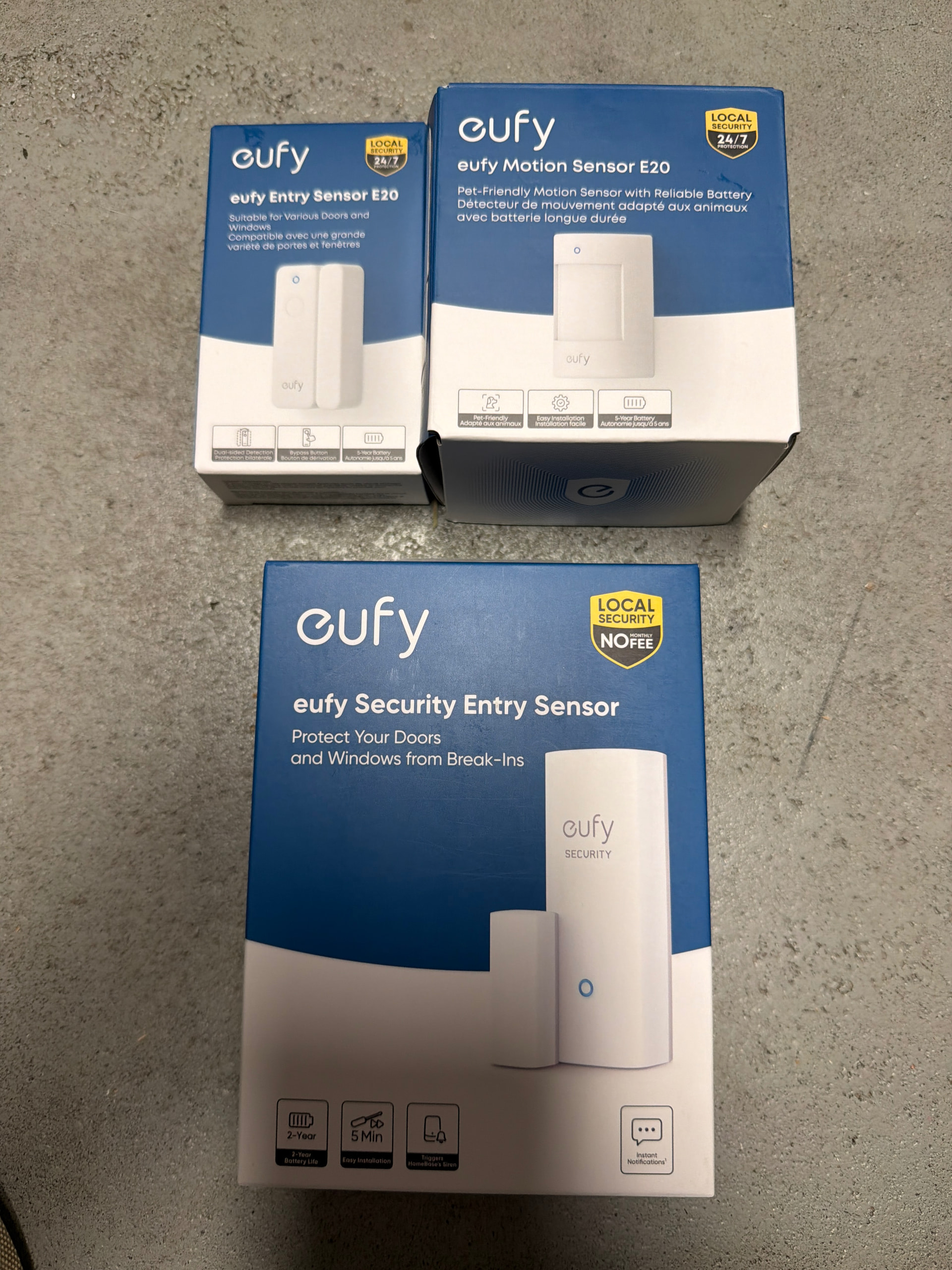
@Woltie_r the bottom one works (some issues at the moment due to eufy changes, but I’m almost ready with a big rewrite of the app which should fix that)
Top ones are not working at the moment
@M_J can you make a snapshot and just open the device in homey and check the snapshot in the device view.
So without pushover
