Android:
Totally unrelated Martijn, but just curious to your Homey setup, devices etc. maybe not in this topic…
@Crashy DM-ed you 
That is a coincidence, I did the same as you. I also returned my Arlo Pro 3 and purchased the Eufy 2c Pro. The Eufy is much better  and no subscription
  .
.
I have to say that the Homey Eufy app is working fine for me, except for the live feed. That isn’t working. Every thing else works as intended.
When I switch in homey from disarmed to away it’s also changed in the Eufy security app and vice versa.
ps. I’ve did asked Eufy support if they could implement a feature, and the person who handeld my case liked my idea and forwarded it to the development team. Fingers crossed. If some one liked the idea as well, maybe they can also put a feature request. The more people want this the better it is
If you have a 1 camera setup with 2 activity zones, zone 1 and zone 2. Like below.
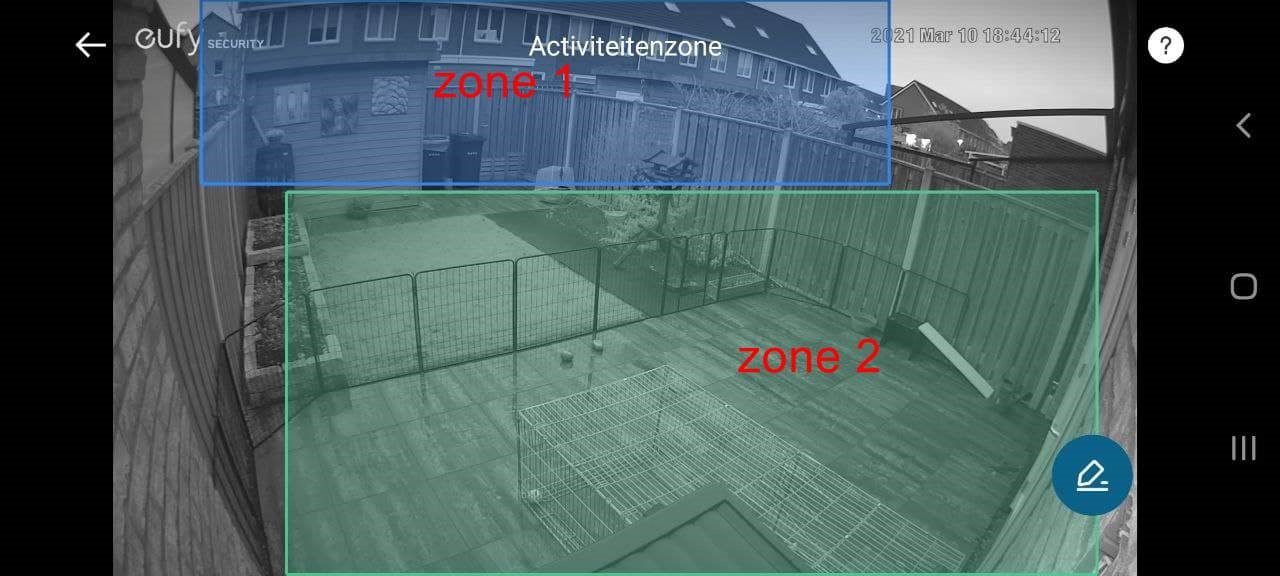
Then when I’m at home, I only want zone 1 to be active (recording and messages alert) when there is movement. And when there is movement In zone 2, I don’t want recording and message.
When I’m away from home I want that zone 1 and zone 2 are active and when there is moment record and sent an alert.
@Jeroen_W
The homey app doesn’t have a live feed only registered events. hopefully one day we can have streams in Homey or if Eufy supports a mjpeg stream it would also work
Ok. I understand. Won’t test from Eufy to Homey then.
Just did a simple Flow: when doorbell button pressed then cast a picture to my Google Nest, push a notification incl picture to my iphone and update the log/timeline with a text. Everything works apart from sending a real picture. Still only get the Eufy standard product shot. I have enabled both record video and push notification for all devices in Eufy. Anything else missing?
Great to have a partner in crime 
I have the Eufy 2 Pro (not 2c Pro).
Are you able to have a change of arm mode in Eufy update in Homey (and not only the other way around)?
What is your settings in the Eufy app to push, cast etc. a picture from a flow?
Cool feature request by the way. Makes sense.
@Nitramevo Can you restart the app and see if the picture sends after that.
Yup. That made it work. Do you think I need to schedule a frequent app restart to make it work on-wards?
@Nitramevo No, most of the times when you added a device it doesn’t register the image-service correctly. I’m still working on this to make it work.
Aha. Get it. You are doing a fantastic job. Big thx!
I need to ask what might be a silly question. How is everyone setting up a second admin account, doing so within the eufy app is not straightforward, seems that I have to install eufy on a second phone to create this, can’t on the phone the whole thing is set up on. Any simpler way or should I just get on with it. Thanks in advance
Hey @Philip_Montgomery ,
Yeah it’s not an easy process.
But you can do it on the same phone:
- Go to family and guests
- invite an extra account with admin rights (doesn’t have to exist yet)
- logout
- sign up for a new account (the one you invited)
- go to you email and do the activation
- login with the new account
- accept the invite from your main account
- logout
- log back in with your main account (all settings will stay)
That worked great thanks, they don’t make it easy, but I suppose we should probably be grateful for that
Haha yes, but they never intended these kind of apps (Homey/Home assistant). So let’s be grateful they didn’t patch it (yet)
Hi all,
I’m looking for people with the Eufy Motion sensor and who can help me test.
New app update (test: 1.11.12 ):
- NEW: Generic motion alarm for all devices (
alarm_motion). This will be triggered on all events (except doorbell_press). Useful for Heimdall or Zoneactivity (CC: @MrFloppy ) - FIX: cleaned up code for Door_sensor
- FIX: disable DEBUG (developer logs) on restart of app.
New app update (test: 1.12.0 ):
- NEW: add motion sensor T8910 - ( CC: @Bas_R @Heula @Karelappel @Renk )
Sweet! I’ll try it out and will let you know.
Other small request; can you also look into the action “start recording” for the doorbell? This is available in the native app, so should be in there somewhere. Thanks!
Yes sure! I think it exists, but i’m not sure where it would save the recording  Normally it saves that on your phone. But i’ll check it!
Arm mode:
When I change arm mode in Homey for one device, it changes for all devices. That’s ok.
Would be great if the mode automatically updated on the other devices to reflect the new mode/choice.
On/off device:
I can only turn on/off the doorbell from Homey. And if I try to turn off on or more of the cameras (and not the doorbell), only the doorbell is affected?
Send a picture:
Only works sometimes and only from the doorbell. Seems only just after a restart of the app?
