@Nick_Wuyts awesome! 
Then probably the notification service wasn’t hooked in correctly. The orange button fixes that 
Good to hear it’s solved !
@Nick_Wuyts awesome!
Then probably the notification service wasn’t hooked in correctly. The orange button fixes that
Good to hear it’s solved !
Changelog:
1. NEW: Add stream has started flowcard (easier to use in flows) (example below)
2. FIX: Optimize stream. Use HTTPS to allow embedding and secure connect for Casting
3. FIX: HLS only stream (no chromecast)
4. FIX: Remove local server for videoplayer and use optimized videoplayer.
5. NEW: get videoplayer by station_sn. (Allow embedding)
6. NEW: VideoJS 7
Note: Looking for people who want to test this
Image for point 1:
Thanks for a great app and the time you are putting into it.
I have Feature request. Is it possible to add so the motion tracking on the Pan & Tilt cameras can be turned on an off?
We have a lot of white in our home and with it on at night the cameras can start tracking all kinds of objets so I have turned it off but I would like to have it turned on if it’s enough lights.
Hey @jonorland
Thanks!
Yes this is possible, will look into it soon
Hi,
I followed the instruction and got it to work but only once. The local address for the tag doorbell stream URL seems to have disappeared from homey.
Is there a way to get the address back?
Hey @Jonas_Berggren
Its not a local tag. If youre in a flow you can search for it in the list of tags.
Yes but it’s blank now, before it was an address linked to the tag.
If I send it as a push notification to myself it only shows up as [Null].
@Jonas_Berggren did you also start the stream? That link is only valid for 5 minutes and then Eufy kills the stream
Like this
Yes, I have done exactly as in your example above.
@Jonas_Berggren there were issues with the streaming, that’s why I made some fixes. However these are not live yet (release notes)
if you want you can install the test version and use a flow as follow:
This has a new Livestream has started flowcard.
Also it has a lot of improvements for streaming; no delays anymore etc
Hi all,
Im thinking about buying the 2K Battery Doorbell with homebase, since i would like to keep my existing chime as well. In the manual i see it should be possible, but the menu to choose mechanical chime explisitly says (dingdong). My existing chime gives a triiing sound. I know they are mechanicly different, so i wonder if the triiiing sounding chimes also work. Also, is it possible to deactivate the existing chime after a certain time? (Young kids who wake up easily😋)
If my sorry if this question has been answered somehere, but i tried the search funtion a few times, the eufy website, and a long time on Google and couldnt find an answer.
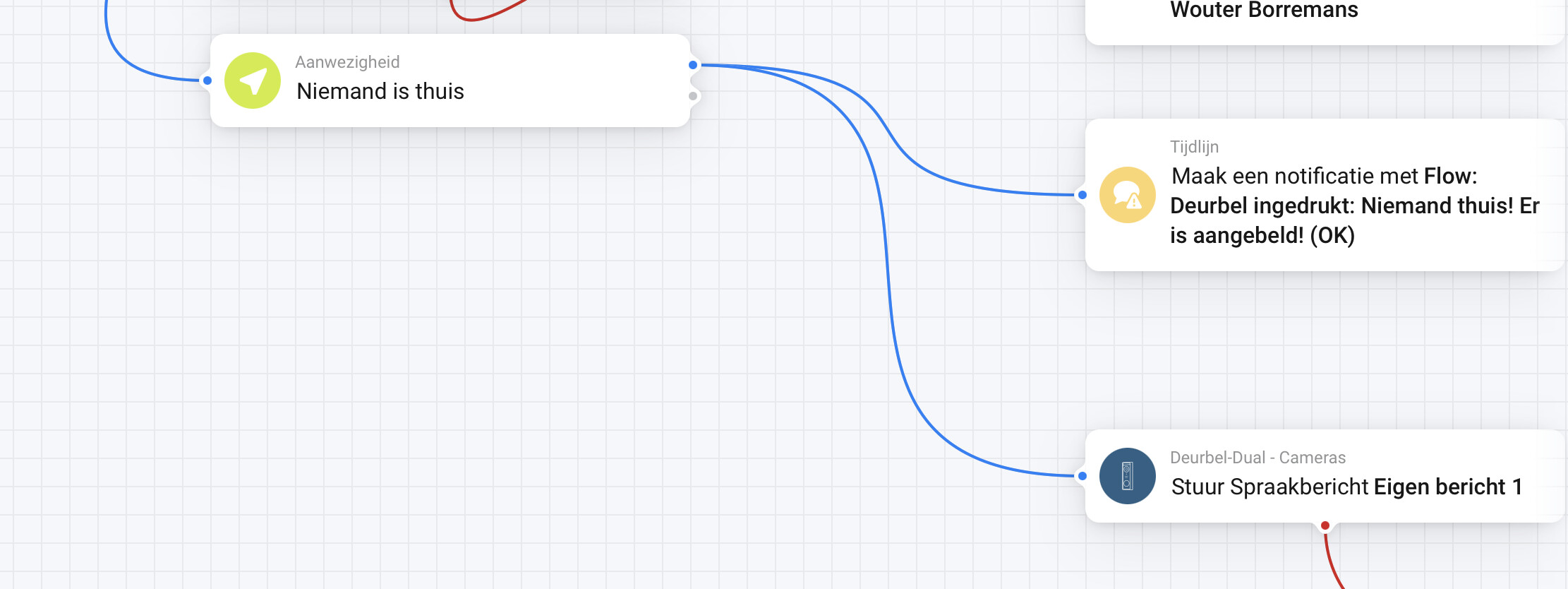
Hi Martijn! Great app I’m enjoying it a lot! Thanks for your effort! I own a Doorbell Dual and I’ve created a flow which triggers serveral actions when the doorbell is pressed. One of them is that when we’re not at home I would like to play a custom recorded message through the doorbell. The standard (integrated) messages work, though the custom message cannot be played. Do you have any idea how I can solve this? There is nog generated error, it completes the step but nothing can be heard. I’ve recorded the custom message with my phone within the Eufy App. Thanks!
Hey @B0rrie
I think the data from the API is not updated. Can you try to restart the Eufy Homey app?
Hi Martijn,
Don’t see how to create a new post, but maybe it actually is a feature request.
I want the Eufy homebase2 and keypad to provide Homey when a valid pincode (known user) was entered. I want to combine that with a doorlock and in a flow open the door. If even which user, that would be even nicer!
And/or can it be done with an Eufy cam and face recognition? I now have the doorbell and checking the best options.
Hey @wilfred_derksen
Oh that’s a new feature indeed.
I think the only possible option is to give the username back. Would that be enough?
Then the type is also possible, so: keypad / app / Geo etc
Let me know
Hi @martijnpoppen,
thanks for your swift reply. The username would be brilliant, as I prefer the name and not to know the pin. If it tells me “this user” I can decide “ok, then open the door”.
So, it would be awesome.
Hi!
I have been using the Eufy Security app for quite some time on my Homey and it has beed great. Thank you for creating it! I do not use many flows or advanced options, I mainly use it to quickly change the security mode for many cameras.
A few days ago, I noticed that this stopped working. I start the flow and it seems to hang. It seems that the app crashes/pauses and the cameras have an exclamation mark next to them. When I restart the app, the exclamation mark disappears but as soon as I trigger the flow to change the security mode, the app pauses again and the mode does not change for the cameras.
At this stage, I am not 100% sure if the issue is with the Homey/Homey app or with the Eufy app/cameras. I only get a feeling that when things crash in Homey, the cameras become unresponsive in the Eufy app as well. When I restart the Homey app and wait a bit, all cameras become responsive in the Eufy app and I can change the cameras’ security mode.
Any ideas on what might be causing this? The only network related change I can think of is that I changed the internet provider but I do that relatively often, every 3-4 months and I never experienced such issues.
So far I tried removing all the cameras from Homey and adding them again. It seemed like things worked for a moment but now the app pauses and the flow does not trigger the security mode change.
Hey @Krzysiek
Sounds like the IP of your Homebase/Camera’s has changed.
You can restart the Eufy app (in Homey → More - apps - Eufy Security - settings wheel right top - restart).
On restart it will discover the camera’s by itself.
Let me know if that fixes it
Changelog:
1. NEW: Add stream has started flowcard (easier to use in flows) (example below)
2. FIX: Optimize stream. Use HTTPS to allow embedding and secure connect for Casting
3. FIX: HLS only stream (no chromecast)
4. FIX: Remove local server for videoplayer and use optimized videoplayer.
5. NEW: get videoplayer by station_sn. (Allow embedding)
6. NEW: VideoJS 7
7. NEW: DingDong MP3 →http://HOMEY_IP/app/com.eufylife.security/settings/sounds/ding-dong.mp3
Image for point 1:
Do you think Martijn it would be possible to send this soune also to Homey directly? I’m thinking to get rid of Soundboard and MicroWebServer apps as I’m using it just because of Ding-Dong MP3 I’m sending to Chromecast devices and to Homey