Indeed @martijnpoppen - that would for sure be a deal-breaker! This is right now the most annoying thing. I bought a couple of Eufy door sensors, but I returned them again, because I need to have notifications enabled in order to have the correct status in Homey - and THAT is annoying
Another thing.
I want to easily see the current alarm status in the Homey app upon start up. Therefore, I have created a virtual device which I keep up to date through my flows (icon/button inactive when disarmed, active when armed etc). Through the virtual device, I can also change alarm state: home, away, partial.
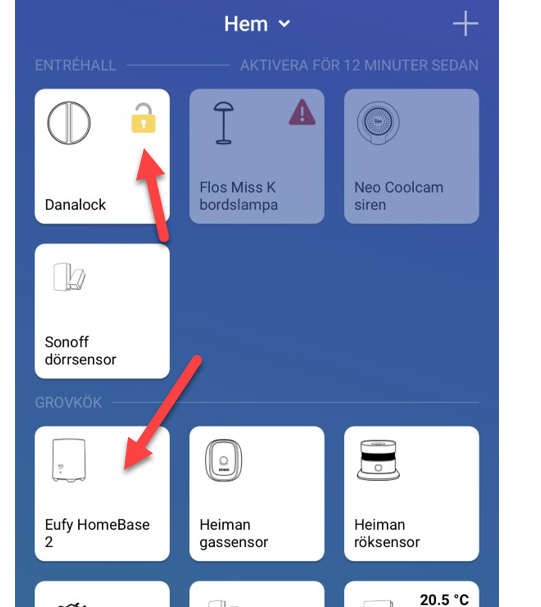
This wouldn’t be necessary if your/the Homebase device icon could offer the same functionality. You don’t need to active/inactive the icon, but maybe some yellow small icon on top that shows if the homebase is armed, disarmed etc?
Just wondering - any possibility of identifying the person who unlocked the Keypad?
My understanding is that you’re essentially using the phone notifications for this and the name is in the phone notifications
Reason - my cat feeder / cleaner etc have their own code but I would like to use different behaviour for my ‘deactivations’ when they visit as opposed to when we are home
Changelog: 1. NEW: add User to Arm mode changed flowcard @vaderag 2. NEW: add alarm icon when homebase is disarmed/off @Peter_Kalrsson
To test it you can install the test version by going to the link above and click the green button to install.
please note that it is a test version. So keep in mind when you no longer want to receive updates you can install the live version again
edit: @Peter_Kalrsson unfortunately i cannot add that lock icon. therefore I need to change the device class and a lot more. So it will show as a yellow exclamation. Same as you see on door/motion sensors. (it won’t trigger the zone activity)
Thank you so much for your effort @martijnpoppen, as always so appreciated!
However, unfortunately, this does not solve it for me, at least. “Disarmed” is a security mode I never use. I have Eufy’s keypad, and if we forget the custom button for a moment, you really have three different modes:
Home
Away
Off
I have created a new mode called “Partial arm”, that I have assigned to the “Cus” buttom on the keypad.
The most common used modes are “Home” and “Away”. If I get into “Off” mode, I will mute all sirens and then switch back to “Home” through a Homey flow. It never stays in “Off” mode, so to speak.
So, for me personally, I want to see if:
Homebase is in Home mode or
Homebase is in an arm state, i.e. Away, Partial Arm.
I can understand that you can’t foresee our different arm states, but if you could add “Home” to your existing implementation, it would be awesome, i.e.:
Add alarm icon when homebase is home/disarmed/off
As I said, this is how I use the alarm system. Maybe you disagree, but for me at least, this makes perfect sense, considering the button on Eufy’s keypad.




 )
)


