Sorry, I can’t get it to work with Iobroker either. It seems that I have an older version of the adapter and I can’t update now due to dependencies.
Need to investigate that.
I hope more people with ID cars and Iobroker can step forward?!
The climatisation start doesn’t work. Tested with all the three versions and also tested the ventilation all the three versions. The climatisation start and stop works with iobroker, but as I said before the start and stop climatisation in Iobroker should be set multiple times in order it to work (I have set it three times). I tested also the start multiple times with the homey app, but it doesn’t work.
The start and stop charging works great. But the button doesn’t follow the charging status when the charging is started somewhere else. I would change this so that the charging status is it’s own status and there would be separate buttons for start and stop charging. Toggle button can loose it’s correct status. Same goes for climatisation button. Just my 2 cents.
The set temperature doesn’t work. I also tested the set temperature through Iobroker and the temperature can be changed in Iobroker, but it doesn’t change the temperature in the car. Or at least I didn’t find the setting for that. Though the temperature can be changed through the android we connect ID app, so I would assume that it should be settable. The set temperature changes in the homey VW ID device when the temperature is changed through the android we connect ID app.
The plug connected now shows the correct status. And all other statuses are also working. Great work!
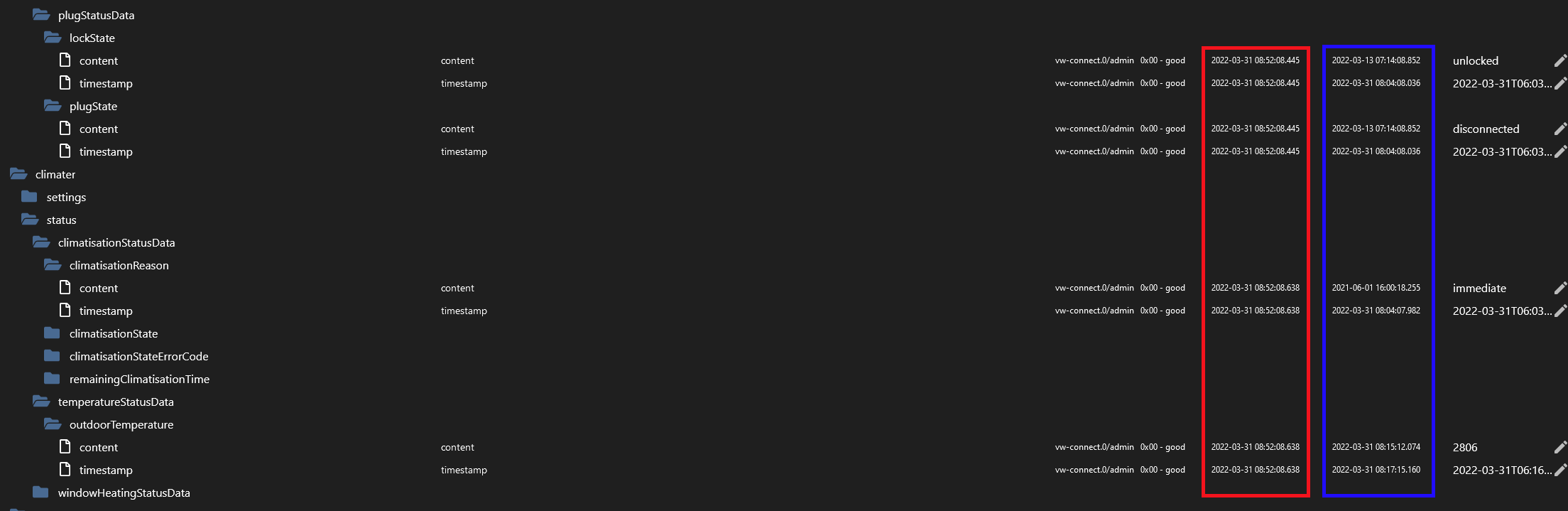
For me it doesn’t change but what is changing regularly (like new time / date stamp every minute or so) in iOBroker for me is following parameter - maybe that’s the way forward ? Would be the best to validate against some api documentation … it seems it’s changing according to real state, so not staying connected all the time :
This seems to “re-read” the basic status, at least based on updated timestamps. Problem with Homey is that timestamp is updated only when value changes, right.
First column is Timestamp, 2nd is when value changed - seems eg. that outdoor temperature is not updated when the car is sleeping.
Maybe there is an easy fix for this, if you let Homey app send this command 3 times (climatisation = true) just to make sure it “sticks”?!
I know I had a similar solution when I used iobroker to start climatisation, I had 3 cards for the start in the “Then”-part.
It might be a weakness for iobroker, because Home assistant seems more seamless. One command is enough and it starts immediately.
This is indeed not working. Good one. Will add it to the to-do list.
Nice
So remote controls are not really working. I’ll check it with my car. Only function I can test is lock and flash . Lock is working for me, flash is not. So when I get that working it will probably work for multiple remote controls.
The point is that even when I initiate refresh in the ioBroker, the values actually didn’t get updated - they stay the same but datestamp indicated the latest were loaded. The same for connected state - it’s TRUE when connected but the fresh timestamp indicates with “fresh” 'true" “connected” - if you know what I mean. But it’s switching between statues like 1x per 1 min - so if it’s disconnected within 5 mins refresh time, it’s actually always TRUE in Homey.
Ok so the refresh call in ioBroker is not the same as the vw connect app. When I force update from the VW connect app on my phone it updates in Homey.
Check got that. I think this is also related to the force refresh. As the iobroker adapter gets stuck at some point and then it needs to restart. In homey I refresh the whole instance (which might have caused a memory leak). So not sure if Homey and ioBroker are the same now.
Yes, that is a clever approach. Just tested with 3 commands with 30 sec interval. Unfortunately it don’t work. Maybe @peltsi51 might have a go with this?


 )
)
 ) .
) .


