@Phuturist, will it be possible to make a flow card regarding ‘input has changed’, in addition to ‘input has been turned on/off’?
(This would be nice to have in case of ‘hotelschakeling’)
@Phuturist, will it be possible to make a flow card regarding ‘input has changed’, in addition to ‘input has been turned on/off’?
(This would be nice to have in case of ‘hotelschakeling’)
Possible sure, you are the first to request it though. Feel free to submit a feature request in Github and try and get some support for it from other users as well. I’m holding back a bit with adding features for single users as every feature requires more maintenance and every extra function added reduces the performance of the app even though this might be much.
You can create a flow that in- or decreases the dimming by X % every X time
I use this to slowly increases some lights during 30 mins from the moment the sun goes down.
@Phuturist I’m trying to set a sunscreen to a specific position. It works when I just use a percentage setting in the card like
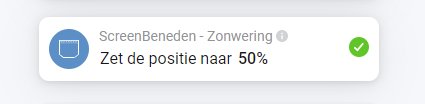
but fails when I use a calculated value (the calculated value is 0.375)

Should this work? Or am I doing something wrong
edit: hmm duh, 0.5 is not the same as ‘50%’ of course, I was assuming the % setting is still a numeric thing. Should I feed it a textvariable x%?
I was expecting this to work since al other options to check state do work with values between 0 and 1
This is a built in action card based on the the windowcoverings_set capability. According to the docs it’s a 2 decimal value. Try 0.38.
I tried that, but it says “token out of range” (same as when I make it 38 just to test it)
edit: it worked when I tried again. Maybe the variable wasn’t updated properly (although it said 0.38 in the list). I added a Round() to make sure it only 2 decimals
Seems to work now, tnx!
Sorry, unfortunately I’ve got another problem with my Door/Window 2 sensors. They respond now correctly except of an deactive Sabotage-Alarm. Since there are a lot of false positives with us, I deactivated this alarm. At the webinterface from the sensor it is displayed with “No Data” but the Status at Homey is “Alarm”. Do I something wrong?
So, finally got back up a ladder and sorted and it does now seem to work. I have 2 flows, one to open the door if the door is closed. If door already open I get a push alert saying door already open. And vice versa.
I have my sensor up at the top of the and the magnet travels with the door, in the shelly app there is an option to reverse logic for this setup. Homey just sees the actual logic.
Thanks for your time and assistance, I shall repeat now for 3 other doors.
There are firmware issues with the DW2 sensor that causes some status updates not being sent. Not much I can do about it. I’ll update this GitHub issue when Allterco Robotics is making progress on this.
I have 4 shelly duo GU10 and a mesh network from deco. I am not abble to connect my lights into the app. I tried to give them static IP but it wont work. Any Idea?
@Phuturist two things, sorry for bothering you again:
okay weird. shelly hangs 50 cm next to the access point. After reboot homey and Shelly it works again, hopefully now longer than 24 hours. what does the values mean? “rssi":-49}
Thx
what does the values mean? “rssi":-49}
smaller RSSI means better signal. Above 70 is bad, you are far below (as you mentioned that you are near the AP), so the signal shouldn’t be an issue. Does the devices still work with the shelly app when you are getting the ehostunreach?
No, I think I know why this is happening and will fix it with the next release. Set it to Homey’s IP manually if you do not want to wait for it.
Not within the Homey app. You will have to manually configure your Shelly’s back to mcast if you prefer this.
Ok thanks for your answer. Last question, how or when will the mcast ColoT address replaced by the unicast ip:port of homey? Only during the first start of the new app version? As this happened as well with the last version of your app.
Of course I’ll manually change it to unicast:port on my dimmer 1. But thanks for including this into next version.
It will be set when Shelly firmware is 1.10.x or higher, my app is version 3.0.28 or higher and it’s not been set before. If it’s changed back manually it will not be updated automatically again. How this works may change in the future but for the majority of users this was the easiest implementation.
Hi,
Recently I can no longer add shelly devices.
Everything restarted and reset to factory settings. Homey v5.0.4. Shelly app reinstalled v3.0.28. Already searched a lot of forums, but unfortunately. In the Shelly Autonomous app everything works fine, in the shelly cloud I can also reach and read Devices on the IP address.
I get the message on both shelly 1’s and 2.5:
Error:request to http:/192.168.178.172/shelly failed, reason: connect EHOSTUNREACH 192.168.178.172:80
I hope you can help. Thanks in advance.
Have you followed the steps from the network troubleshooting guide in the first post of this topic?
I red all information, but didn’t do all actions.
In the mean time problem is solved. Strang is that the ios shelly app says wifi reception on the device is “good”, but for homey it seems not enough.
I relocated the shelly1 to the wifi main access point and then the shelly app for homey connected the device!
Relocated the shelly1 back to its final position and now everything works fine. 
Have you updated the fw of the shelly devices? Because the latest fw should have massive improvement when using multiple ap.
Problem was solved
Although shelly on ios said wifi was good on device, for homey it seemed not enough.
Put the shelly very close to the main wifi access point and than it worked, also when putting it back to original location.
Met vriendelijke groet,
René van Duijkeren

