Revert back to your old modem. Obviously something changed and it got messed up. Troubleshooting user network configuration is out of scope for me.
Could you post a screenshot of this?
Revert back to your old modem. Obviously something changed and it got messed up. Troubleshooting user network configuration is out of scope for me.
Could you post a screenshot of this?
Message to the community
When I started development of this app I was an active Homey user and I needed support for Shelly. As I enjoyed developing apps I didnt mind putting (a lot of) free time into developing the app. Nowadays I dont use Homey anymore and the free time I have to put into this has shifted from developing the app to supplying customer support to the ever growing user base. Most of the questions posted here arent even code related but are related to a user’s network configuration which I have no control over.
I have tried my best to create a troubleshoot guide but I still find myself having to answer the same questions over and over again. This is not what I signed up for and I notice that maintaining the app is starting to cost me more energy instead of giving me energy, not something you want out of a hobby.
My short term decision is to stop responding to network related support questions. I’ll have to think about what I want to do for the long term which obviously also involves a good talk with Athom and Allterco Robotics.
I wish reverting back to the old modem was that easy. I appreciate you can’t supprot network changes. I had too much trouble with the old modem not even doing DHCP properly. Posting the screenshot per your request: first and last device are the not-working and working shelly devices.
I can confirm via the shelly nativa app that the IP is correct of the top one. The bottom one works., the top one doesn’t.
I’ll tinker with it more later, will let you know if i manage to fix it or find out more.
Do you also have a static IP address set on the device itself?
You should check how the device broadcasts itself over mDNS. If that is also missing the hostname that will indeed give issues during discovery. There are tools available to troubleshoot mDNS for various (mobile) operating systems.
Could you post the output of /shelly of the first dimmer?
And did you also try to factory reset this device. Wondering if that would result a hostname being shown.
No. Devices are set to DHCP. Given my modem pains, I forced its DHCP to always generate the same IPs to the Shelly’s so Homey (which stores the IP) would not get confused.
Ill do that tonight. I have a Mac so plenty tools I’m sure. Need to look into it as I don’t normally look at the broadcast messages. Will also factory reset the Shelly see what that brings. Will post back my results.
Possibly related: shelly dimmer integration failes since 2023.2.0 · Issue #87126 · home-assistant/core · GitHub
I have’nt got these (gray) Shellys so I can’t repairing these. It is only an info about Shellys.
Shelly’s are working again. It occurred to me that with the swap of modems, dhcp may have been skipped, especially with the fixed assignments.
I set my phone IP to fixed and disabled dhcp, removed the WiFi repeater (who uses the dhcp of the modem) for 30 mins and then turned everything back on.
The dhcp ID remains “unknown” but given the fixed assignment landed in the same IP. Interestingly now the defunc Shelly dimmer worked again, plus adding the removed one worked like a charm, where prior it would not be found.
Moral of the story: take your time to disconnect all WiFi routers when swapping a modem out. Make your setup utterly disconnected for a good half hour and then reconnect modem, then connected devices.
Thanks for your patience and a wonderful app.
Because of this, I have an IP set on both sides (DHCP on the router and static IP on the shelly device itself).
Before that, I had problems that occasionally the devices were not accessible even through the native Shelly mobile app even though the IP address was set ok from the router. From local network was working but from cloud was not.
Do you have any information if this will be supported and if so when?
i started complety from scratch and now it seems to work. i see the beacon bluetooth messages all 30-50 seconds in the debug log of the proxy script and the beacon status in homey gets updated correctly.
Update: 10 minutes later it stopped working again 
I will stop the idea to use the button as a beacon and only use the button itself, which is working fine…
Yes, never at the moment. If you would like this you need to request it at Allterco Robotics.
The static Ip makes sense. I can configure my DHCP to start at a higher range, but even today first nine numbers are not assigned by default. In the end a fixed dhcp Mac to IP has the same effect but still requires dhcp to be stable, which is why I had to replace my modem … thanks for thinking with me here.
Hey! I am struggling with Shelly 3em cumulative energy calculation. I’ve now compared it to the electric company’s readings and it looks like the cumulative energy is only calculated from one phase in this app? In Shelly’s application, there is a section that states total energy and this corresponds to reality. Would there be any way to calculate the actual cumulative energy in this app?
Homey Cloud, Shelly app v3.22.8
Today my Shelly app triggered “Cloud connection error”.
I afterwards checked functionality, all was up and running 
Look at this:
Temp sensors event card names
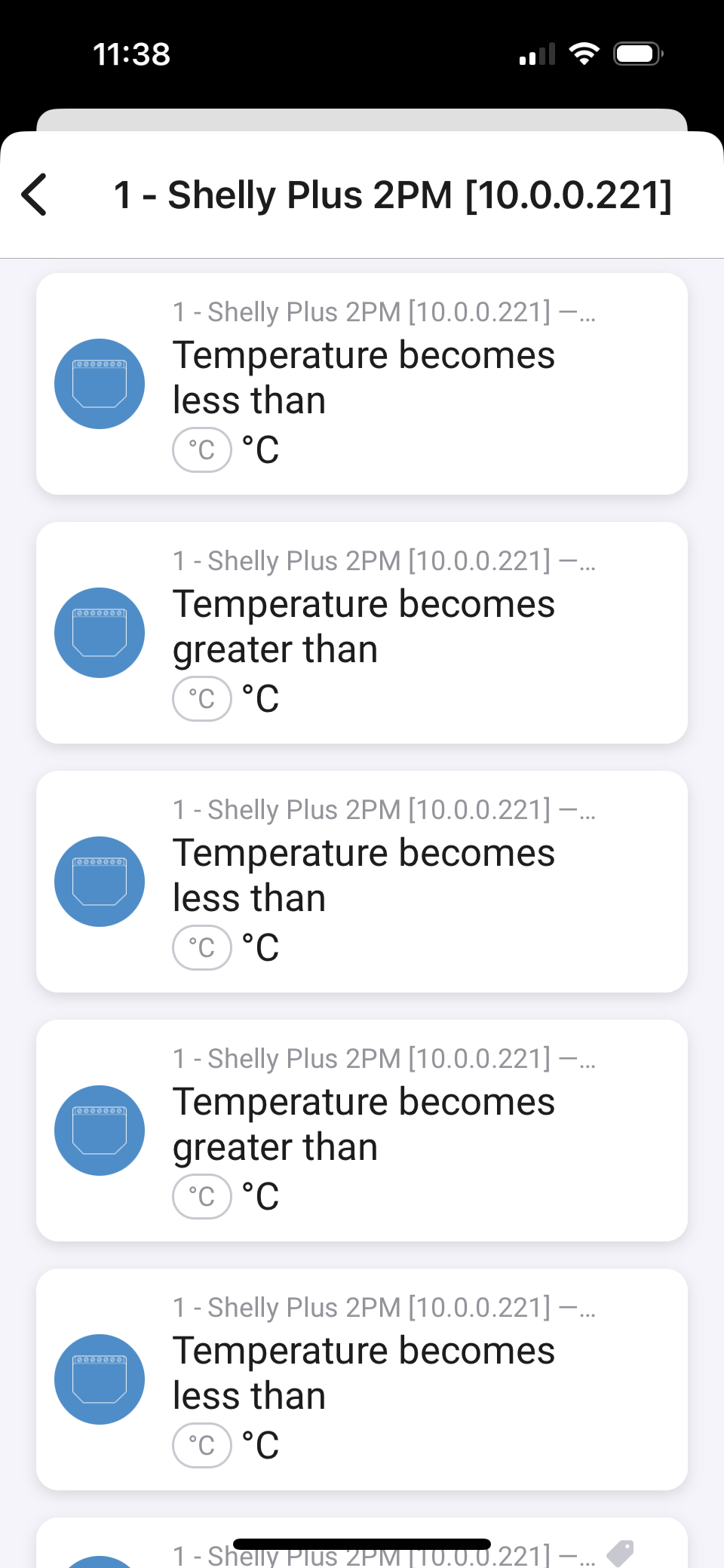
I have a 2PM with sensor add-on and three temp sensors. It works fine in Homey (thanks for the app!) However the event card names are a bit tricky to use as the name does not identify what sensor it is reading, they are named the same:
However the ”has changed” events identifies the sensor:
Would it be hard to have the app show the sensor number in the ”greater/lower than”-events as well?
I’m actually quite surprised the less/more than trigger cards are present for these temperature sensors. Capabilities added through external sensors / add-ons are implemented as a sub-capabilities (for example measure_temperature.1).
The documentation explicitly says Flow Cards will not be automatically generated for sub-capabilities, you should create these cards yourself.. So what I did is create the temperature has changed flow card with the correct reference to the sensor triggering it. I have no control of the availability or naming of any of the other trigger cards for these external / add-on sensors. This is something in Homey core.