Yes, works 
Hi,
I own a Doorbird, obviously, and a Bold Smartlock. Was “tricked” into this combination, because I assumed since both are supported by “official” apps, the basic functions would be available. Turns out that activating the lock by RFID is not possible because RFID is not available as an IF card.
Webhooks should world and one does:
https://webhook.homey.app/xxxHomeyIFxxx/RFID_erkannt?tag=RFID_erkannt
(works)
However, these local Webhooks (which I would prefer) dont´t work:
http://192.168.1.XXX/webhook?events=RFID_erkannt&tag=RFID_erkannt
Http://192.168.1.XXX/api/manager/logic/webhook/RFID_erkannt
http://192.168.1.XXX/api/manager/logic/webhook/RFID_erkannt?tag=RFID_erkannt
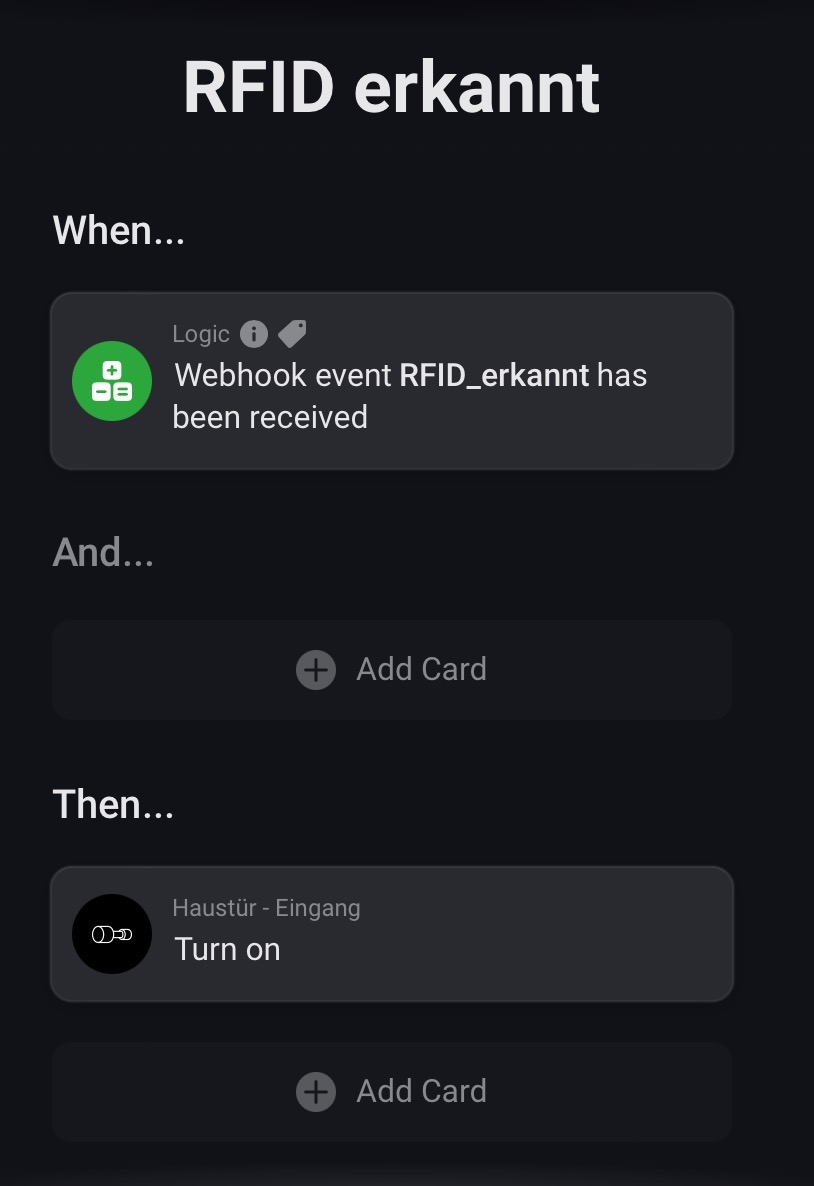
The very simple flow looks like this:
This question doesn’t seem to be related to the DoorBird app. Since I don’t use Homey myself I can’t really help you with a webhook related question. Best is probably too to a separate topic for this question.
Basic functionality for this has now been added with the latest release. It’s not optimal and you will need to follow the instructions from the first post but it works!
Awesome! Thanks for the update and implementation @Phuturist ! I sold my house, but in a near future I hope getting a new doorbird and try your new feature 
Doorbird is not working in homey.
Suddenty not Connected???
Hello,
I just received the Homey Pro 23 and am trying to add my doorbirds to MyHomey.
- I downloaded the Doorbird App
- In the general settings, I need to set up my email ID where I keep on getting an error message. SMTP port 25 or 587 no difference. I think this might have to do with the 2-way security setup, but I have no clue how to solve this while keeping the 2-way security setup (P.S. smtp.gmail.com)
- Going to the devices: I have 2 Doorbirds, and both IP addresses are being recognized! Entering my Doorbird user id’s (not admin) as in my Doorbird app. I get the error message: not authorized user.
As mentioned on that settings page you need to setup an app password when using Gmail.
Follow the pairing instructions. You need to use a user that has the API-operator permission enabled.
Thx!
| Phuturist
February 7 |
- | - |
Harry_Inia:
In the general settings, I need to set up my email ID where I keep on getting an error message. SMTP port 25 or 587 no difference. I think this might have to do with the 2-way security setup, but I have no clue how to solve this while keeping the 2-way security setup
As mentioned on that settings page you need to setup an app password when using Gmail.
- I did notice this link in the general settings, but the link doesn’t react… (nothing happens).
- used your link in this email and was able to successfully add the 16-digit pw and send an email

Entering my Doorbird user id’s (not admin) as in my Doorbird app. I get the error message: not authorized user.
Follow the pairing instructions. You need to use a user that has the API-operator permission enabled.
Visit Topic or reply to this email to respond.
To unsubscribe from these emails, click here.
With the 2 Doorbirds, I could pair with the tickbox off (see picture) using the Doorbird user-details.
- With the tickbox on, I have the error message. Speaking in Doorbird terms, is the API-operator the admin?
- One of the Doorbird has a Door-relais connected. I don’t see these options (it does function in the app so it is activated)

No that’s not the same. As mentioned it’s a manually created user under the maintenance settings of the DoorBird. You only need the admin user to create the user. After (or during) creation of the user you can set the permissions of that users and it needs all but geofencing permissions. When you add the device with a users without these permissions and you do not set the notification schema the DoorBird is pretty much useless within Homey.
One of the permissions that you need to set for the user is the permission to control the relay. Could very well be that without this permission the relay is not visible.
So remove your DoorBirds, create a user with the correct permission and re-pair them again.
February 7 |
- | - |
- With the tickbox on, I have the error message. Speaking in Doorbird terms, is the API-operator the admin?
No that’s not the same. As mentioned it’s a manually created user under the maintenance settings of the DoorBird. You only need the admin user to create the user. After (or during) creation of the user you can set the permissions of that users and it needs all but geofencing permissions. When you add the device with a users without these permissions and you do not set the notification schema the DoorBird is pretty much useless within Homey.
I could generate a new user and log in with that account, with the thick-box ON, successfully.
However, no additional options have been added. E.g. the door-relais option (or live watching) I do not see…
- One of the Doorbird has a Door-relais connected. I don’t see these options (it does function in the app so it is activated)
One of the permissions that you need to set for the user is the permission to control the relay. Could very well be that without this permission the relay is not visible.
So remove your DoorBirds, create a user with the correct permission and re-pair them again.
See above, a new account with all permissions, without geofencing, set… but…
Could you post the output from http://yourdoorbirdip/bha-api/info.cgi while using the credentials you have added the DoorBird to Homey.
Doorbird-P:
{"BHA": { "RETURNCODE": "1", "VERSION": [{"FIRMWARE": "000142","BUILD_NUMBER": "17047230","WIFI_MAC_ADDR": "1CCAE372AA66","RELAYS":["1"],"DEVICE-TYPE": "DoorBird D1101UV-V2A"}]}}
Doorbird-VD:
{"BHA": { "RETURNCODE": "1", "VERSION": [{"FIRMWARE": "000143","BUILD_NUMBER": "16998890","WIFI_MAC_ADDR": "1CCAE3703531","RELAYS":["1"],"DEVICE-TYPE": "DoorBird D202"}]}}
Based on this info the relay should be added just fine. Could you post screenshots of all the different tabs under the device from the Homey smartphone app.


That first slider is to trigger the relay.
Ik zie dat mijn icoontjes nu gevuld zijn met 3 opties met daarbij nu ook de trigger…; super!
Er is wel een live snapshot, maar zou er ook livestream moeten zijn?

Please keep it English. Homey does not support a continuous video stream. You can refresh the snapshot though.
En nog eentje: hoe bedien ik het IR-licht?
English please!
There is an action flowcard for triggering the IR light. Please have a look around, I’m not a helpdesk.
