@Arie_J_Godschalk: I searched the forum but couldn’t find the answer. is it possible to use random timers? if so, how?

@Jux2k2 Do you have a stopwatch PSMaster running after PS_Step_0?
I see inconsistencies when using Start or replace stopwatch. In one flow it works, but when I create a new flow with a new stopwatch, it does not work: when testing I try to run “Start or replace stopwatch Test stopwatch” the flow shows a red failure, but the stopwatch is created with value 00:00 and not running (visible in Settings/Chronograph).

Error: Invalid time
Is it normal?
Update 1: I think I found the culprit. It works well when the name of the stopwatch is without spaces. Weird thing is that it does work for me in another flow.
Update 2: Found it. When the name contains a single space it does not work. When the name contains 0 or more than one spaces then it works fine. 
Is there a way to see Al the timers I’ve set ?
No, not yet, it’s on the feature list.
But currently, all time goes first to getting all apps 100% working with the the Black Puck (a.k.a. HP2023) 
I understand
I was using countdown timers from Jeroen bos but don’t know he will update it to sdk3
The Countdown App from @ralfvd is also very excellent i think.
It’s already updated to SDK3, based on the BLL app and has had some updates recently.
And, in the App Settings, you can edit or view all countdowns that are created through app settings or through flows.
Okay
When you add the function to see all the timers I love yours !
I’ve always used the countdown timer app but I think that one will not supported anymore
Thanks, i’ll let you know. Fortuantly, it’s about the second ticket for chronograph, so shouldn’t take to long.
you have not yet received a request to view the timers in the settings I understand and is therefore a bit more at the top of your list?
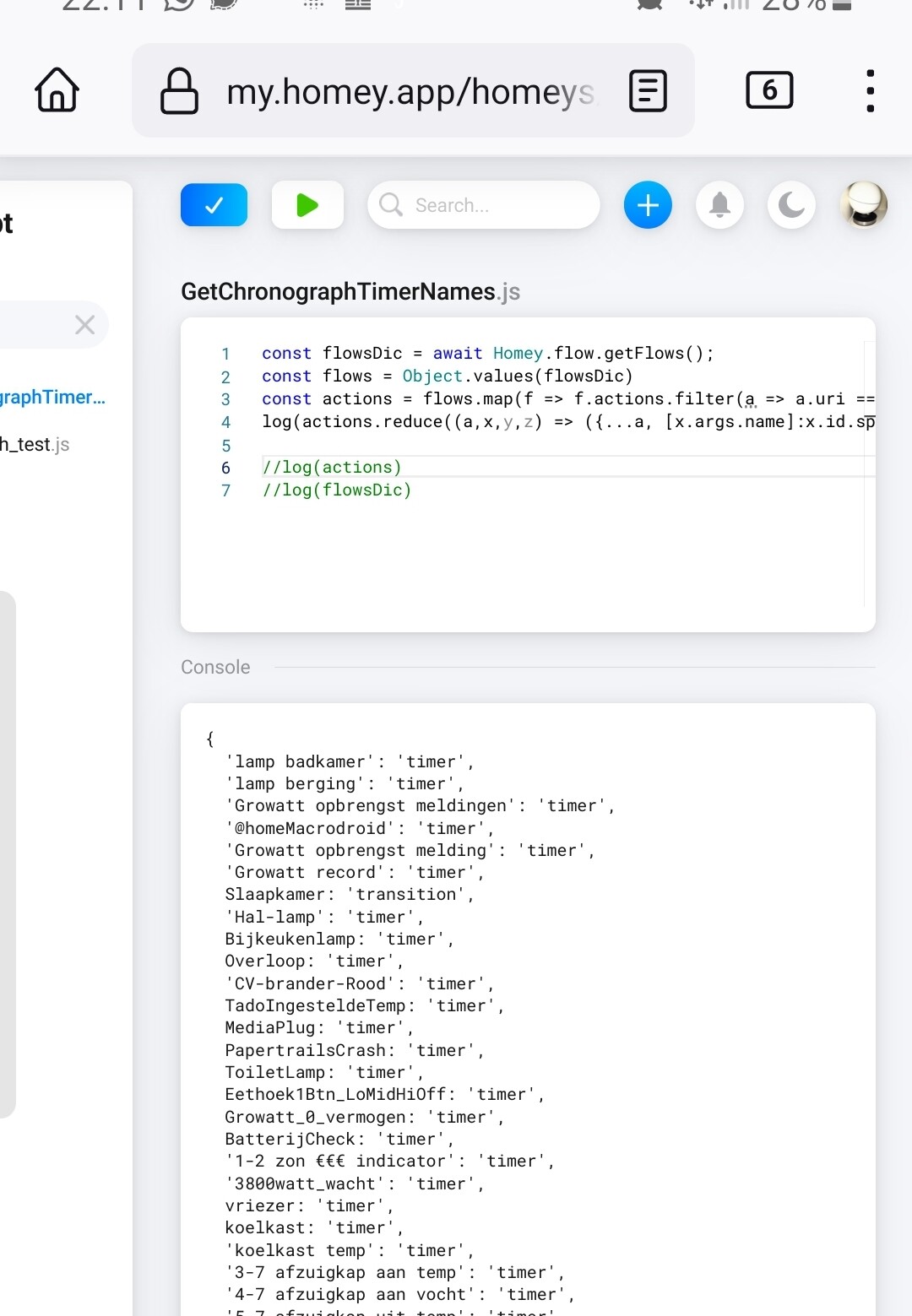
For the time being you can use this Homeyscript:
const flowsDic = await Homey.flow.getFlows();

const flows = Object.values(flowsDic)

const actions = flows.map(f => f.actions.filter(a => a.uri === 'homey:app:nl.fellownet.chronograph')).flat()

log(actions.reduce((a,x,y,z) => ({...a, [x.args.name]:x.id.split('_')[0] }), {}))
Love this! Using it heavily, but I need to convert to text hh:mm or hh:mm:ss which requires me to make more calculations/cards. Is it too much to ask if you could provide in text tags?
You mean to have the duration/elapsed time in hh:mm:ss format, made available as a string tag/token?
I’d like that as well as a feature request.
(I created bitbucket issue #12 for this).
Yes. However, I just found a template in the flow exchanger for time-calculator. It could replace the flow I have for the conversion. Studying it now…am just getting into TEF etc, amazing stuff! Very impressed!
I also found your homeyscript for it (here).
I am not sure which is better/more efficient. So far I managed to stay out of homeyscript in my drive to simplify
I think I would still prefer a text tag directly from Chronograph.
Check.
Now I use a little script to convert elapsed/duration time (in ms) to hh:mm:ss and pass it as text tag (Which you just found  )
)
Trying, but a real first timer with this Homeyscript/TEF.
- I have the script cv_monitor.js in homeyscript.
- I revised the Chronograph flow to test with a stopwatch.
- I created in the same flow a script card with cv_monitor
But I get an error from the DC card: Flow Card not registered (type: action, id: hs_runCodeWithArgReturnsNumber)?
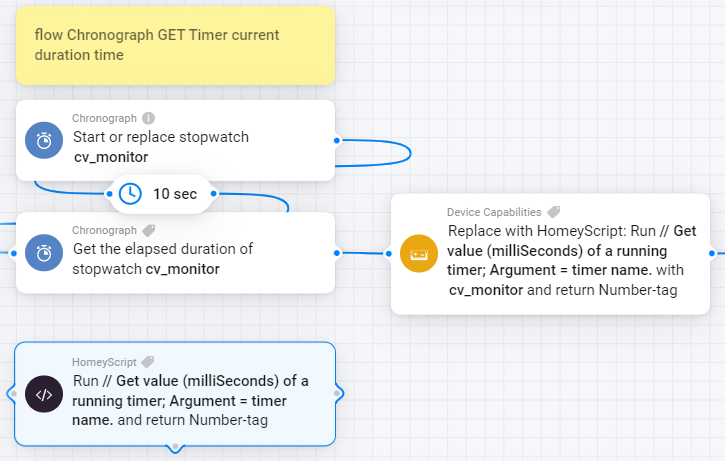
Update: I just found out: replace the fake DC card wiht the HomeyScript card…Apologies
You have to replace the DC card with te HS card.
And the example HS card you show, uses the timer name as argument, this was before Arie made the duration/elapsed time tags available. So with the situation on your screenshot, you don’t need the two Chronograph cards.
Does this make sense as example, now the HS card only converts the [Elapsed] tag to hh:mm:ss in a returned text-tag
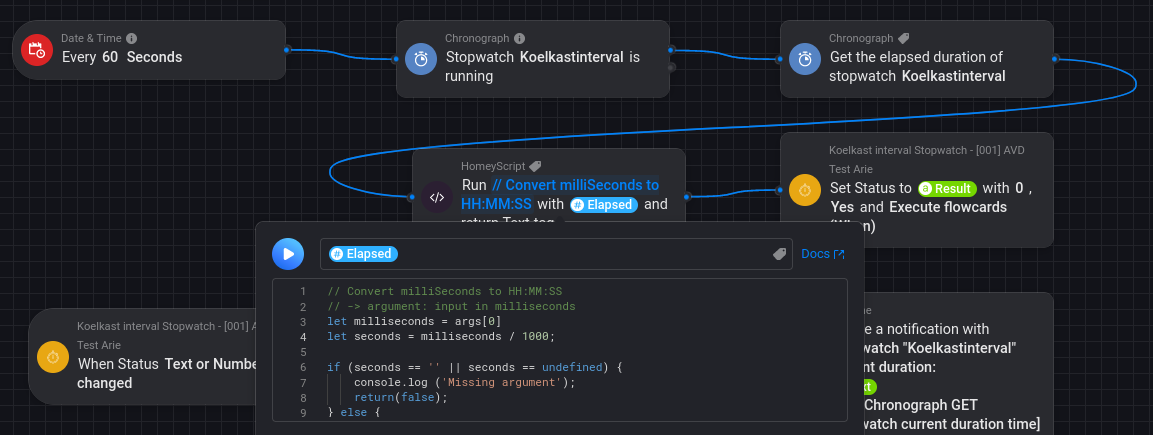
This is the used script:
// Convert milliSeconds to HH:MM:SS
// -> argument: input in milliseconds
let milliseconds = args[0]
let seconds = milliseconds / 1000;

if (seconds == '' || seconds == undefined) {
    console.log ('Missing argument');
    return(false);
} else {
  d = seconds;
  var h = Math.floor(d / 3600);
  var m = Math.floor(d % 3600 / 60);
  var s = Math.floor(d % 3600 % 60);
}
  // Show as 'HH:MM:SS'
  var clock = ('0' + h).slice(-2) + ":" + ('0' + m).slice(-2) + ":" + ('0' + s).slice(-2);

console.log(clock);

return(clock);
Got it, thanks so much!
(I am not sure my comment should be in this thread or elsewhere, apologies)
@Peter_Kawa How can your script be modified to have two (or more) results (tags), for example:
// Convert milliSeconds to HH:MM:SS and HH:MM
// → argument: input in milliseconds
let milliseconds = args[0]
let seconds = milliseconds / 1000;
if (seconds == ‘’ || seconds == undefined) {
console.log (‘Missing argument’);
return(false);
} else {
d = seconds;
var h = Math.floor(d / 3600);
var m = Math.floor(d % 3600 / 60);
var s = Math.floor(d % 3600 % 60);
}
// Show as ‘HH:MM:SS’
var clockHHMMSS = (‘0’ + h).slice(-2) + “:” + (‘0’ + m).slice(-2) + “:” + (‘0’ + s).slice(-2);
// Show as ‘HH:MM’
var clockHHMM = (‘0’ + h).slice(-2) + “:” + (‘0’ + m).slice(-2);
console.log(clockHHMMSS); // HOW TO ADD clockHHMM ?
return(clockHHMMSS); // HOW TO ADD clockHHMM ?
Does not seem to accept time (ms) as input and uses the Better Logic function [Execute BLL Expression (as Tag)] to execute date() to get a start time.
Maybe it is possible to input the milliseconds but @Peter_Kawa 's homeyscript seems sufficient till we can get a text tag from the stopwatch card.

@Peter_Kawa Peter, when you specify the extra tags for hh:mm and hh:mm:ss, please add the name tag of the stopwatch/timer as a request.

