RonnyW
December 2, 2025, 5:00pm
322
I made a quick fix: The app checks now cloud and local storage independent of subscription.
Can you please test if this is working for you?
New test version 2.0.4:
RonnyW
December 2, 2025, 5:51pm
323
If you only want to trigget lights, it would be easier to use a motion sensor. I’m doing it the same at the entrance.
If you want to get instant motion alerts, you can also make a subscription for only one camera. Then you also get a preview image from the motion trigger, ypu can send as push message. I did it for my entrance camera to see who is out there directly in the push message. Using the Blink app you only get the text massage and have to check the video. So it’s a small advantage having a one camera subscription.
I cannot connect my Blink Account in the Blink for Home-App.
RonnyW
December 4, 2025, 7:10pm
325
Which app version are you using?
I have the Version v2.0.3 installed
RonnyW
December 4, 2025, 8:10pm
327
Can you please install the app version again from the app store? We had similar issues causes by a broken update (only parts of the app got updated). This was fixed by Athom. But perhaps you got a damaged update.
Edit: wait, I think I found a possible case in the app. Let me check…
RonnyW
December 4, 2025, 8:32pm
328
Ok, have the issue, too.
Seems to be an error a Blink - or another API change
opened 05:04PM - 04 Dec 25 UTC
**Describe the bug**
Since this afternoon I've been experiencing authentication … errors with blinkpy. Before that my script had been running flawlessly for exactly one month (i.e. with the new auth method), but now there is a token handling problem. Reauthentication fails,
Login via app with identical credentials works without problems.
**To Reproduce**
Steps to reproduce the behavior:
1. Test skript:
````
#!/usr/bin/env python3
import asyncio
from getpass import getpass
from aiohttp import ClientSession
from blinkpy.blinkpy import Blink
from blinkpy.auth import Auth, BlinkTwoFARequiredError, UnauthorizedError
async def main():
username = input("Username: ").strip()
password = getpass("Password: ")
async with ClientSession() as session:
blink = Blink(session=session)
# Nur Username/Passwort, KEINE Token-Datei, KEIN Refresh
blink.auth = Auth(
{"username": username, "password": password},
session=session,
no_prompt=False,
)
try:
print("Calling blink.start() ...")
await blink.start()
print("blink.start() returned without raising.")
except BlinkTwoFARequiredError:
print("2FA required, calling blink.prompt_2fa() ...")
await blink.prompt_2fa()
print("2FA flow completed.")
except UnauthorizedError:
print("UnauthorizedError raised by blinkpy (invalid credentials / token flow).")
raise
except Exception as e:
print(f"Other exception raised by blinkpy: {e!r}")
raise
print("Login completed without exception.")
if __name__ == "__main__":
asyncio.run(main())
````
2. Login with username/password
**Expected behavior**
Should have asked for 2FA
**Home Assistant version (if applicable):** <HA Version Number>
**`blinkpy` version (not needed if filling out Home Assistant version):**
0.24.1
Python 3.11
raspbian bookworm
**Log Output/Additional Information**
```
Username: c****
Password:
Calling blink.start() ...
Unable to refresh token. Invalid refresh token or invalid credentials.
UnauthorizedError raised by blinkpy (invalid credentials / token flow).
Traceback (most recent call last):
File "/opt/blinkctl/./test.py", line 43, in <module>
asyncio.run(main())
File "/usr/lib/python3.11/asyncio/runners.py", line 190, in run
return runner.run(main)
^^^^^^^^^^^^^^^^
File "/usr/lib/python3.11/asyncio/runners.py", line 118, in run
return self._loop.run_until_complete(task)
^^^^^^^^^^^^^^^^^^^^^^^^^^^^^^^^^^^
File "/usr/lib/python3.11/asyncio/base_events.py", line 653, in run_until_complete
return future.result()
^^^^^^^^^^^^^^^
File "/opt/blinkctl/./test.py", line 26, in main
await blink.start()
File "/opt/blinkctl/venv/lib/python3.11/site-packages/blinkpy/blinkpy.py", line 133, in start
await self.auth.startup()
File "/opt/blinkctl/venv/lib/python3.11/site-packages/blinkpy/auth.py", line 180, in startup
await self.refresh_tokens()
File "/opt/blinkctl/venv/lib/python3.11/site-packages/blinkpy/auth.py", line 144, in refresh_tokens
self.login_response = await self.login(refresh=refresh)
^^^^^^^^^^^^^^^^^^^^^^^^^^^^^^^^^
File "/opt/blinkctl/venv/lib/python3.11/site-packages/blinkpy/auth.py", line 122, in login
raise UnauthorizedError
blinkpy.auth.UnauthorizedError
```
RonnyW
December 5, 2025, 3:27pm
329
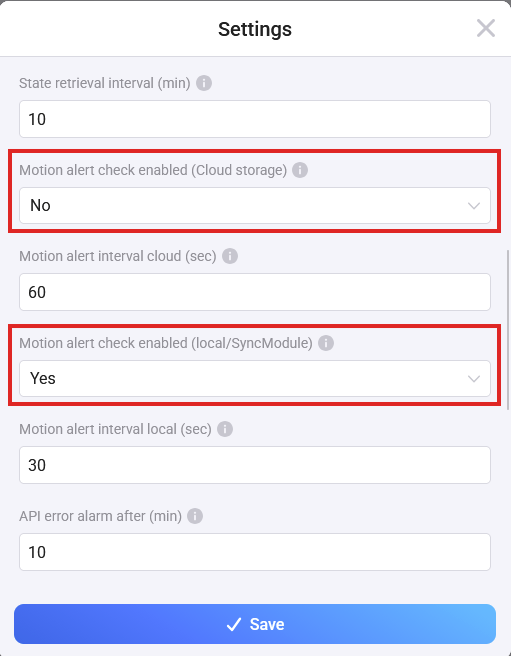
New test version 2.0.4 :
addes setting for local/cloud video check in account device settings
The previous version only had one setting to activate/deactivate video check. The decision between cloud and/or local was done based on an active subscription.
The possible subscriptions are not clear atm. So I added a second setting to control both video checks manually.
Please deactivate the one you don’t need. If you have a partial subscription (camera based, not all cameras) and you are using cloud and SyncModule , keep active both.
PS: This update does not solve the Blink API issue
RonnyW
December 7, 2025, 9:31am
330
Blink changed the API again (or blocked auth URLs beside oAuth).
I have to check the update of BlinkPY. It seems, the app had to “simulate” the auth screen. I can start to implement a fix in a week…
If you are already logged in: don’t re-auth. The token refresh should work.
If you can’t log in: Please wait for a fix.
I have installed in my Homey Pro
I have a Blink account and cameras
But when I try to add my account it fails
The account is active I confirmed my password.
Any ideas or advice please?
RonnyW
December 12, 2025, 10:33pm
332
Please use the app thread
Blink changed the API again (or blocked auth URLs beside oAuth).
I have to check the update of BlinkPY. It seems, the app had to “simulate” the auth screen. I can start to implement a fix in a week…
If you are already logged in: don’t re-auth. The token refresh should work.
If you can’t log in: Please wait for a fix.
Thanks. I thought it was just me
Look forward to the fix
I received the follwing Message in the Timeline this Morning:
The message is saying that the Blinkapp is updated, but when I Look to the App, it is not updated.
RonnyW
December 15, 2025, 6:31am
335
That’s still the information about the last API change. It comes up on app restart.
RonnyW
December 18, 2025, 6:31pm
337
Short update…
I got implemented the half way. I’m using BlinkPY as blueprint. But BlinkPY seems to use auto http cookie handling. Something I had to add to my JS code.
I have some other pre XMas work to do and can continue next week.
Stay tuned. And sorry for the delay.
Suutje
December 23, 2025, 1:01pm
338
App keeps on telling me that my credentials are incorrect, although I double checked twice with the original app.
Any idea what might cause the issue?
Thanks
Bonjour,
Je viens de migrer de Homey (2018 vers 2023).
La restauration des paramètres, connexion avec les appareils s’est bien passée sauf avec l’appli Blink.
J’avais des triangles rouges sur chaque appareil Blink ainsi que sur le compte.
J’ai essayé de réparer sans succès.
J’ai donc supprimé tous mes appareils Blink et tenté de recréer les appareils.
Après la saisie des identifiants, j’ai un message d’erreur
J’ai modifié le mot de passe Blink (la connexion avec l’appli Android est ok) et retenté sur Homey mais toujours pas bon.
Pourriez-vous m’aider svp ?
Dans l’attente de votre retour, je vous remercie par avance
Bien cordialement
RonnyW
December 23, 2025, 2:10pm
340
@Christophe_GARCIA @Suutje
Please read some posts back. And please keep this thread in english
Suutje
December 23, 2025, 4:42pm
341
Thanks for the hint. Will try again after Christmas