I will take a look at it. But it’s the standrad NodeJS date localization.
Hi @RonnyW i missed completely the update. Yes I am going to test very soon! I will keep you posted
OK I tried, and now I got this error:
Error storing SMB: exportVideoSmb(): Error writing file 2025-07-2508-36-51poopcam.mp4: object Object
Diagnostic Report: 5555b45b-627c-46a4-9f2e-3b3751473b7b
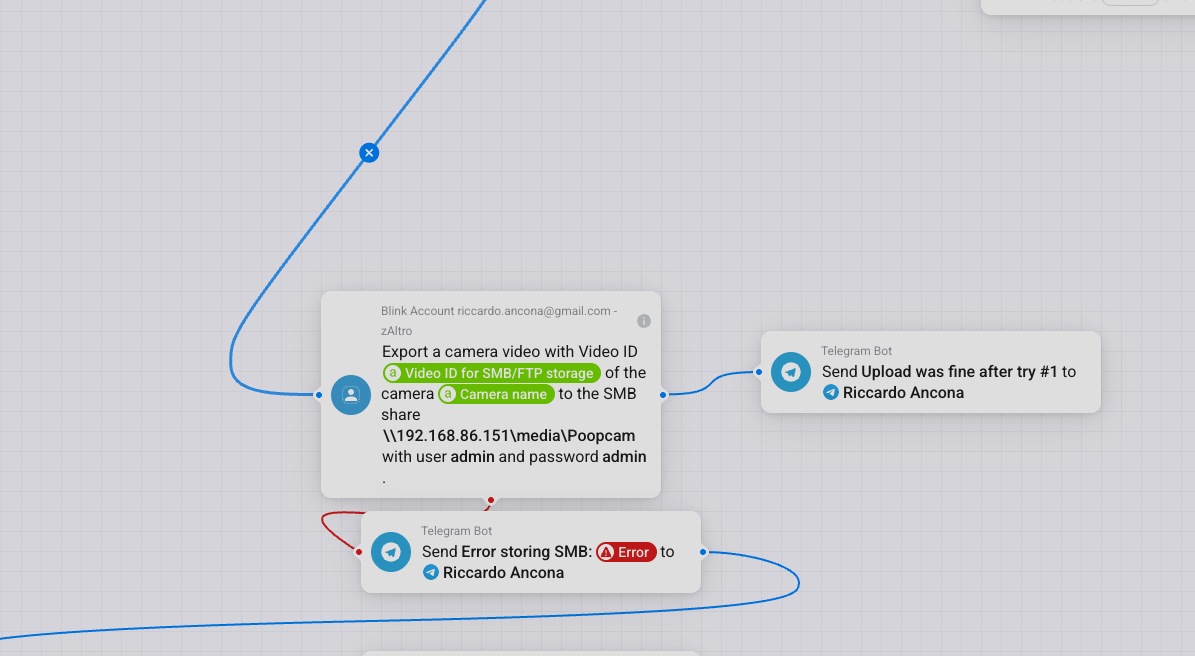
Is it working without folder?
The error message includes an object instead of string. We can’t see the message in that case. I will check if I can reproduce the error.
Now it starts to work! I don’t know why but I never had the same issue. Between some 404, 409 now it manages to upload succesfully.
Do you know how it could somehow handle a “queue” of event, dequeueing them every N seconds, so that I keep all events and I don’t occur in simultaneous writing that usually lead to 409?
Hello,
I am using a Homey Pro 19 and the Blink system with Sync Module V2, local storage via USB.
I have very often the problem that I want to activate / deactivate the system when last person is leaving / first person is coming home - but the system is shortly after trigger via flow changing back the status. Can someone help me?
Thanks a lot

Just received this message from blink . With older version they must be referencing to the blink app and the agent version it sends to grab data I guess
| **Update your Blink app
| and mobile device** |
|---|
| Please read this important update about your ability to access your Blink system via the Blink Home Monitor app after September 29, 2025. |
| undefined |
| Our records indicate that one or more of the mobile devices linked to your Blink account is using an outdated version of the Blink Home Monitor app on an older operating system (OS). Please ensure your mobile device’s OS and app are updated to avoid losing access to your Blink system. |
| undefined |
| What is happening? |
| undefined |
| On Sep 29, 2025, Blink is making several changes that may impact your ability to access the Blink Home Monitor app: |
| undefined |
| undefined |
-
The Blink Home Monitor app will only be supported on the following mobile operating systems:
-
Apple’s iOS 15 and above
-
Google’s Android 9 and above
-
Amazon’s FireOS 7 and above
-
-
While your Blink system will continue to operate normally, older versions of the Blink Home Monitor app will need to be updated before you can access your system, including Live Views or Clip Lists
| How does this potentially affect you? |
|---|
| After Sep 29, 2025, if you are using an older version of the Blink Home Monitor app, you will be required to update your app to the latest version before accessing your Blink system. |
| undefined |
| If your mobile device is also using an unsupported version of iOS, Android, or FireOS, you will need to update the operating system before you can update your Blink Home Monitor app. Depending on your mobile device’s operating system support policy, older devices may not be able to upgrade to a supported operating system. |
| undefined |
| If your device is unable to meet these requirements, we recommend using the Blink app on a different device. If you are no longer using the device, you can manage, add, and remove mobile devicesfrom your Blink account. |
| undefined |
| While we recognize the inconvenience this may cause, please understand that this decision was made with the best interest of our millions of customers in mind. Many older devices cannot support the features and security requirements necessary to ensure that we are delivering the best overall experience for our customers. |
| undefined |
| You can find instructions on updating your mobile device’s operating system at the following pages: |
| undefined |
| undefined |
| You can update your Blink app to the latest version by selecting the appropriate option from the links below: |
|---|
| undefined |
| To learn more about Blink’s minimum supported mobile operating systems and for links to the latest app versions, please visit our support page. |
|---|
I got this, too. I have to check the code. If I remember right, the app is doing http requests simulating the Blink app.
Bad side: Android doesn’t allow usage of own certificates since some years. That makes it hard to track https traffic.
I Think / hope that the only thing thats needed to change is the agent reference for the http requests / api logon.
I used the fiddler certificate just a few weeks ago to capture the undocumented api of the Naturella and the WifiPool apps . I had no issue accepting the fiddler certificate on android or ios to have it act as a proxy to capture . Its amazing if you just capture all traffic from login to every function and you give the capture to chatgpt with the timeline you did all the functions in the app how it builds a complete API documentation in a minute.(or 10 when chatgpt has its off day  )
)
I used a network sniffer on Android that exports a wireshark file. That way it was easy to log traffic from one app only. But that does not work anymore.
Now you have to use external tools/server 
Take a look at fiddler . Its a 2 minute setup.
Install it on pc/mac add certificate to phone and set proxy server to the ip you have installed fiddler on.
And that’s not possible for unrooted Android afaik 
The Homey app does not provide an app version. I could add a version…but the mail sounds more like an API change.
The Blink app uses a reverse engineered API. And if Blink changes basic REST endpoints, then I would expect that the app does not work fron 29.09.2025 
Hello RonnyW, are there any news about the “Blink for Home” App in Homey? I use your app and am very happy with it. This morning there was a failure while “deactivate” the system, but activating a little later worked fine. Have I still to expect that the app will stop working soon? Thanks for your app and your engagement
Blink app is still working 
So the forced app update is caused by something else.
The access to the system/SyncModule can be interrupted if SyncModule or camera is in use. You can check the error code and the help in account device settings. http 409 = device is in use.
from a few hours i get invalid credentials…error 426
Me too
Habe seit heute auch das Login Problem in die Blinkt App (Anmelde Fehler error 426. )
I also got http 401 unauthorized.
