Maybe you can check Insights. Maybe then you can find out if you have changed something, e.g. Homey firmware update, something at the WLAN network etc.
Are the temperatures updated in the official BleBox app? What FW do the sensors have? Which Homey do you use with which FW?
I have just one temperature sensor but it works flawless.
I can’t catch the problem. I have the 2023Homey latest 10.0.8 fw.
The tempsensors are different HW and FW versions but no one from the 8 refreshes. In the Blebox app is everything running well.
I tried now to delete one tempsensor and add it again and now the Homey can’t find the deleted tempsensor…
I restarted the app restarted the tempsensor but Homey don’t find it again
Finally after restarting everything several times Homey found the deleted device and after adding it the other tempsensor refreshing it’s temperature again. Don’t know how and why but hope it will be ok now.
@Tomasek_Severa - from what you write it seems that it was a network related problem - Homey didn’t see the temp sensors. The question is - what finally helped? Maybe you restarted the whole Homey and it helped?
And - next time - before you restart the app, please send me a diagnostic report. Maybe there will be something interesting.
Hi
I recently got two sensors and they are working very well, seems like this could be a good option to the zigbee problems I’ve been having lately…
However, as i was troubleshooting another issue, I noticed that the app was generating a CPU load of ~4% consistently. I then set the polling interval to the max allowed, 60000 ms, which made a big difference. Still, polling a thermometer, much less a moisture sensor, every minute is way too often for my needs for simple building automation - could we have the polling interval increased to a much longer period (probably i would use 5…15 minutes for most cases, I’m sure anything up to an hour might be useful for somebody).
Hello,
Which HomeyPro version do you have? I’ve got 2019 with around 30 BleBox devices and I can see load of around 0-1% in total for the app (all pollings set to 1000ms)… I’ve had one info about 2023 HomeyPro and high CPU load, so I’m wondering if it’s not a HP2023 problem…
I’m on HP2023, yes.
Here’s a screenshot of the CPU load from the start (I can’t figure out if I could get a specific date, so this is a little unclear) - from (1) you can see the load lessening, when I adjusted the polling to 60000ms.
The lower graph is the latest hour. To be frank, this seems very different from the log from when I worked on the polling interval (shame I didn’t screenshot it then), the 10% spikes now show on most of my similar sensors (Aqara, Shelly…), and their scale seems to obscure the <1% levels entirely. I’ll see if I can get the logs out in text format…
Oh, right, I needed to reboot on 13.10.2023, so I don’t have anything in the logs from before then…
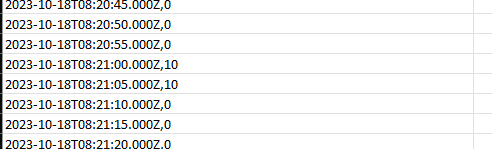
In the hourly log the info is now just zeroes apart from the spikes ~35 minutes apart, where the load is 10% for roughly 10 seconds (the resolution of the log is 5 sec), like so. So I don’t know if the logging has changed in a recent Homey update, or what’s going on, many apps now give me a similar CPU load log.
Hi Piotr!
As Simon 54 switches are using BleBox app to control, is it possible to connect them to Homey Pro? Maybe you have some information about that?
„Cóż za przypadek” congrats! Now I can change my vintage Simon 54 switches (4 months old) into the GO version and sleep peacefully knowing that they will work along the Homey Pro will Homey put them into Apple Home as well?
I didn’t try yet, but I think - yes. All BleBox devices worked with experimental native Home Kit integration and also with HomeyKit (now HomeKitty), so Kontakt-Simon should also work.
I’m trying to connect the Blebox tempSensor to Homey Pro. But the homey cannot find it.
Have installed wBox app on computer and linked the sensor to the same 2.4 Ghz network that the Homey Pro is using. In wBox everything works fine. Did also install a wifi socket to the Homey without no issues.
Does anyone have any ideas what could be causing this? Any help would be greatly appreciated.
Hello,
Please check your router configuration. mDNS-SD is required for BleBox devices to be found by Homey. If Homey is in the same LAN as your BleBox and can’t find it - it’s most likely that your router cuts off mDNS-SD.
I’m also trying to add a Blebox tempSensor to Homey, but it can’t be found. I also have no clue if ‘mDNS-SD’ is supported or enabled on my TP-Link Deco XE75… I haven’t found a setting in the Deco settings for this so far…
I got an info that there is a new version of tempSensor - maybe it behaves differently than v1. Please invoke in a web browser http://IP/info - where IP is the ip address of your tempSensor. Please send me back what you get in the browser.



 congrats! Now I can change my vintage Simon 54 switches (4 months old) into the GO version and sleep peacefully knowing that they will work along the Homey Pro
