Hello,
Please issue in the web browser: http://IP/info - where IP is the IP address of your switchBox Light and send me the result.
Hello,
Here is the result:
{"device":{"deviceName":"Overkapping Sonos spanning","type":"switchBox","product":"switchBoxLight","hv":"s_swBL.1.0","fv":"0.1021","universe":0,"apiLevel":"20200831","iconSet":59,"categories":[3],"id":"4a3fdac4b334","ip":"192.168.1.56","updateRequired":1,"availableFv":null}}
Eric
It looks like it is a supported version. Did you try to update it? I can see: “updateRequired”:1
Yes, I tried to update it a lot of times.
Every time it says “update succeeded” but the update keeps being mandatory.
I also tried to update it through de webserver with the ota/update command, but same result.
Turn de power of for 1 minute did not help either
Eric
Newest result…
{“device”:{“deviceName”:“Overkapping Sonos spanning”,“type”:“switchBox”,“product”:“switchBoxLight”,“hv”:“s_swBL.1.0”,“fv”:“0.1021”,“universe”:0,“apiLevel”:“20200831”,“iconSet”:59,“categories”:[3],“id”:“4a3fdac4b334”,“ip”:“192.168.1.56”,“updateRequired”:1,“availableFv”:“0.1021”,“lastOtaSuccess”:1}}
So it’s on 0.1021 and available FW is 0.1021?!??
Weird behaviour, but I don’t think it’s a problem. Please generate Diagnostic Report for BleBox app in Homey mobile app - I’ll try to check if there’s any error.
Hello,
Quick question: will ShutterBox 230VAC works well with external shutters with slats (lamelas) based on this motor: Somfy J4WT Protect (4 wires: up, down, N, PE)? (Without any control unit from Somfy)
I have more then 10 shutters with slats and I want to be sure to buy proper motors compatible with Blebox.
Of course, I want to have as well physical buttons close to each window.
Additional question: will I have indicator of current position of slats and/or shutter itself?
Thank you in advance for quick reply.
BR,
Mateusz
Try asking on the official BleBox Facebook group - the producer representative should be able to answer you.
Hi,
is it possible to create a widget?
I use AirSensor, the information provided by the device directly on the local page would be great to have in the form of an identical widget

ChatGPT created this “application” in 5 minutes - of course, it requires some reviewing, as we all know how to he prepare the code… but it’s always a helping hand 
so maybe it would be possible to do it? 
What do you mean by “a widget”?
sorry for the late reply.
I understand it as the possibility of observation in the same shape as presented on the local device page or on manufacturer’s website in the “Air quality” section for the selected device on the map in the homey dashboard
instructions for switching to the dashboard and adding a “widget”
https://support.homey.app/hc/en-us/articles/16732145289116-Creating-Homey-Dashboards
I took a screenshot of a sample dashboard and added an image from the map as a “widget”
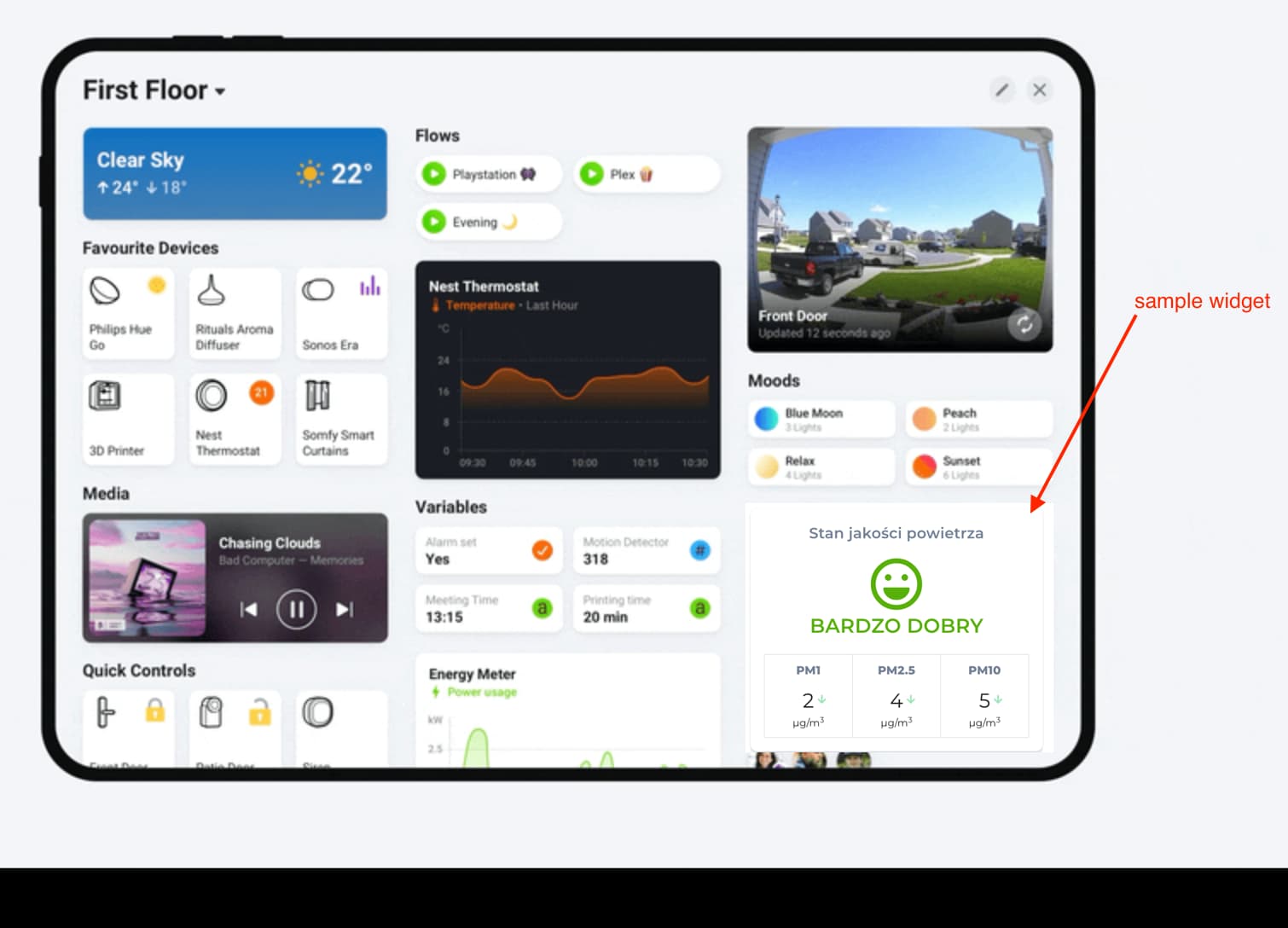
OK, I get you. At the moment I don’t plan to make any dashboard widgets (no free time for that).
I received the BleBox TempSensor Pro today. Unfortunately, I have been unable to add it to Homey, both the 2016 and 2023 models. However, the sensor works perfectly fine in the official BleBox Android app.
After many hours of trial and error, I discovered that I have the BleBox TempSensor Pro v2. Before providing further details of the solutions I tried, I would like to know if the TempSensor Pro v2 is officially supported by the Blebox app for Homey. I already have a standard BleBox TempSensor added to Homey (2023 model), which also shows as v2, although this is not explicitly mentioned on the BleBox app page (Link). Notably, some devices on the BleBox app page do specifically indicate “v2,” which is why I am a bit uncertain.
I added the device details from the BleBox Android app below.
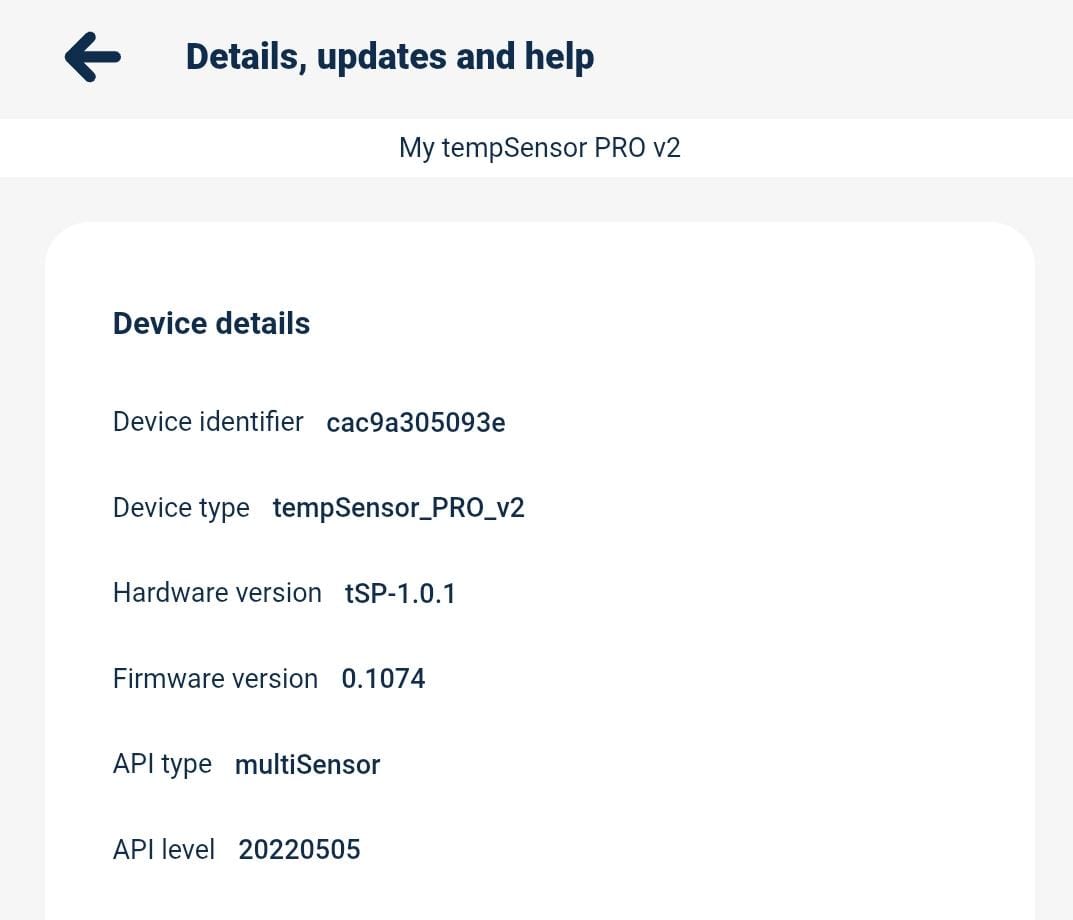
It looks like they changed device type - previously it was tempSensorPro_v2, that’s why Homey didn’t recognize it. I’ve made a little fix, please check the new test version here: BleBox | Homey
Thanks a lot for the quick reply! I downloaded the new experimental BleBox app and it is working perfectly fine now, even with both 5 and 2.4 GHz Wifi on in a mesh network it was possible to add the Blebox Tempsensor Pro.
Thanks again and keep up the good work!
That’s great!
Hi
I hope you can assist me with an issue I’m having integrating my blebox Saunabox into my Homey Pro smart home hub.
The physical installation of the Saunabox is complete, and it functions perfectly using the original blebox mobile application. For the Homey integration, I successfully added the device by entering its local IP address.
Currently, Homey is correctly receiving data, such as the temperature, from the Saunabox, and these readings are accurately displayed within the Homey app. The main issue, however, is that I cannot control the Saunabox via Homey. Any attempts to send commands (e.g., turning on/off or adjusting temperature settings) result in no action on the device.
I would appreciate it if you could provide information on which specific settings or configuration steps are necessary—either directly on the Saunabox, within the Homey blebox app, or in the Homey device settings—to enable full two-way communication, specifically the control function. Is there a particular API endpoint or local network setting that needs to be enabled or adjusted for Homey to successfully send control commands?
Thank you for your time and support!
Hello,
First of all - please check if your saunaBox has the latest firmware - maybe it needs an update. Also I assume your saunaBox has a static IP that does not change. The driver in homey uses just 2 endpoints to send commands to saunaBox - http://IP/s/t/TEMPERATURE (where IP is the IP of your saunaBox, and TEMPERATURE is the temperature in Celsius) and http://IP/s/ONOFF (where IP is the IP of your saunaBox and ONOFF is 0 or 1 = OFF or ON). You can try to call those endpoints in the web browser if they are working.
Last thing - you can send a diagnostic report from the app - I will receive it and I can look if there are any errors in the logs.
Herr is the Report of the App
27148671-23dd-4b66-b0a8-7c62360381dd
send commands via ip adress is working
