In the meantime, Claude.ai solved the issue - apparently, it had something to do with certain characters . Here´s the code snippet that solved the issue:
it is unclear from the comments and instructions what is the correct sequence of things to do to install properly. I can see that the following is clear.
Flash your Ulanzi TC001 clock with the AWTRIX 3 Firmware. This is fairly straight forward and can be done at AWTRIX 3
Once Flashed connect to the awtrix_xxxxxx Wireless Network and login with password 12345678
Once Logged in on the SSID awtric_xxxxxx network connect to http://192.168.4.1
Once connected to http://192.168.4.1 enter your Wireless SSID and password. This will connect the Ulanzi TC001 to your home network. After it reboots you can connect directly to the Ulanzi’s new IP Address.
The things that are not clear
Do we need to install an MQTT Server/Broker? If so can we use either the Server/Brokers available (MQTT Server by Emile Nijssen or the MQTT Broker by Menno van Grinsven), if you can recommend one it would be great (again if needed).
If we only install the AWTRIX Homey App by Radovan Kepák do we need a Broker/Server above?
Finally if only the AWTRIX is needed dow we need to fill out the MQTT section on the Ulanzi’s web interface? And if we do how do we get the IP address, Port and username and password needed?
No. You connect to your Ulanzi device by providing the IP and user name/password that you created for logging into the web configuration page of the Ulanzi. I am not sure anymore, but if I recall the app finds the Ulanzi clock on the network and you even don’t have to provide the IP manually .
I guess i could write some manual and yes, app will find clock itself by mdns, only user/pass is not implemented in setup process, i should look at it, and buttons in when, but i have working concept with these…
About mqtt, my app communicate directly via http, so no mqtt needed
Hi! I have a couple of Awtrix devices (formerly Ulanzi TC01) and love them! But now I ran into a problem: all of a sudden the Awtrix devices will not show custom apps or sticky notifications anymore….
I have set up the displays with the top buttons to always/only show the time, which they do fine. I then use two flows to display extra information: 1 display works as a P2000/emergency services pager display (showing messages from the fire department) for 30 seconds as sticky notifications (which get dismissed after 30 seconds. The other display will show the current dynamic energy price as a custom app, which gets updated every 15 minutes as energy prices change.
These flows worked just fine yesterday, but now no display of information. What does work is the playing of ringtones, so the connection between Homey Pro 2023 and Awtrix works. When testing the sticky notification flow, it looks like the text is scrolling really, really slow (like 1 row of pixels per many seconds) sometimes (in stead of not showing anything).
What did I try already (and did not resolve the problem):
restarting both the Awtrix ESP’s from the webGUI
restarting one Awtrix by powercycling it with the top buttons
re-updating the firmware on one Awtrix with the (already installed) 0.98 firmware from the webGUI
restarting the Awtrix app in Homey, version is v1.3.8
restarting the MQQT server v1.1.0 in Homey (although the Awtrix app probably does not use it, but it is part of the Awtrix config)
restarting the Homey v12.10.1 from homey.app (and waiting patiently untill all apps were up again)
What else can I do to fix this or troubleshoot things? The displays make a great clock, but I would also like to show more info at times.
i would not connect awtrix to mqtt and homey via tcp at same time to be honest, as it can be unpredictable in race conditions…
Try to create flow that send some text to awtrix and see if that works for you. We can always try to create diag report and try to send request via postman to verify it. I do not see any update from awtrix lately, so there should be no issue
If I run a test, I see the animated flow run just fine and the Play card works like a charm. Notifications on the timeline also run fine. But I experience more strange things, like the Philips Hue app stopped working suddenly, after a restart it is working fine.
This might be a Homey thing, instead of an Awtrix thing… It should not be a diskspace thing, since there is free space there (845MB of 2.66GB available). Memory is 206MB of 1.99GB available + 937MB Swap, so should also not be a problem. Even CPU is at max 40% over the last minute (due to getting all the usages, I guess) and less than 30% over the last 15 minutes.
BTW, I am not connecting Awtrix over MQTT and Homey via TCP by choice, I just installed the Awtrix display and one of the config things was MQTT. I installed the MQTT server, added users for both displays and filled in the homey IP and default ports in the Awtrix webGUI. And everything worked. I can remove the MQTT config in the Awtrix to test, but it worked fine yesterday.
As @SunBeech wrote, my app is not using MQTT to communicate, it uses directly TCP. If you create new flow, only with send message, try to use just simple text, color, no more data, and check what happend…. If it will work, we can speculate about data or awtrix set… there may be even issue with Awtrix, i am trying not to use permanent stuff to not break ROM (Ulanzi uses poor chips for ROM, so it have limited number of writes), Blueforcer (author of Awtrix firmware) told me it is best to not write on it and keep all data in memory only
Okay, removed the MQTT Server app and removed any field content on the MQTT page of each Awtrix. After saving blank fields I can now only configure an MQTT server, all the other fields are gone. Restarted both the Awtrix app on Homey and each Awtrix. No changes in behaviour, Play works fine, Sticky Notification doesn’t or is very very slow. The Custom App is also very slow, but shows on the display after a (long) while. It then does not switch back to the time display though.
It looks like the Awtrix itself is running into limits, as I can also not use the top buttons, at least they only react after at least 30 seconds or so. Unworkable… Lucky the power off an on combination still works. Is there a way to monitor this? No option in the webGUI.
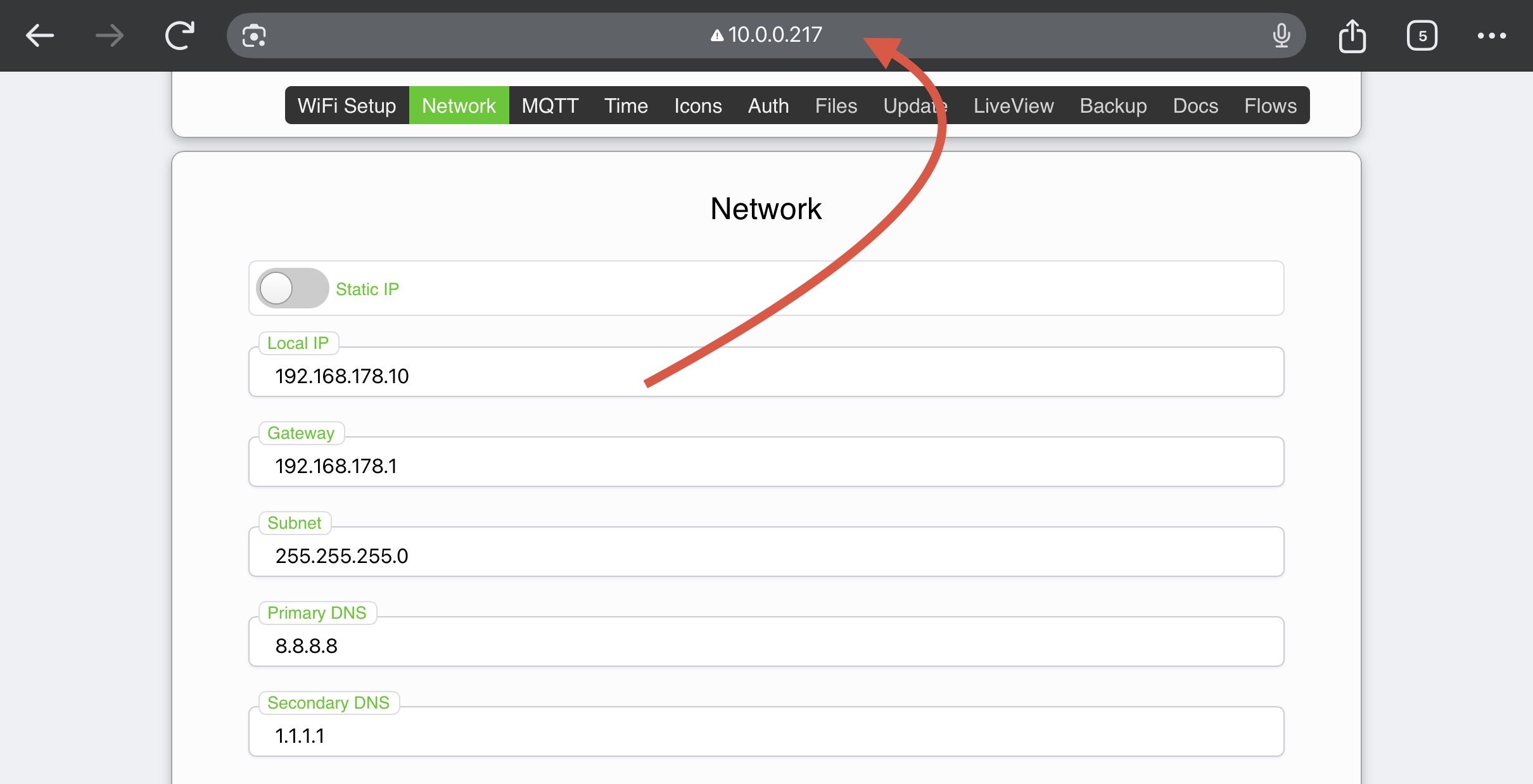
I did find something strange in the Network config of the Awtrix: even though set to DHCP and getting a valid IP from my Unifi network and being reachable on the reserved IP, the field on the Network page show something quite different (192.168.178.x instead of the 10.x.x.x address it uses). I also changed that to the correct values, but still not enabled Static IP (since it will get a reserved IP by DHCP). Did not help though. Did not expect it to work, since the Play card works fine, so the Awtrix is reachable by the Awtrix app.
I don’t think this is causing your problem. In my case have similar values. My Ulanzi has a reserved IP address. The values in the web interface are, I believe, default values used, if you enable the static IP toggle. If you use DHCP, then your DHCP server provides the IP and DNS addresses.
I did a factory reset, used the AP Mode to input the Wifi connection and after a restart it was back on the network with the same IP address (because DHCP reservation ). And the behaviour did not change… No response from the top buttons, reaction to any change in the display content is very, very slow and as an example the time lags several minutes behind if the clock is visible.
And no, no other flows are flooding the display with notifications. It shows the clock and a pager message once in a while for display 1 and the time and the new power price every 15 minutes. Thats it.
Just checked the Timeline in the app: Flow Checker also reported various flows that use the display now as broken (flows notify me if the washer or dryer is finished, so max 1 notirifcation daily for each). Flows are fine at the moment, so maybe the displays went into error mode on the Homey and that caused the flow to be broken.
And out of the blue, both displays became responsive again… Both had more of the standard apps enabeld, but I could turn them off via the buttons again. So problem went away…
Strangely, I only factory reset display 1 and that did nothing for the problems. The last thing I did was upload all icons again and then an ESP restart. Display 2 I did not touch all the time…
Still puzzled why this happened… But hope that it will never happen again. But I suspect the Homey to be the culprit, since display 1 and 2 both went slow at the same time and went normal again at the same time, while I only was trying things out on display 1.
Better make a backup of the Homey soon, as I have a lot of flows I do not want to lose.
Well, I pay homey cloud backups, it is cheap, backup every day, and I belive Athom deserves the support, have Homey Cloud Backup pre-paid like 10 year in ahead already
 .
. and yes, app will find clock itself by mdns, only user/pass is not implemented in setup process, i should look at it, and buttons in when, but i have working concept with these…