The issues remain over here, already contacted the developer but they are blaming Homey or that I altered too much on the Evohome side…
Never ever had issues with the old in the meantime deleted community app.
The issues remain over here, already contacted the developer but they are blaming Homey or that I altered too much on the Evohome side…
Never ever had issues with the old in the meantime deleted community app.
Noticed had issues too
At this moment its working again.
What I did to fix it
Probably since the Update to 1.9.1 of the Honeywell Home evohome app,
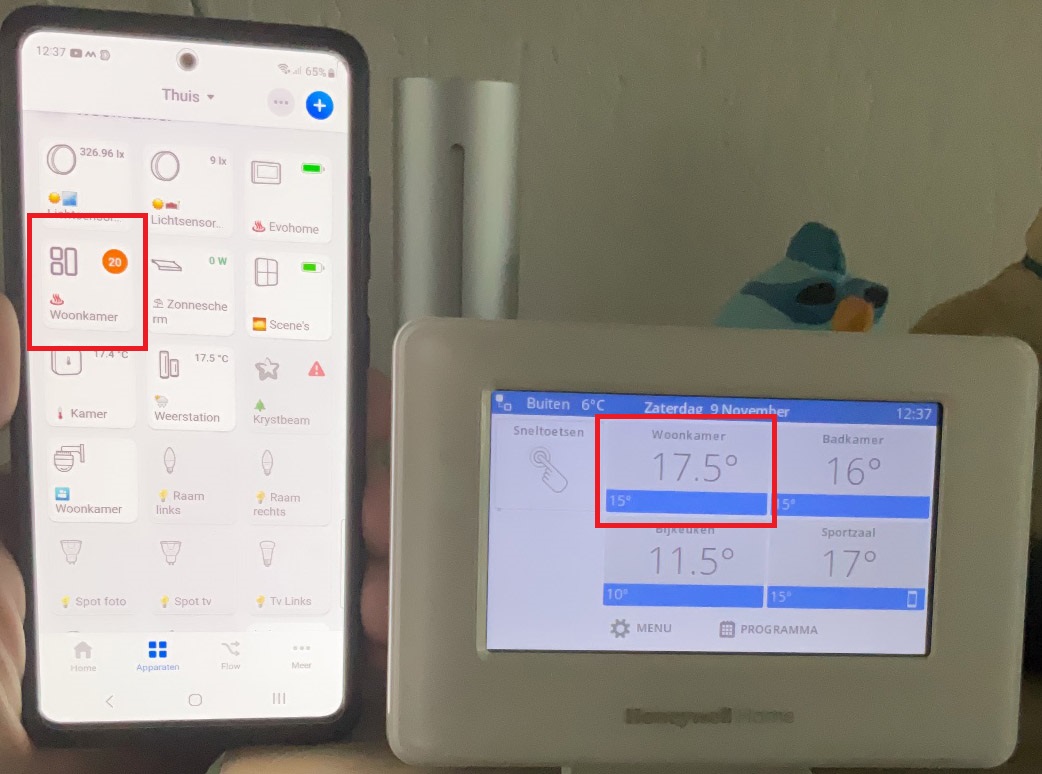
I have the following problem, everything that is changed on the Evohome is no longer changed in Homey.
Everything that is changed on Homey is passed on to the Evohome.
So setting the room to 20 degrees in Homey is picked up in the Evohome, but when I set the temperature back in the Evohome, this is not passed on to Homey. (see photo).
The App has already been reinstalled and the Evohome and zones have also been added again.
I already have a question pending with Honeywell, but I wanted to know if there are more people with this problem, and if they have already solved it.
As a workaround, I now restart the Evohome app every 5 minutes.
See my posts above
The connection is working, but there seem to be really large delays now and then.
Making the flows respond completely wrong
Hi Lee,
Just saw your post. I indeed have used the “External Heat/Cool Changeover input” on the HCC100 to trigger heating/cooling and it is working great. My ground source hear pump has a low voltage (0V - cooling, ~4V - heating) switching signal which triggers this. I have installed a Shelly Plus Add On to monitor this in Homey as well. Hope this helps.
Cheers,
Sander
For now the problem is solved for me,
This is what the helpdesk said,
It turned out to be a problem on the Homey side where updates could not be handled properly. This has now been resolved, so I assume that everything should work as it should again
After today’s update to version 1.9.2 my trigger when “temp is lower then” is not working.
Also when I try to make a new flow, the chart/trigger “temp is lower then” is missing.
Someone have any tips?
Anyway to rollback to 1.9.1?
What does that mean, “adopted too much on the evohome side”?
I have a Honeywell WiFi Thermostat (RTH9585WF1004). When I try to add the device through the Honeywell Home evohome app I get “The email or password provided is incorrect.” on this site: (Total Connect Comfort Log In)
If I click on New User, it goes to a different website (Honeywell Home - My Total Connect Comfort) which I can log in to fine, but it doesn’t link back to Homey. Is there any way to fix this?? I have a TCC login, I can log in with it, but the site that Homey links to is incorrect??
I am very interested in the same setup with my heat pump. How did you connect the heat pump with the HCC100 Heat Cool changeover input?
In the documentation of the HCC100 I can only find it is an input, but no details on how to connect something to it. Or is it a simple relay setup? (Closed is heat/open is cool or something?)
As for signaling the changeover via a Shelly for display in Homey: how did you connect this? On the HCC100 side or on the heat pump side?
Many thanks!
Daan (language NL and English 
Further more:
Which thermostats are you using in your Evohome setup that’s get the callback from the hcc100 that a changeover from heating to cooling or vice versa has occurred? The round thermostats seem to only support heating where the new T4 thermostats should support heating/cooling mode. But again the Resideo documentation is not conclusive how this works and which thermostats you should use for compatibility of this setup. Calling Resideo support gave an answer, but said only wired thermostats of the T4 range can do this, which is mentioned nowhere in the documentation of the wired or wireless T4 documentation (both support heat/cooling according to the documentation) but nothing mentioned about the callback from the hcc100 when triggered by a changeover by the heat pump.
Before ordering all new thermostats I first need some guidance on which thermostats to use. Hopefully the wireless are capable (contrary the answer form Resideo) because using only the wired T4’s would be almost impossible to achieve in my setup.
Just wanted to check I’m not missing something. Is it not possible to control the evohome hot water via Homey?
hi all, Is it possible to get insights on the real heating demand (on-off relay)? Thus when evohome opens the relay of the heating system for a few minutes? I would like to monitor that.
Post Moved, Title was: Evohome never resets the battery low warning - how do you do it?
The tittle says all - weeks after weeks, each evohome controlled valve will have eventually its battery exhausted, you replace the battery but the alert will remain and will never reset. Any idea, how to reset this status manually ? On the original evohome app, the alert is over but not on Homey Pro, like it never receive the trigger “battery replaced” or never read the battery status…
Thanks in advance.
Looks to me like a bug in the App,
Did you report it to the App developer using the Support-contact link in the AppStore?
Edit: Checked my own install but there have not been low battery’s after re-installing a couple of months ago. Don’t know when it worked last time I replaced my battery’s in the HR92’s.
Edit 2: checked at installation from friends. There it worked at least 6 months ago. So before the last App Update.