[APP] Govee - Making your life smarter

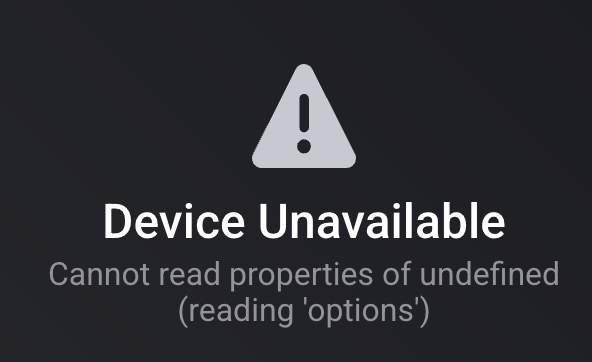
I’m getting the “Device Unavailable" “Cannot read properties of undefined (reading ‘options’) error on 6 of my Govee devices.

Backlight = H61B2

Entry Down = H61E1

Entry Up = H61E0

Hall Path = H61E0

Living Room Path = H61E0

TV light = H6168

All are compatible devices.

I have a Homey Pro 2023 hub.

I’ve attempted the following fixes already:

  • Restart app
  • Power cycled devices
  • Removed and re-added devices
  • Uninstalled & reinstalled app
  • Created new api key

How can I fix this?

Are they local api or cloud api or matter devices?

Did they ever work?

They are all Cloud API.

Living Room Path and Hall Path were the only ones connected previous when I was testing out Homey Cloud and they worked fine then.

I later purchased a Homey Pro hub and removed the devices and app from the Homey Cloud. But they have never worked on the Homey Pro hub, though other Govee lights are working fine.

Please create a diagnostic report, it’s a weird error.

1 Like

19918179-f4a8-4d4b-8bde-6958cbae4175

hey, with the new Govee Table Lamp 2 Pro x Sound by JBL in homeypro, will I be able to control the lighting but also have a speaker available?

Doubtful, so far I haven’t seen any speaker control in the api other then simpel music scenes.

So I noticed in reading the description on app front page the note about DIY scenes being available in cloud only. Also saw comment stating for cloud features you need to use the Govee mobile app to request the API key for you account. Additionally saw that Govee API v2 allows for DIY flight scenes.
I have not been able to get them to show up in flows. Has something changed? Or just a misprint/typo?

How does one do that? Within govee mobile phone app?

Nope should work if you have them. But there are DIY scenes features that make them not show up in the api if you use those in your diy. We are not sure yet what features make them dissappear.
Also sometimes it helps to restart the app. I don’t update the known diy list very often.

yeah it is very strange. For my curtain lights, H70B3 only scenes that show up are the govee standard ones. No DIY scenes. For H70B5, none of the govee preset scenes show up, but only some of my DIY scenes show. And for H705F Permanent Outdoor lights, no govee scenes show and all of my DIY scenes show up. Very strange behavior

I did a JSON pull of capabilities and that also confirmed it too. ODD

Can I use these lights for my Christmas tree with my HP23 (Homey Pro 2023)?
I’m not interested in complex scenes or special effects, I mainly care about having cool white and warm white, adjusting the brightness, turning them on and off, and using them in Flows.
Most importantly, I want them to work locally (without relying on the cloud).

Thanks to anyone who can advise me!

Yes they would work, minimal through the matter support and probably also through the api

1 Like

thank you :slight_smile:

Ik krijg zins een paar dagen onderstaande error op mijn Plafond lampen en air purifier eigenlijk op alles dus in mijn geval.

Ze zijn verbonden via de cloud api en hebben altijd goed gewerkt.

De error is

Apparaat Onbeschikbaar

Unexpected end of JSON input

Probeer eens een nieuwe api key te maken en in te stellen, daarna de app herstarten.

Soms wordt de throttling toch geactiveerd als he teveel cloud devices c hebt. Stel dan de poll interval wat groter in.

1 Like

And back to English please

I have to sets connected via the Govee App using the cloud Api and they work well but I have noticed you can’t use DIY scenes with this version of light

If some of you send me the json in the advanced settings of this device using the browser app, select entire json and copy paste, then I can check if a new diy method was added

Hi Kaoh

is this what you need

[{“type”:“devices.capabilities.on_off”,“instance”:“powerSwitch”,“parameters”:{“dataType”:“ENUM”,“options”:[{“name”:“on”,“value”:1},{“name”:“off”,“value”:0}]}},{“type”:“devices.capabilities.toggle”,“instance”:“gradientToggle”,“parameters”:{“dataType”:“ENUM”,“options”:[{“name”:“on”,“value”:1},{“name”:“off”,“value”:0}]}},{“type”:“devices.capabilities.range”,“instance”:“brightness”,“parameters”:{“unit”:“unit.percent”,“dataType”:“INTEGER”,“range”:{“min”:1,“max”:100,“precision”:1}}},{“type”:“devices.capabilities.segment_color_setting”,“instance”:“segmentedBrightness”,“parameters”:{“dataType”:“STRUCT”,“fields”:[{“fieldName”:“segment”,“size”:{“min”:1,“max”:15},“dataType”:“Array”,“elementRange”:{“min”:0,“max”:14},“elementType”:“INTEGER”,“required”:true},{“fieldName”:“brightness”,“dataType”:“INTEGER”,“range”:{“min”:0,“max”:100,“precision”:1},“required”:true}]}},{“type”:“devices.capabilities.segment_color_setting”,“instance”:“segmentedColorRgb”,“parameters”:{“dataType”:“STRUCT”,“fields”:[{“fieldName”:“segment”,“size”:{“min”:1,“max”:15},“dataType”:“Array”,“elementRange”:{“min”:0,“max”:14},“elementType”:“INTEGER”,“required”:true},{“fieldName”:“rgb”,“dataType”:“INTEGER”,“range”:{“min”:0,“max”:16777215,“precision”:1},“required”:true}]}},{“type”:“devices.capabilities.color_setting”,“instance”:“colorRgb”,“parameters”:{“dataType”:“INTEGER”,“range”:{“min”:0,“max”:16777215,“precision”:1}}},{“type”:“devices.capabilities.color_setting”,“instance”:“colorTemperatureK”,“parameters”:{“dataType”:“INTEGER”,“range”:{“min”:2000,“max”:9000,“precision”:1}}},{“type”:“devices.capabilities.dynamic_scene”,“instance”:“lightScene”,“parameters”:{“dataType”:“ENUM”,“options”:}},{“type”:“devices.capabilities.music_setting”,“instance”:“musicMode”,“parameters”:{“dataType”:“STRUCT”,“fields”:[{“fieldName”:“musicMode”,“dataType”:“ENUM”,“options”:[{“name”:“Energic”,“value”:0},{“name”:“Rhythm”,“value”:1},{“name”:“Separation”,“value”:2},{“name”:“Hopping”,“value”:3},{“name”:“Piano Keys”,“value”:4},{“name”:“Fountain”,“value”:5},{“name”:“Day and Night”,“value”:6},{“name”:“Flow”,“value”:7},{“name”:“Spin”,“value”:8},{“name”:“Blend”,“value”:9},{“name”:“Spring”,“value”:10},{“name”:“Ripple”,“value”:11}],“required”:true},{“unit”:“unit.percent”,“fieldName”:“sensitivity”,“dataType”:“INTEGER”,“range”:{“min”:0,“max”:100,“precision”:1},“required”:true},{“fieldName”:“autoColor”,“dataType”:“ENUM”,“options”:[{“name”:“on”,“value”:1},{“name”:“off”,“value”:0}],“required”:false},{“fieldName”:“rgb”,“dataType”:“INTEGER”,“range”:{“min”:0,“max”:16777215,“precision”:1},“required”:false}]}},{“type”:“devices.capabilities.dynamic_scene”,“instance”:“diyScene”,“parameters”:{“dataType”:“ENUM”,“options”:}},{“type”:“devices.capabilities.dynamic_scene”,“instance”:“snapshot”,“parameters”:{“dataType”:“ENUM”,“options”:}},{“type”:“devices.capabilities.toggle”,“instance”:“dreamViewToggle”,“parameters”:{“dataType”:“ENUM”,“options”:[{“name”:“on”,“value”:1},{“name”:“off”,“value”:0}]}}]

Thanks
1 Like

Yes, unfortunately I see only the normal diy capability. So those I retrieve dynamically based on the presence of this capability. So if they return an empty list it’s unsupported by the api.

1 Like