I selected light and now it works fine. stupid of me for not trying it sooner. thanks for the help and developing the app👌
Ill check what is going wrong in the other scenario, thanks for helping out determining the issue.
I only want to say thank you for this app - since the local api works i can make a lot of ideas happen, that i had in my head ;*
Hi, if app it could be used with 7075? Its govee outdoor wall lights. I want to use them for outdoor alarm lights.
The list of models is not shared by govee, so you will have to try.
Govee thermometer:
i added a second device and readded the first one.
Observation during the last 20 days: constant deviation of exactly 0,1°C between Govee app and homey, which is not an issue, but also not understandable.
So maybe there is some rounding issue or anything else…
I just installed the v2.12.2 and it seems like when it switch on/off the hexa lamp the app crashes. It reboots after a while, with sometimes the wrong status. It can think that the light is off while it is on.
Hmm, ill try to replicate, can you send me a diagnostic report?
Offcourse.
76cd3470-64a7-4d5b-b5e5-33994343f168
Maybe the problem is only with the local api?
Yes it was indeed only with the local api. Thanks for the quick report. I refactored a piece of code to improve cleanups when devices got deleted and just did not test it well enough  , I just published a new version to fix this. And tested with my local devices
That was a quick response. Thank you. It seems it doesn’t crash the app, but the hexa doesn’t switch on anymore.
I was to quick. It seems to be working without a problem. Thank you, kaoh

Please update to 2.12.3
Hello.
I just got my nee wall sconces H6088, i have the local api activated in the Govee App. In the govee homey app i added the api key. When i add the light frim cloud setup it is working but i want to add my device with local api. It is connecting but i want it with the cloud enhance local api function. But i get an error while activating this. I treid readd the device and reinstall the app without succes. What am i doing wrong?
I have made a rapport of it: 741cce54-8155-4d77-8d39-7e7d0c6a5afa
Hopefully you can help me.
Kind regards,
Rickert
Can you restart the Govee app in Homey? See if that solves it now?
Your log is clean, I see no errors there.
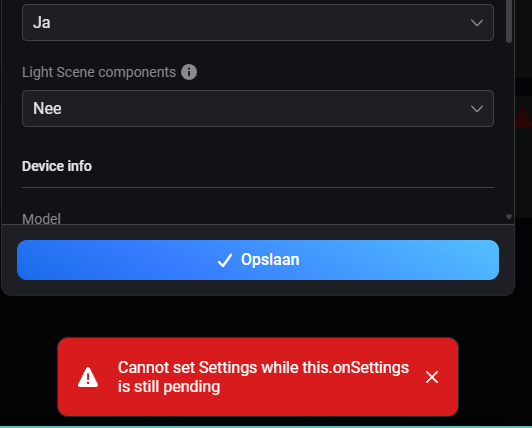
for me is the same…error flagging cloud enhancements
Ill give the onsettings code a look over to set if i can spot something that might cause this
@Rick_den_Otter and @Davide_Zamo a fix for this issue is just been released. It was a timing issue, while storing the new setting I also download the cloud capabilities for this device and store them in the settings also. But Homey doesnt like that since it was still storing the first setting. So I offloaded the second one into a timer that runs after 1 second after the first is changed. So it seems to work now nicely in sequence.
