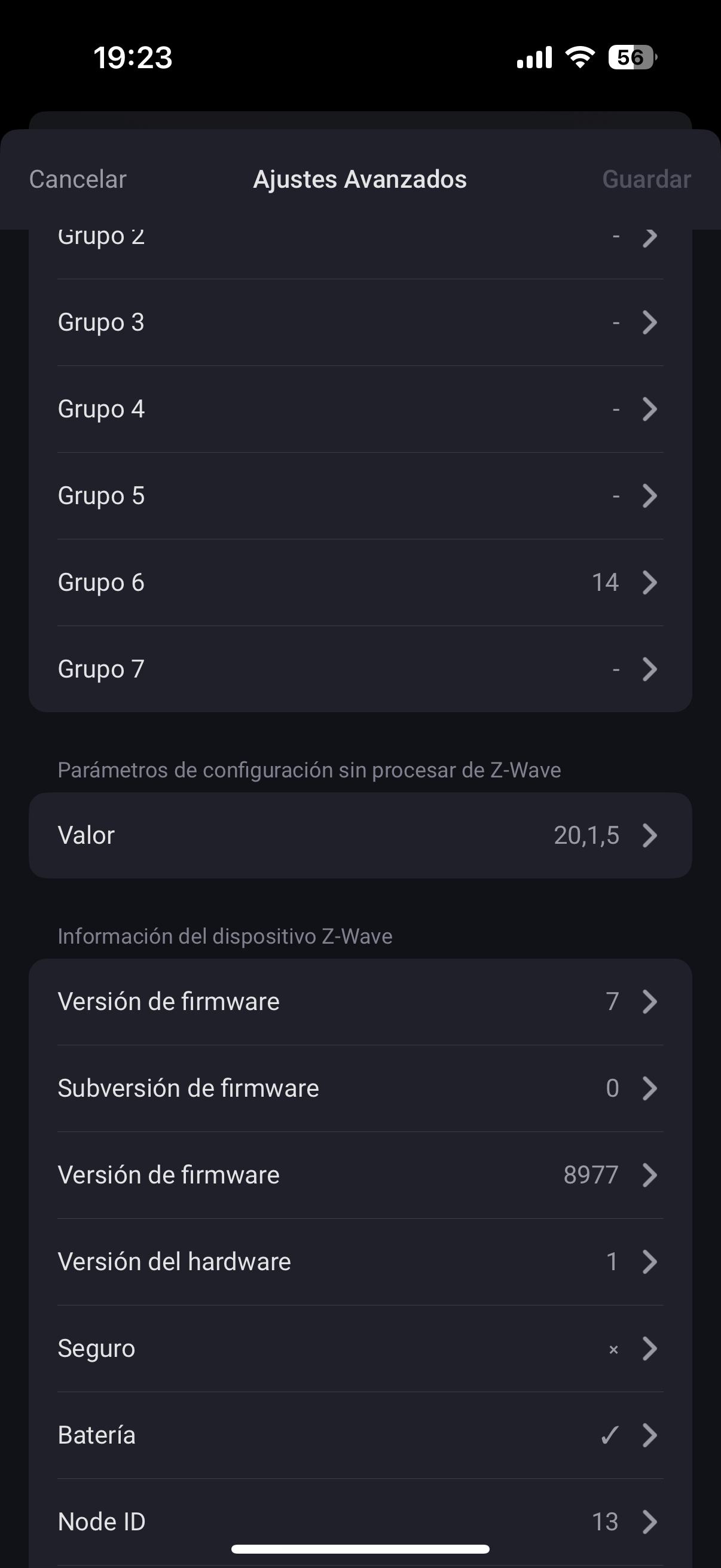
I forgot to mention one very important detail. A Z-Wave raw configuration can only be done if the Z-Wave device is included “unsecure”. Your Walli Controller is included “Secure (Authenticated)”.
Sorry!
But it’s possible to include Z-Wave devices with the “Secure (Authenticated)” safety standard them “unsecure”. For that you have to exclude the Walli Controller and follow this instructions while inclusion:
However, you still haven’t answered the question if you use roller blinds or venetian blinds. That’s why I can’t answer the question about if the Z-Wave raw command is correct. Ok, if it goes according to the Z-Wave raw command, then it’s a roller blind, an info or confirmation would still be good.
What I don’t understand is why you entered a 7.5 in group 6 of the Walli controller? Can you explain this?
I also have a small request: Can you please post larger screenshots in future? The current screenshots are almost impossible to read. Thx!
No, it’s not possible.
Window coverings can be controlled generally in two ways:
– with up/down and stop commands (first screenshot) OR
–with a precise open/close level (second screenshot)
This is specified in the Homey SDK reference documentation (source). For technical reasons, it’s supposedly not possible to use both versions together.
I don’t know why Athom chose one variant for the roller shutter (which version is it exactly?) and another variant for the Walli roller shutter. Please contact Athom support in this regard.
I have deleted both the roller shutter controller and the Walli controller and added them to the zwave network without security. They have generated these new nodes for me and I have updated the configuration and it still does not work.
Sorry, I made a mistake in the example of the raw command code in my first post, even though I had described it correctly before.
Description:
Example:
Of course, you must not enter the NodeID of the Walli Roller Shutter but the NodeID of the Walli Controller!
So the code must be: 13,1,5
Edited: Because it is wrong. Correction already made in post #1036!
But there is another point what is missing. You have to fill in the NodeID of the WRS in the Association group 6 of the WC → 14
Acc. waking up the WC and saving the changed settings. The changed setting are just saved correctly, if a green banner appears with an info “Changed settings are saved”, or something like that.
If the info in the green banner is something like this “The changed parameters are transferred at the next wake up interval” then the new settings will not work, even if they are already displayed!
walli roller (node14)
group 1= 1.1
group 2= 1.1
group 3= 1.1
Raw =13,1,5
walli controller (node13)
group 1= 1
group 2
group 3
group 4
group 5
group 6=14
group 7
Raw=
If I see the changes made on the Developer Tools website, they are already changed, right? It still doesn’t work for me. I never thought this would be so complicated.
The configuration of group of the WC is ok, but the Z-Wave raw command is missing.
And according Z-Wave raw command of the WC, I made another mistake, sorry. I have already corrected it in my other posts.
Instead of the NodeID of the Z-Wave device, the ID of the parameter must be used. Because the configuration is carried out “within” the device itself, the NodeID of the device does not need to be mentioned. If you carry out a raw Z-Wave configuration from Developer Tools…
No, unfortunately not. These are just the same values that are shown in the advanced device settings. Therefore, please make sure that the green banner with the text “Settings saved” is displayed after pushing the Save button.
I hope everything is correct now. Sorry for the chaos!
In my opinion, everything is now correct.
If the Walli Controller lights up red after being pressed, then as far as I know this means that the command could not be sent or Homey didn’t receive this command.
Please check the connectivity in Developer Tools → Z-Wave.
Wake up the Walli Controller and then immediately click on Test. Test can be found via the 3 dots on the right-hand side in the row of the Walli Controller:
(My WC was not reachable, because I didn’t woke it up before)
Btw, please try to delete the “old” devices with NodeID 6 and 7. Sometimes a Homey restart is enough, sometimes you have to do it manually.
Click on Test until the device isn’t reachable, then click on Remove. Sometimes you have to repeat this several times until the device is deleted.
The problem was that the new information was not recorded correctly in the controller. I repeated it several times, knowing that it was correct, until it worked. Thank you very much. I have already deleted the nodes that I do not use. Now I can buy more of these controllers for the rest of the blinds, knowing that they work. Thank you very much.
I would like to install Fibaro switches so that my switches no longer cut off the power of my connected bulbs. Which model would be the most appropriate? Does it work well with Alexa?
Sorry, but I don’t understand what you are trying to do.
You want to install Fibaro switches, so that your current switches no longer cut off the power of the connected bulbs?
What kind of bulbs do you use? Dump bulbs, or smart bulbs like from Philips HUE?
I’m currently using Govee light bulbs and ceiling lights. My problem is that with conventional switches or even Aqara H1, once the switch is turned off I no longer have access to the bulbs via the applications or flow because they are no longer powered. I’m therefore looking for a way of no longer really cutting off the power supplies to the smart bulbs. And if I’ve understood correctly, that’s precisely the role of the switch modules that go behind the switches, isn’t it? As I don’t have a neutral in my lighting system and I’m in love with Fibaro’s reliability and quality, I’d like to know if my solution is the right one and what product would you recommend? Thank you, I hope my message was clear.
No. They work in the same way like a conventional or Aqara H1 switch. They also cut off the power supply as soon as they are switched off manually or smartly via the Homey app (or via Flow).
The only way to avoid cutting off the power supply is not to install a switch (relay) and to connect the cables directly to each other.
If you still want to be able to switch the smart lamps manually using a switch, you need battery-operated switches and program corresponding flows.
When it is cut via flow or the application precisely the bulb is always recognized even when turned off. This is not the case via switch.
However, I have read many times that thanks to the relays, the bulbs would always be recognized because the sending of the signal does not really cut the circuit directly from a switch directly.
When a smart lamp is “switched off”, the lamp is only dimmed to 0 % brightness, but is not cut off from the power supply. Even when a smart lamp is “switched off”, it consumes power to remain reachable via WiFi, Zigbee, Z-Wave or other protocols.
Therefore the golden rule for smart lamps is never to cut off the power supply.
How to avoid it was already answered some posts above.
However, I must add something to my statement “never cut the power to a smart lamp”.
WiFi lamps may be cut off from the power supply. However, they must then be switched on again before they can be fully controlled again.
Zigbee and Z-Wave lamps should definitely not be disconnected from the power supply.