Just saw your post @TedTolboom. Yes, that was mine. Here’s the updated info if it helps.
Tried a power cycle for about thirty minutes to no avail. I re-added the FP300 sensors (these were directly paired to Homey using Zigbee), which seems to have worked after the first one errored out on the first attempt. Now, the flows are mostly working, but we’re back to the FP300 sensor states getting locked in the “On” state again.
It seems the update(s) broke the Zigbee Mesh in Homey (but the Matter bridge from the Aqara Hub kept the bulbs alive, and the W100 paired to Zigbee on the M200 started reporting correctly after the hard extended reboot).
Here are my diagnostic codes if it helps track down any weirdness to prevent further issues. One is prior to the repairing of the FP300 sensors and the other is after the fact.
Yes, same here… I have 11 FP300’s dotted around my house, one in every room. 10 of them are paired to my Homey Pro (2026) via Zigbee, and one is paired to my Aqara M3 hub, then Matter bridged to my Homey.
I have also been trying a Lafaer LWR02 in one of the most problematic rooms alongside the FP300 that was giving me the most problems.
The FP300 paired with my Aqara M3 so far haven’t spotted a single false positive, or sensor stuck state.
The Lafaer LWR02, so far has been faultless, and has had zero false positives, zero lights turning off when I’m sat still, and no sensor stuck states.
The 10 FP300’s paired with Homey via Zigbee… randomly two or three of them a week (different ones most of the times) will get stuck in a sensor state (usually presence and/or motion detection, but once in a blue moon stuck not detected) Yet the other sensors on the device often will keep updating readings.
I have various other Aqara devices, contact sensors, vibration sensors, a water leak sensor, several bulbs, a T1 ceiling light fixture, smart lock. All of which seem pretty rock solid and reliable (except the Matter over Thread smart lock, but I am pretty positive it’s occasional glitches are due to Athom’s implementation of Thread not being 100% reliable, as when that glitches so do other brands Thread devices). The only Aqara Zigbee devices I have sensor reliability issues with are the FP300’s… which is a real pain, because most of my automations hinge around them detecting my disabled broken self hobbling between rooms on my walking stick. So any testing, logs, reports I can provide to help get to the bottom of these FP300 issues I am more than happy and eager to provide. I am happy to be a guinea pig test case (heck, I’m already a nut case )
Smart plug (US) – lumi.plug.maus01 joins but fails pairing on Homey Pro 13.5.2 / app 1.19.1 Two Aqara Smart Plugs (US), SKU AP003USW01, both join instantly as routers (Developer Tools shows LUMI / lumi.plug.maus01, “Unknown Node”), but pairing via “Smart plug (US)” ends in “Unable to connect – Something went wrong while adding this device”. Generic Zigbee fails the same way. Tried both units, a Homey restart, and pairing 1–3 m from Homey. Other Aqara devices (lumi.weather, lumi.sensor_magnet.aq2) paired fine on the same network (channel 20). Has anyone paired this plug recently, or could this be a newer hardware revision the driver doesn’t handle? Happy to provide more details. Athom diagnostic report: 5CA9DD78.
What version of the app are you running? And what sensors are you using in the Flow, and have you also checked in a Standard Flow is the properties are missing?
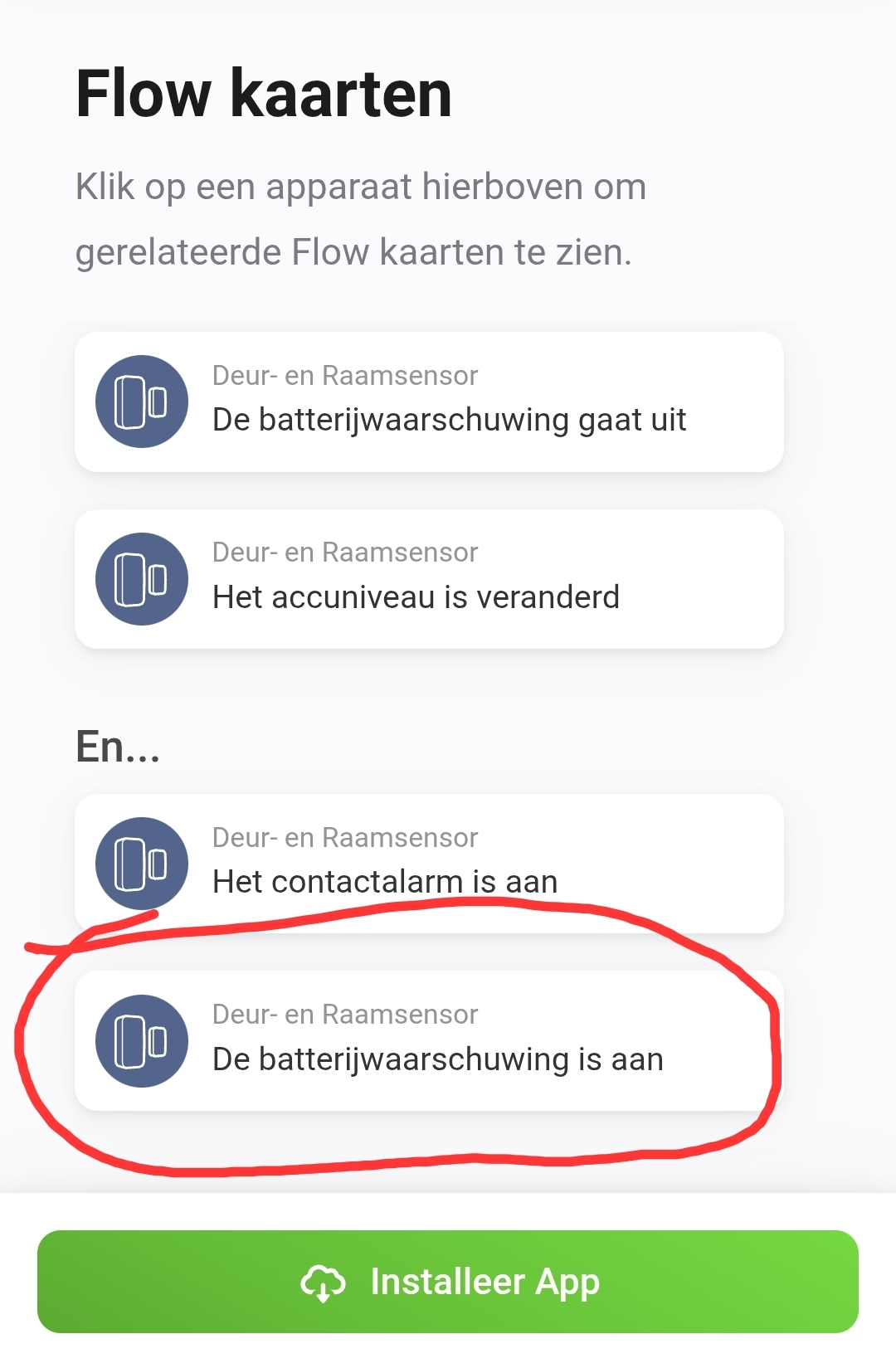
If you are talking purely about the And Flow cards, they have not changed, the battery check has always been a logic check against the device’s battery tag value. That tag value is updated every time the device sends a sensor update to Homey, so is as live as sleepy battery sensors get.
For the developer to get the report, you have to do an Aqara App diagnostic report, which produces a much longer report ID. Please see my earlier post on how to generate this:
There are more reports that the W600 thermostat firmware operates at a hysteresis of ± 2 degrees.
Although it is configurable on the W500, it is not (exposes) on the W600.
I’m running a test on two W600’s to see if I can influence the control logic / hysteresis of these W600’s.
That is breaking my mind. The FP300 devices connected at Homey communicate exactly the same as with the M3 hub… Will set up a test with two FP300’s positioned next to each other; one connected to the M3 hub and the other to my Homey. Capturing the RAW Zigbee communication and comparing that with the M3 and Homey logs… I might add a FP1E as reference measurement.
Figured you are
Thanks for offering, but a bit difficult to get real logs here, without knowing what the actual Zigbee communication has been..
Well.. since the issue is related to the inclusion, which is handled by the Zigbee Core, this is actually the relevant log. I don’t have direct access to it, but have access to the people who do
Yes, I also got that impression from reading around on this topic. The app update works nicely for me by the way, but unfortunately as you point out does not address the issue I describe. The internal measurement in W600 actually does a decent job here and corresponds well to e.g. FP300 and Netatmo temp measures I have spread around in the same room. The core of the issue is as you describe that it heats about 2 degrees above the set point. The only solution I have so far is to take this into account by setting temps two degrees lower than the desired temp (e.g., 21C when you want 23C). Then the regulations hits 23 quite on the spot, but this comes with its own issues in terms of Homeys ability to display when heating occurs and not etc. Glad that you are looking into this, let me know if you find a way to control the hysteresis. Best
I have a Lafaer LWR02 (which is basically the same as an FP300 with all the same sensors) placed adjacent to my most problematic FP300. The Lafaer only reports presence, not separate PIR & mmWave sensors. But I have setup an advanced flow the has 2 counters stored in number variables, that increment each time one of the sensors is triggered, and waits a few seconds and checks if the FP300 presence alarm is on or not… to get an estimate of how often false positive motion events are triggered… the flow emails me a results table at midnight Monday morning and then zeroes all the counter variables.
The getting stuck in a sensor detect state is harder to track and demonstrate. Sometimes if you fire off a few Start AI Spacial Learning commands it will clear and start working again. But sometimes the only way to clear it is to hold the button on the FP300 to reset it and then run a repair (which for mobility impaired little old me is a mahoosive pain in the posterior).
If there are any tests I can run and provide diagnostics reports for (app and/or Athom) I will gladly help if it resolves these issues (as I have invested a lot of time, effort and money in these FP300’s)
I’ve been discussing in another forum thread about Homey device cards getting stuck and not updating (that one is media devices not updating) but extensive testing has led to the conclusion that it is within Homey core code and not the app itself (as similar behaviour has been observed in another media controller app looking at the same devices)
The missing “AND” cards where explained by @DirkG, referring to the release notes. As you can see in the screenshot I posted previously, there was a “AND” card that isn’t there anymore.
I stand behind my my statement above, the tag value is the same updated value of any card you may have been using previously, and can be tested against with the logic AND cards
@TedTolboom just a heads up: the W100 sensor is accurately reporting again, but the button inputs are no longer recognized by Homey (but were prior to both updates).
The device is connected to Homey via Matter Bridge and is paired to the Aqara M200 using Zigbee.
Ted did reply to say he does actually have connections at Athom, so hopefully he should be able to get both the Homey and the Aqara diagnostic reports. (You can never provide too much detail when fault finding… those gremlins are tricky little pests to track down)


 )
)