I think measuring/checking is better than assuming.
Zigbee and wifi 2.4GHz channels should be tuned with care; lots of hands-on info can be found here:
https://community.homey.app/t/how-to-plan-and-setup-your-zigbee-network/94770
The u200 smart lock is getting the long awaited ‘unlatch’ matter feature. How do we get this app to support that matter functionality?
Do we need to re-add it homey?
Yes, you need to uninstall U200 and re-pair it with Homey to get this feature.
Thanks for the link. Can you shed some light on how one actually measures the Zigbee networks wellbeing, other than the obvious developer tools tables & stuff not working? My 40 Zigbee devices from which 26 are routers, are there and reporting.. even the Roller shade devices seem to talk at least to Homey when looking at dev tools despite same devices reporting unavailable in app. Strong evidence supports that nearby (~ 1-2 meter) router plugs are working, as there are flows turning some lights off and we can see that happening.
Back in 2020 when got previous Homey Pro 2019, spent weeks figuring out best choices for devices and locations to make the Zigbee network resilient and eventually got it working. After those days i have had no major problems with my Zigbee mesh and Pro 2023 did not change that. I’m running daily checks on end- devices via HomeyScript and there are no issues. Routers are placed quite evenly and there shouldn’t be concentrations of devices so that i would hit howto-guides listed limitations. But who knows, maybe i am, difficult to say as there is no way telling how the routing truly goes via walls and ceilings and there is no z-wave style routing visible.
Even if that is the case that mesh is unbalanced or overcrowded, problem surfaces only on these two Roller shade devices, which then mysteriously seem to be saying hi to Homey via capability.lastUpdated, even today

Hello, I had an Aqara Door Window sensor installed and used succesfull in the past. I bought 5 Aqara Door Windows Sensors a couple of months ago to expand this and the first 2 i’ve installed without any problems. The third one wasn’t working. I let it rest, but now i was trying to add the 4th and I could pair, but then it shows no activity and no battery status. After removing and readding the Aqara app even my working one, isn’t working anymore. Is there some issue with the combination of Homey Pro 2019, Aqara App and door window sensor (t1 and legacy one)? Hope someone can help.
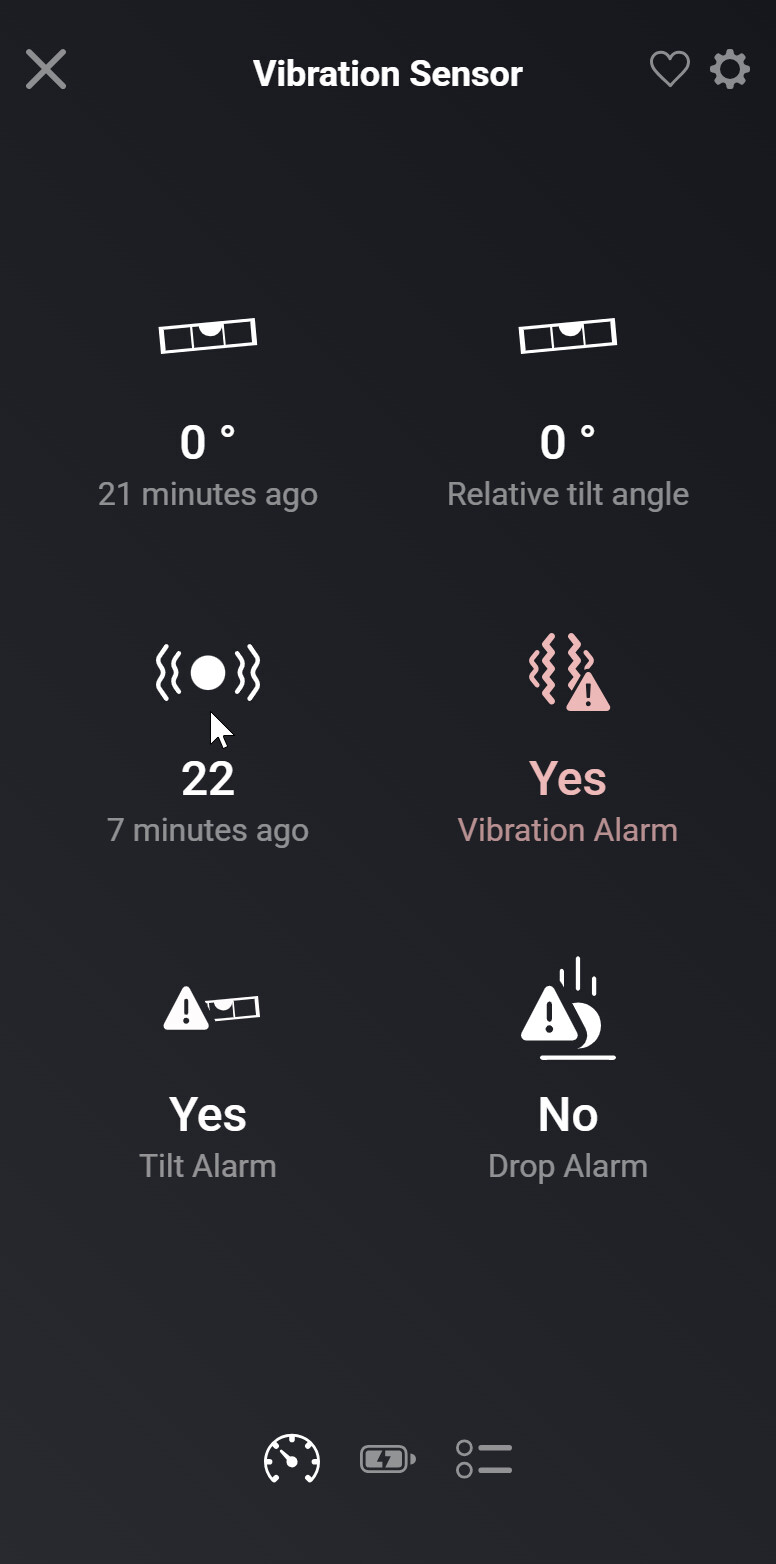
I am not sure what this number means and when it is updated. In my case it does change over time, but not when vibration occurs. There seems to be a delay of several minutes after the vibration event, before it changes. However on vibration, the vibration alarm is activated instantly.
It is a weird value indeed. It would be nice if it was real time. The vibration alarm is very unreliable, and does not get triggered half of the time. Can the sensitivity be changed somehow?
As far as I can see, not in Homey. The only configurable setting related to vibration is the cancellation delay. Maybe there are more options available when you connect the vibration sensor to an Aqara hub / control it via Aqara’s own mobile app. But I am not sure.
Double check: I assume you are actually referring to the vibration alarm and not the tilt alarm. More settings can be configured regarding tilt in Homey.
you are not the only one, it is a strange product. for me it works fine 60% of the time and the rest I get nothing but a time-out message. if I operate it in the homey app it almost never seems to work but sometimes after 3 minutes it still performs the last action. there may be an update but to install it you first have to buy an aqara hub which defeats the purpose of a homey. if I had known this in advance I would never have bought it (also saves a lot of nagging from the wife)
Sinds een paar dagen werken mijn Aqara producten niet meer via Homey. Ik heb de app en de Homey al een reset gegeven maar het werkt nog steeds niet. Opnieuw verbinden via reparatie optie of opnieuw toevoegen lukt ook niet. Uiteindelijk de Aqara app verwijderd en opnieuw geinstalleerd. Ook dit had helaas geen effect.
Op dit moment meerdere bewegingssensoren en rolgordijnmotor die niet meer werken. Heeft iemand een idee?
Seems placement does not help, have tried various places but eventually same outcome. Now outweighting whether to spend additional 60 € to Aqara Hub v2 but… nothing guarantees that firmware update would help.
Hi, i have three of the Aquara Roller Shade Driver E1.
I also have a 4 channel Zigbee switch I control them with. Button 1-3 is for each driver and the 4th button is controlling them all at the same time.
My current flow:
Press up/down moves blinds to 0% or 100%
Hold press up/down moves blinds to 50% either way.
What I’m missing is being able to stop the blinds by pressing up or down while it’s running. This function exists if you press the butting on the driver weitself. Any ideas how this can be done in Homey, if at all possible?
I posted the same question for the Aqara Curtain Driver E1 in the Aqara section on this forum a while ago, but have not yet received an answer. It does not seem to be possible at this moment:
@TedTolboom: perhaps you could indicate whether you are planning to add such a stop function for the curtain / roller shade driver devices?
Why are my aqara zigbee device keep failing that much?!
Every few days there is a aqara device in my network which does not respond anymore and it needs to be repaired.
Other zigbee devices never need to be repaired, mainly aqara…
This morning a curtain motor stopped working, no reaction what so ever…
After repair it worked again, but only just once and stopped again working, needed to be repaired again…
I really don’t know why aqara devices connection fails so much, as said other brands which use the same zigbee network have never any issues.
Also I use a lot of zigbee routers in my network, so that also cannot be the cause of the problem.
Does your zigbee mesh consist of Aqara only? Or is it mixed with Ikea lights for instance?
mixed, innr, aqara, tuya zigbee (native on homey) etc But aqara is most used zigbee brand
To me the only known issue between Aqara and other brands: when an Aqara sensor starts to use an Ikea light as zigbee router, it stops sending updates, and worse, it stops looking for alternative zigbee routers.
Maybe it’s similar with one or some devices of (an) other brand(s).
You’ll have to experiment a bit by temporary removing zigbee routers from one brand at a time.
You can use e a recent backup to restore the original setup.
I do use ikea zigbee extenders/router to increase my network
