Where should I add the Start Button? I want to start a flow when a button of my Ikea remote is pressed, but I can’t find any Advanced Flow in the list.
Should I add the Start Button in this way??
Ok, that’s clear. In my flow I used the “Then” card for starting the flow. In thi case I want it to be activated with the “When” card as shown in the screenshot…but I can’t find out how to select my Advanced Flow…
I like the A.F., it would be a great idea to add scrolling to the design canvas. After creating and structuring my flows, the canvas gets bigger than the standard viewing window. With Cntrl+mouse wheel (windows) keys I can zoom in and out, but repositioning on the part of the canvas you want to change is difficult. A kind of scroll bars on the flow design canvas would be helping with that. Or in case someone has any alternative, please let me know.
I’m glad my bad information helped as my suggestion also select cards.
But I have also noticed there are scroll bars when the canvas is too small to see all the cards.
Maybe it would have been better to drag the canvas with just the mouse button down and require Shift + button to select items or vice-versa.
from an architectural point it makes sense. Important is that if triggers an the same flow are started at the same time, actions are taken per trigger. tested here:
With the scroll wheel you can scroll up and down and when pressing a SHIFT key together with the scroll wheel you can scroll left and right. There are also scroll bars but they very thin.
imho only for aesthetics and easier editing (replacing a card that has many outgoing or incoming lines.
Fuctionally it doesn’t do anything as with two same tiggers like in the example “hallo” above from @widameista it still triggers 2 times as both triggers run on their own. An ALL would not have prevented that.
First of all I like the new advanced flows very much! It makes creating flows and managing them so much easier! It’s a great new addition to my Homey!
It’s to bad the advanced flows are not visible in the Android app. I understand that a phone screen would be to small, but I have a 12" Android tablet that could be used for editing advanced flows without a problem.
Instead I tried editing advanced flows on my tablet in the web editor in a Google Chrome and FireFox mobile webbrowser, but there are two things that don’t work. It isn’t possible to select a flow card and drag it to another position and it’s also not possible to drag a connecting line between two flow cards. I used my fingers and a Samsung S-pen. Also tried to open the web editor on the tablet in the webbrowsers Desktop Mode but that didn’t work either. It would be nice if this could be fixed.
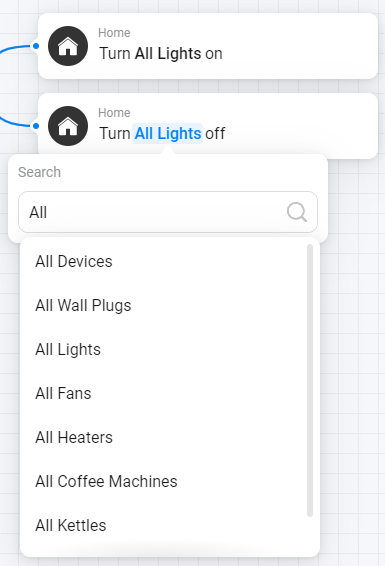
You can “Group” all the lights with the “Group” and send your command to this “device”.
Or
If these are all the lights in a certain zone, you can use the app “Flow Utilities.”
No, All cards available for a brand or type device are the same in AF as before, that doesn’t differ with AF. Turning On or Off all - Type_Device is all you can.
Yes, I understand the use of using the All devices.
On and off
I used to use the App ‘ Group’ from the ap store but it would be nice to minimallize the use of apps and do it with these super fine new Advance flow.
I will keep on using the app.
What do you mean with this?
“You can “Group” all the lights with the “Group” and send your command to this “device”.”
Is this standard Homey functionality? Ik cant find it? Can i also sent the dim commando to all devices in this group?


 it worked for me when holding down the scroll wheel and moving the mouse. Did not work with mouse button down.
 as my suggestion also select cards.
 It makes creating flows and managing them so much easier! It’s a great new addition to my Homey!