Hi, suggested alternative solution, use “Timer” app.
For temporarily increasing the brightness, and the current brightness is at 50%, use this card:
Timer (dim): 100%, 300 seconds, Restore to previous state.
This way, you can use less cards and your flow becomes less complex. Have fun!
When you use the Timer app (I used it before, but had to cut in number of apps), you don’t get a light which stays on as long there’s motion within a timeframe.
With the timer app, the light will always dim to 50% while motion is still detected, and then the light will dim to 100% again.
Or, you have to use this card:
Then the flow becomes as ‘complex’ as with Chronograph, so it is a matter of which app you like most, or which suits the best
I was rather sceptical too about buying AF because not seeing the benefits at first glance.
But after 2 days of playing with it i already got rid of 25 “oldstyle” flows. Have some 4 scene controllers in use and they generate a lot of flows, but prgramming is now a lot easier.
My house and environment is still working the same and more to come.|
Best buy! (after the Homey ofcourse)
Absolutely loving AF, a few things to get my head around but now my flow count has halved and Homey seems even more responsive, especially with sensors. The mobile app will need an overhaul to make some form of management possible though, currently have hardly any flows which can be accessed via the app
I absolutely love the advanced flows. Like others I managed to bring down the number of flows dramatically.
After updating to the 8.0.4rc3 release, however, I cannot seem to start an advanced flow from another advanced flow. Starting a regular flow from the same advanced flow works fine.
When manually starting the advanced flow I get the following error message:
Anyone else? Or should this be reported somewhere specific?
It is working here, did you perhaps delete or renamed the flow you are pointing to in your flow-card? did you click on the actual flow in the drop-down/auto-complete (not just type out the name)?
If you have a. Homey Pro or older model Homey I expect you can use any other language/country setting and buy Advanced Flows option here Advanced Flow
by the way, ir is installed / enabled as a license on your Homey Pro immediately after paying, no physical delivery necessary. just test a country that enables a valid payment method for you.
I did select the flow from the drop down (after entering the first letters).
It seems to be related to the start button and only affects the Start Flow card. Any of the other cards, like Start Flow with Text (as long as the starting flow has the asociated flow start card).
You will be happy to hear that this issue was found and fixed already by our development team and the fix will be added to a new firmware update very soon after testing.
I’ve bought Advanced Flow some days ago, and it’s really a GREAT new feature that helps a lot doing complex flows (and in fact, as I really use Homey a lot, almost all my flows are complex ^^). No, my flows are a lot easier to be done, to be read and to be tested. Moreover, I’ve quite less flows than before Thanks a lot to all the Atom’s team !!
One question for the Dev Team : It would be great if this feature could be used with an Android tablet (and not only with a PC). I’ve tried with Chrome on my tablet (with the “computer” Chrome option) and I think it would really be possible to do so. Almost everything works fine excepted some problems that could certainly easily be fixed if wanted. So, what does the Dev Team thinks about this ?
It partially works with a bluetooth mouse (I’ ve a BT keyboard+trackpad), but the right-click does not open the menu for adding flow cards and stuff…
Same goes for Firefox.
I converted my standard flows to advanced a few weeks ago and while I’m overall very happy with the improvement, but I am really missing a few things. They probably have been mentioned before, but I just wanted to mention the list of things I ran into during migration:
Huge issue: obvious #1 is the lack of a mobile editor, especially while still tuning the new flows it’s very inconvenient having to go to a PC for small tweaks or even look at a flow.
Annoying Issue: no option to temporarily disable cards (or connections). That one should not be too hard to implement, just pretend the connection was deleted, but save it in a different state until it gets enabled again.
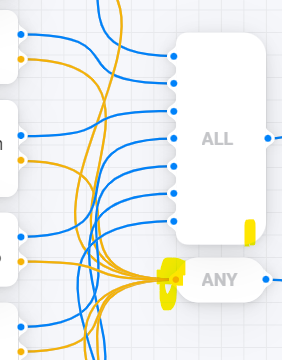
Issue: no option to connect an ELSE/NOT to an ALL block (e.g. right bottom, similar to AND cards). That’s a common use case, and with an additional ANY block + all connections it gets messy:
Small issue: would be nice to have a WHEN card to assign a custom flow name to start an automation section on the canvas by name. I know you can use the “Flow started with…” card and the “Start value” tag, but that felt counter intuitive to me. Might be for backward compatibility, but a canvas is not a flow after all…
Request: improve deleting connections that are located/hidden behind cards. I had to do a lot of moving back and forth just to delete connections. Maybe it should move to the foreground while selected, or add a context menu option to delete it?
Request: exit the test mode automatically after completing the test, and a configurable delay of the test animation would be handy (takes too long IMO).
I think this will not work.
Say you have three connections to the ALL card.
First being just an “if A less than 10”. That will be a quick check.
Second could be a delay card followed by a if-greater card. This will reach the ALL card delayed.
Third could be multiple cards in seriel and might not even reach the card before the ALL card.
So when should the ELSE part of the ALL card be activated? The logic for the ALL card needs to know everything of the logic before it.
I do agree with all your other thoughts. I hope the Athom guys checks this thread.
I guess they are working to improve the advanced flows, as they said in the presentation; they didn’t want us to have to wait too long for advanced flow. So they did not fix everything.
It might not be optimal performance-wise because it needs to wait for at least the first false result (A, B or C) in the ALL, but it then it should work?
So if the ALL part (A and B and C and …) evaluates as false, the NOT connection activates.
The ALL element is waiting for input and only executes the outbound connection if ALL inputs are true.
The ALL element doesn’t know about a previously executed element with a false state.
To get a “all false” state (A and B and C) == false, you need to connect all false lines to a second ALL element.
To get a “one or more false” state, your example is right. All true lines together at the ALL and the false lines to the ANY (only one false is enough for it, so it’s a NOT (A=true AND B=true…).


 and more to come.|