The issue we are experiencing is that the link will not open the app even though it is installed.
Did you login to the app with the new user account, prior to following the invitation link?
Yes, of course. Popup disabled etc. Have Googled and checked all Android settings. Same issue on 2 x phones.
Try it from the owner is a webbrowser to a family member in a incognito webbrowser. That is the easiest.
When I try to add a memeber it says
Noe gikk galt, vennligst prøv
igjen.
TypeError: Cannot read property
‘localeCompare’ of null
FamilySettingsScene
n StaticContainer
EnsureiinglNviigator
SceneView
in RNSScreenContentWrapp…
Prøvigjen
0

Jeg løste problemet. Hvis du logger deg på med pc og ser under familie&gjester ser du at det er flere sendte invitasjoner som ikke er besvart. Slett disse og send en ny så løste problemet seg
Tusen takk, det fungerte bra her også 

Bare hyggelig.

I reported the issue to Athom and they came with the following response. Compliments to them!
This issue has already been reported by other users and our Development Team has already fixed the issue. This fix is deployed in the next update of the Homey Mobile App, which will become available soon.
As you found out yourself already: the issue is caused by a pending invite which hasn’t been accepted yet. You should still be able to manage Family & Guests accounts through the Homey Web App (my.homey.app). When you remove the pending invite through the Homey Web App you’re able to open the Family & Guests screen in the Homey Mobile App as well.
any news?
i run in the same Problem. now It IS 2026
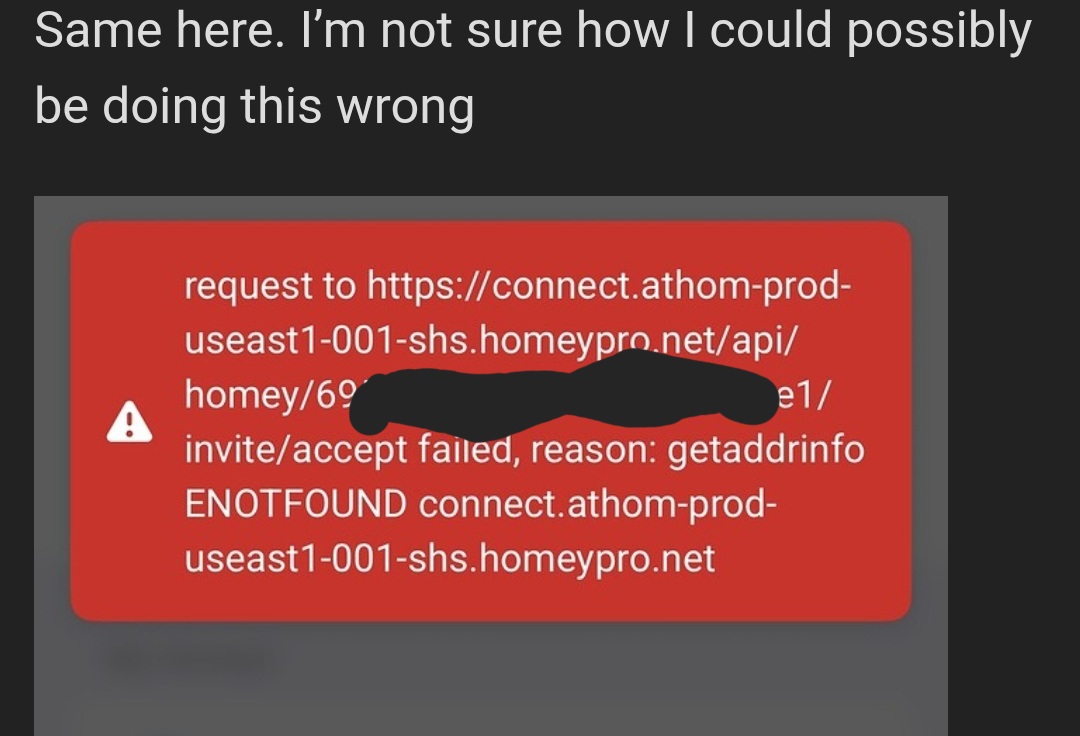
Same here. I’m not sure how I could possibly be doing this wrong
That error is because of the cloud outage. It’s marked as Resolved but it certainly isn’t. The developer tools and mobile app are also not working.
I would recommend to keep trying again, this works for me at least.
First of all, welcome to the Homey Community!
To make sure you are aware of the forum rules, please read the Welcome to the forum! post here.
Looks to me something completely different as the error is different.
Pls Report what you have tried.
For some context I’m running Homey via a docker on Truenas Scale. Overall I have been able to figure out most issues I’ve had but this one is stumping me. So initially I created a family invite via the app. Then used iMessage to send the link. My wife has signed up for an account but when attempting to accept the invite it fails. I also tried sending links via airdrop and email. But no luck. I tried to use a vpn to see if there was some DNS resolution problem, but I got the same errors again.
I then when to my PC and tried via the browser to invite. Then used private mode in both Firefox and Edge to accept the invite using my wife’s account. Errors may have been marginally different, but no luck so far.
I’ll run through the process again while I’m typing this and post any errors I may see.
-
Via private browser window I clicked accept and logged in with my wife’s account. Receiving this error. “Invalid Parameter Type: inviteToken. Got: object. Expected: string”
-
Via a standard non private edge window I get this error after clicking accept. “request to https://connect.athom-prod-useast1-001-shs.homeypro.net/api/homey/6959a8394dfb0458f932c1e1/invite/accept failed, reason: getaddrinfo ENOTFOUND connect.athom-prod-useast1-001-shs.homeypro.netshs.homeypro.net”
As a side note I have my DNS servers for my LAN set to both a cloudflare and google DNS server.
Try accepting the invite on a mobile device with wifi off & 5G data connection on. Make sure the browser has “Desktop mode” enabled.
With physical Homeys I’ve encountered similar “unwillingness”, but I never got any error messages.
Tried these steps and no luck.
It was worth a shot, but that error message is indicating other issues; most probably due to the current generic cloud issues, alr mentioned by Sven.
As a test, I just tried to add a user to SHS-as-HA-addon, but I didn’t get any error message. I ended up in the same swamp: either the app suggests to add a new Homey, or the browser says “Invite already accepted”, whilst it is still pending.
Note:
It is recommended to never share your Homey ID (the long code in the URL of your error messages).
I’d blur it or remove it.