Not really a question, but after having trouble with this for some time and not being able to find any information, I thought I should share my findings.
I bought the Wiser LK Fuga Freelocate switch to control my lighting. I wanted the following capability: simple on/off control, smooth dimming while holding down the button until release, and color/scene change.
The on/off part is easy enough, but the smooth dimming until you release the button is not.
When you first add the switch, you’re missing a flow card called “Long Press”, which is actually a when released function. To add this, you need to open the switch settings and change all button modes to “Dimmer Toggle.” This will add the last flow card, allowing you to do this.
Then you need 2 Yes/No variables per group of lights you want to dim. I’ve called these DimUp[groupname] and DimDown[groupname].
I’ve also created number variables for the amount that I want the light to be dimmed per second — but you could also just use the slider. Note that the number variable goes from 0–1 for 0–100%, so 7% would be 0.07.
Then you need to create an advanced flow that looks like this:
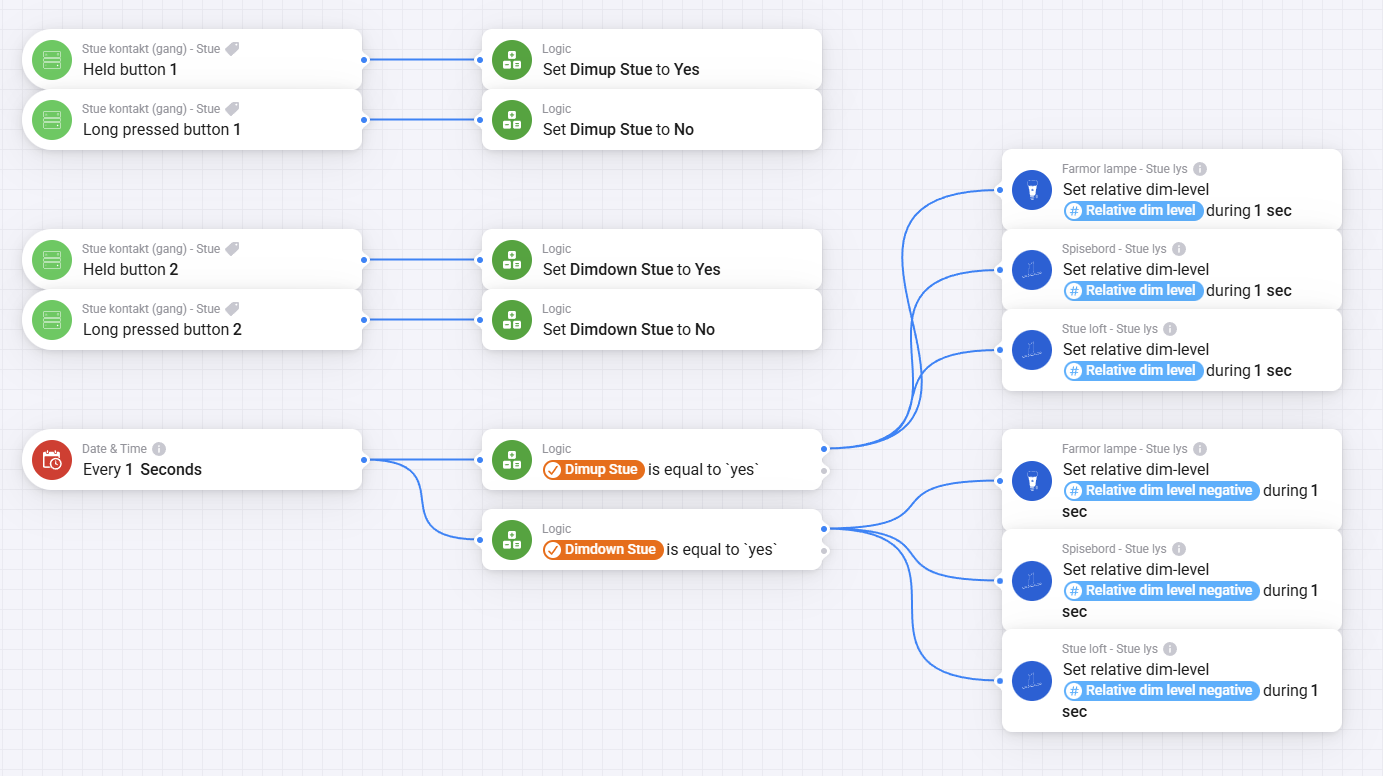
I’ve also added the so that pressed button Any will activate Logic: Set DimUp Stue to No, this is to make sure that if one of the Signal to turn off the DimUp or DimDown function does not get recieved you are still able to reset it without going into the Homey app

I would have liked the dimming to be quicker, but I didn’t want to increase my steps beyond the 7% I have them at now. You also can’t dim more than once per second without complicating it further with scripting. if any script wizards out there needs a project i would mind 
If your bulbs does not have the dim during 1 sec function i know that Dimmy can help you there
