Hi,
can anyone advise on the possibility of using a virtual energy meter for display in the Energy tab?
I have a Huawei SUN2000 integrated into Homey. Everything runs, but the connection to Homey doesn’t pull the data that is measured through the Modbus energy meter.
However, this data can be retrieved from the energy meter via Modbus.
So I have the household consumption data extracted and stored in variables.
But how do I get this data into the Energy panel so it shows as household consumption? I’ve really tried all the apps—from virtual devices, to device capabilities, I tried to figure it out via an HTTP Energy meter, etc. Basically, I’ve exhausted all the options I could think of, and I simply can’t create a virtual energy meter that Homey would accept in the Energy panel.
Could someone maybe help? In short, I need to use a virtual value as the measured household consumption.
I tried, but it wont show in energy panel. Did you have that working? In this scenario, I am only not sure how to do the kwh value correctly, as the huawei data are kW, but I remember I tried simply to set a value to kwh, and it did not show anyways.
I do not have it working. But I remember that when the Energy tab was introduced, my Youless device did not show up in the Energy tab because the device capabilities were not correct and I had to waite for an update of the Youless app. So it is important to the the right capabilities.
When you have only kW, you have to make a script that runs every 10 seconds and calculate the energy used in that 10 seconds and add it to current value in the power field of the virtual device.
I don’t know if the energy tab supports two P1 devices, but I might give it a try.
aha, this took the right direction
After adding the device, a consumption card appeared in the energy panel, so that’s the right way
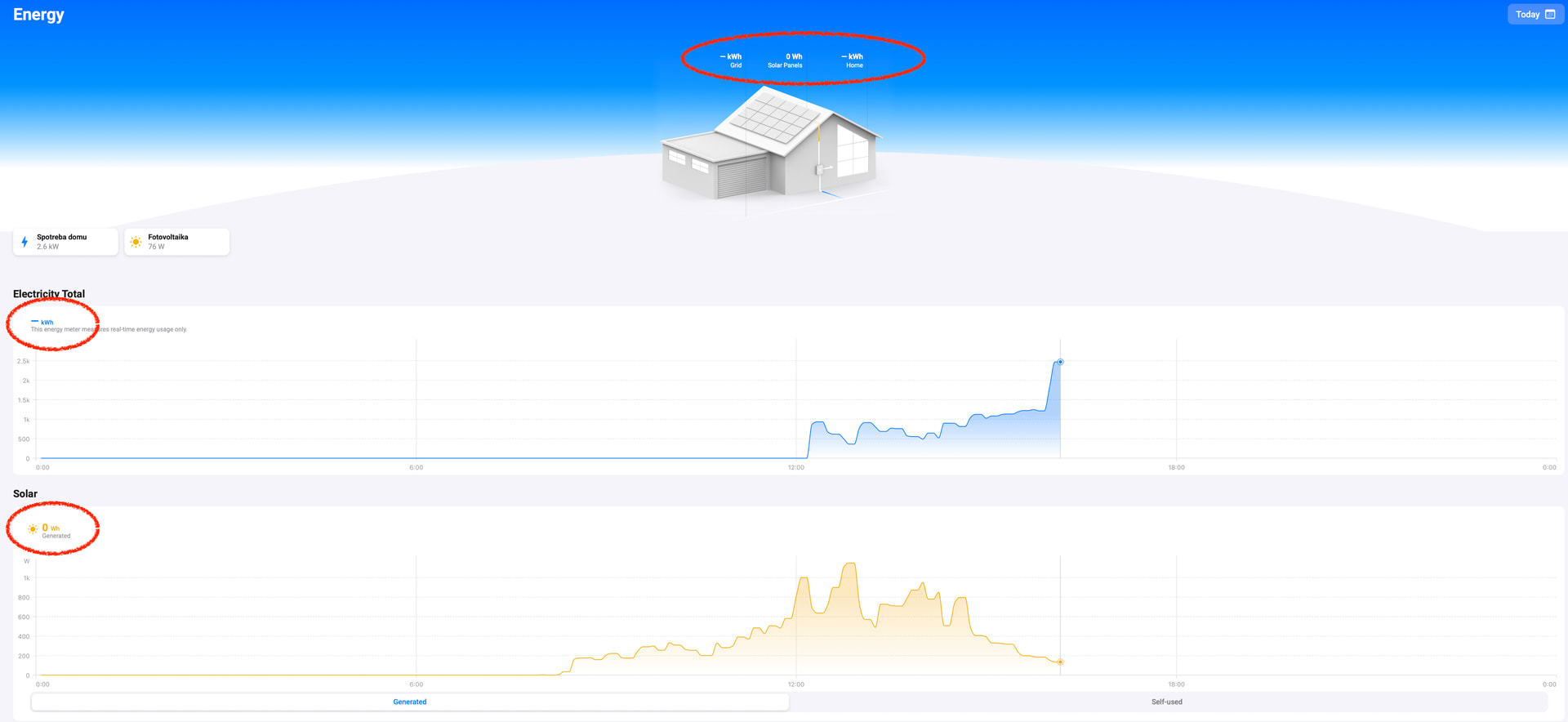
But it says “no data available.” Also at the top, where the current consumption in “W” should be displayed, there is just a “-”. When I click on it, I can see that it’s correctly pointed to this new VD and there is a value, for example 607 W.
Huawei originally reports this value as negative, so I changed it to positive to test it, but the energy panel doesn’t read it either way.
The only thing I can think of is that the energy panel needs to collect some data before it can display the graphs. But that doesn’t explain why it doesn’t show the current “W” from the device.
What I did notice, though, is that even the VD itself doesn’t have a consumption graph inside it—it’s unavailable.
aha, it works now, I didn’t have the “Real Field” box checked. Thank you very much for your help and your time!
If I may ask one more thing: via Modbus I’m reading the “active power” value from Huawei. It uses these values:
>0: feeding power to the grid
<0: obtaining power from the grid
So when I’m drawing power from the grid, it gives negative numbers. Can it work like this—will the energy panel handle it, or does the consumption value always have to be positive?
There is smart meter connected to it. The meter is DTSU666-H .
But Huawei Sun2000 wont integrate into homey with data from the meter, it only integrate the production data. However, the meter can be accessed by Modbus, and that is how I pull the data.
The DSTU-666 is simply connected on the 3 phases comming to the house, as any other energy meter would be. I am only not sure about using the raw “active power” data from it, which are positive when I am sending energy to the grit and negative, when I am pulling from grid.
But that is something I can figure out as soon as the sun comes out
One more question though. In energy panel, the first line are the daily kWh - grid, solar panel, home. I have all 3 of them empty, only Solar panel shows 0Wh (huawei app shows 3,25kwh todays production). Is there any way to have those data displayed?
I completely understand. SUN is an inverter that only measures production, that’s clear. My DTSU energy meter, however, is primarily installed as part of the SUN system so that Huawei can display complete data, including household consumption and export.
However, the app I use to integrate Huawei into Homey only shows data from the inverter itself, not from the DTSU. So while I can see DTSU data in the Huawei Solar app, the Huawei app in Homey doesn’t read this data—it always shows 0.
That’s why I read data from the DTSU separately, completely outside of Huawei. This works because the DTSU is also connected to the local network, and its data can be pulled. So I literally connect to the DTSU via Modbus and only pull the “active power” value I mentioned.
In the Homey Energy Panel, the Huawei inverter displayed production normally, so I could always see production. The problem was only with consumption, which I couldn’t get there before, but with your method it worked. How the Energy Panel will interpret negative active power, I’ll see—but in any case, I can handle it and, if necessary, recalculate it to a positive value (if it’s negative, I subtract export from production, and that gives household consumption).
What’s left for me now are just the “graphical details,” i.e., displaying cumulative kWh in the Energy Panel. I’ve marked it in the screenshot.
Everything else seems to be running: production is pulled via the Huawei SUN integration, consumption via Modbus and the virtual device you helped me create, so I have “live data.” It’s just the cumulative values that aren’t being calculated yet.
You might have to wait for the next day, as at 00:00 the kWh values in the graphical picture of the house will be reset to zero.
For the missing value for active power in the solar edge app, you might contact the developer, maybe active power means something different as power from the grid.
Rmb thanks again. I can confirm that solar production kwh showed later on, maybe after the production went to 0 so Homey had the total production per day value.
Consumption did not, but I guess this is the limitation of this kind of reading data.
About the solar edge app - this was discussed, with new “EMMA” system on Huawei it shows the data, but with the SUN2000, because the data are sourced from thir party device, it does not show. The explanation is reasonable and I dont think it will be fixed. But now its all ok, I will see the data later on and I will fix it to calculate correctly depends of the results.
Thanks again for your help, you are amazing
Yes, that idea came to my mind as soon as I clicked “Reply” And I already tested it, as soon as I added Energy “sensor meter”, in energy panel the “-” changed to “0”wh”.
So that did the trick.
Now this opens a lot of new questions VD with energy sensor meter has possiblility to be “cumulative imported” and “cumulative exported”. So I am not sure, if I should create two values (one imported and another exported) and have them be calculated from the active power.
But again, this is something I will understand as soon as the production will be higher than consumption, so its something I can play with
Rmb thanks again, you helped a lot.
See picture below. As soon as the DTSU666-H becomes negative, the graph kW goes below 0 and changes from blue to green. The total energy for the household is the total netto energy delivered by the network (so imported - exported) plus the energy from your network. Lets wait for the results. I wonder whether you have to add capabilities “Meter_power.imported” and “Meter_power.exported”.
I had to choose it in the VD, when I added the option of energy sensor meter. See photo.
But I think this must be somehow separeted, because if I have both clicked, the valculations are like 2kwh-2kwh=0kwh.
So I think I need to create two number fields in that VD, one consumption, one production and recalculate the “Active power”, so when it is positive, it adds to impotr and if its negative, it ads to export cumulative value.


 it looks like in problem description you are really mixing DTSU666-H and SUN2000 problems. Just show a screenshot of your problem(s).