You can create a virtual energy meter that shows the power usage from Eva, and have it appear in the Homey Energy tab 
Just follow these steps:
- Install the app “Device Capabilities”
- Add a new device and select “Devices Capabilities” then the Advanced Virtual Device (AVD).
- Choose “Create an empty AVD”.
- Give it a name and select an icon.
- Go to the virtual device’s settings:
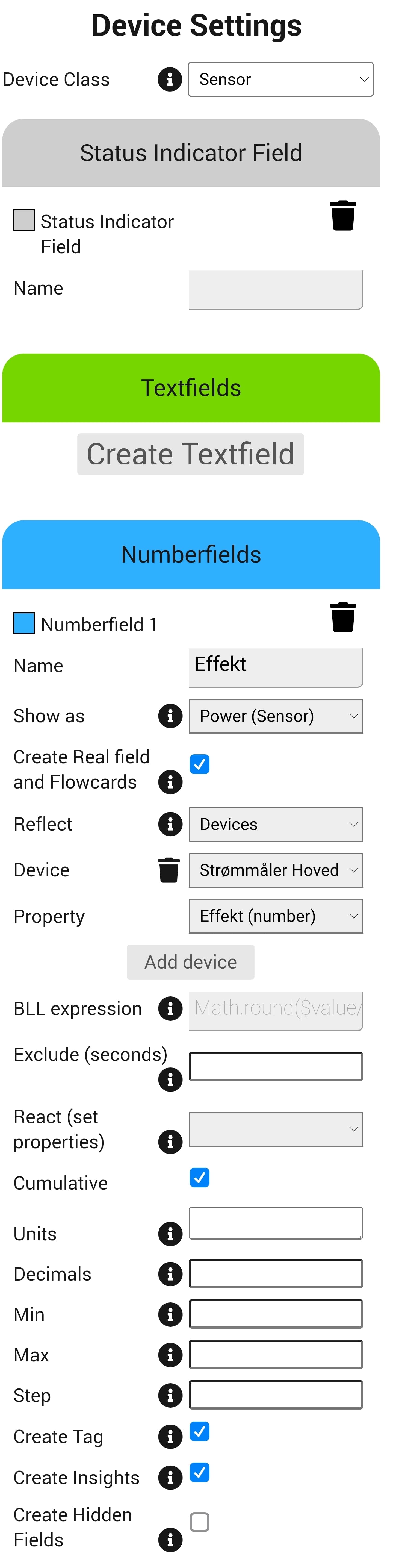
Settings > Maintenance > Repair - Set the Device Class to: Sensor
- Create a new Number field.
- Give the field a name (this will be the label for your virtual energy meter).
- Under “Shown as”, select: Power (sensor)
- Under “Reflect”, choose: Devices
- Under “Device”, select your Eva energy meter
- Under “Property”, choose: Power (number)
- Make sure to check the box “Cumulative”
After that’s done go into the device settings and enable:
Tracks total home energy consumption > Yes
Your virtual meter will now appear in the Homey Energy tab and reflect real-time usage from the Eva meter 

Device settings (Device Capabilities) should look something like this: